Studio management and production management are related but distinct disciplines. Studio management focuses on the facility: the rooms, equipment, schedules, finances, and operational systems that keep a production studio running day to day. Production management focuses on the project: the creative workflow, deliverables, timelines, crew, and budget for a specific production from brief through final delivery.
Studio management asks, “Is the studio running efficiently?” Production management asks “Is this production on track?” Most production studios need both, and the best outcomes happen when both systems are connected. This guide breaks down the differences, explains where they overlap, and shows how they work together across film, TV, audio, video, and podcast studios.
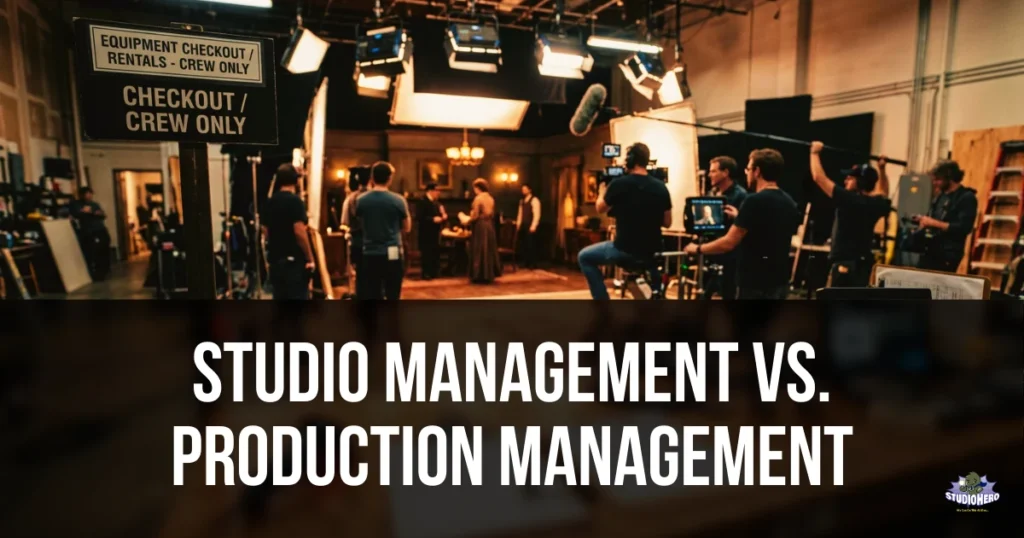
The Core Distinction
The simplest way to understand the difference:
Studio management is about the facility. It exists whether or not a specific production is running. The studio needs to be scheduled, the equipment needs to be tracked, the bills need to be paid, and the operations need to function regardless of which project is in the building today.
Production management is about the project. It exists because a specific piece of content needs to be created and delivered. A production has a beginning (the brief), a middle (the creative process), and an end (the delivery). When the production wraps, its management wraps with it.
A studio manager keeps the building ready. A production manager keeps the project moving.
Both are essential. Neither replaces the other.
| Studio Management | Production Management |
| “Is Studio B available Thursday afternoon?” | “Is the rough cut ready for client review?” |
| “Where is the C300?” | “Did we get the B-roll from last Tuesday’s shoot?” |
| “How many hours were all rooms booked this month?” | “Are we over budget on this music video project?” |
| “Did the HVAC maintenance get completed?” | “Has the colorist received the locked edit?” |
| “Is our QuickBooks synced?” | “Did the client approve the final mix?” |
For the full scope of what studio management covers, see our complete guide to studio management. For production-specific project workflow strategies, see our guide on project management for successful production.
Side-by-Side Comparison
| Dimension | Studio Management | Production Management |
| Primary focus | The facility and its operations | The project and its deliverables |
| Time horizon | Ongoing, continuous | Project-based, finite |
| Scope | All activities across the entire studio | All activities within a single production |
| Key question | “Is the studio running efficiently?” | “Is this production on track?” |
| Scheduling concern | Room availability, resource allocation, booking conflicts | Production timeline, shoot days, edit schedules, delivery dates |
| Equipment concern | Inventory, tracking, maintenance, availability | Which gear is needed for this specific shoot or session |
| Financial concern | Studio overhead, revenue by room, cash flow, overall profitability | Project budget, cost vs. estimate, production-specific expenses |
| People concern | Staff scheduling, contractor database, team capacity | Crew assignments for this production, role-specific coordination |
| Client concern | Client records, booking experience, overall relationship | Client feedback on this project, revision rounds, approval status |
| Success metric | Utilization rate, on-time booking, facility uptime | On-time delivery, on-budget completion, client satisfaction |
| Continues when idle | Yes. The studio still needs management even with no active projects | No. When the production wraps, its management is complete |
| Software example | Studio operations management platform | Production management system |
What Studio Management Covers
Studio management encompasses every operational function required to keep a production facility running. It is the infrastructure layer that exists beneath and around every individual production.
Scheduling and Booking
Studio management handles the calendar at the facility level. Which rooms are booked, which are available, how resources are allocated across the day, and how clients request and confirm bookings.
This includes managing the studio scheduling system, maintaining calendar synchronization across the team, operating the client booking portal, and preventing double bookings and scheduling conflicts.
The scheduling tips in our scheduling optimization guide are studio management functions because they concern the facility’s capacity, not any individual production’s timeline.
Equipment and Asset Management
The studio owns equipment. That equipment needs to be inventoried, tracked, maintained, and allocated regardless of which production is using it. Studio equipment management covers asset tracking, checkout and return processes, preventive maintenance schedules, depreciation, and utilization reporting.
When a microphone goes missing, that is a studio management problem. When a camera needs a firmware update, that is a studio management task. When someone needs to know if the Blackmagic Pocket 6K is available next Tuesday, they are asking a studio management question.
Studios that neglect this area consistently encounter the equipment tracking problems and shared equipment mistakes that disrupt sessions and frustrate teams. The full equipment management and maintenance framework is a studio management discipline.
Financial Operations
Studio management handles the facility’s financial health: invoicing clients, tracking expenses, managing petty cash, reconciling accounts, monitoring cash flow, and ensuring overall profitability.
This includes operating the studio invoicing system, managing the studio budgeting tools, and maintaining the overall studio finance management workflow.
Petty cash management, expense tracking, and cash flow optimization are all studio management functions because they concern the business, not any individual project.
Facility Operations
HVAC, electrical systems, acoustic treatment, security, cleaning, compliance, insurance, and physical maintenance are all studio management responsibilities. The facility must function whether a production is in-house or the studio is between projects.
Studios that want to streamline these operations and avoid common studio operations mistakes need documented standard operating procedures and consistent operational routines.
Studio-Level Metrics
Studio operations metrics like room utilization rate, revenue per room, average booking value, client retention rate, and facility uptime are studio management measurements. They evaluate the health of the business, not the status of a specific project.
What Production Management Covers
Production management encompasses every function required to take a specific project from initial concept through final delivery. It is the project layer that runs on top of the studio infrastructure.
Production Lifecycle
Every production moves through a defined lifecycle. Production management tracks and coordinates every phase:
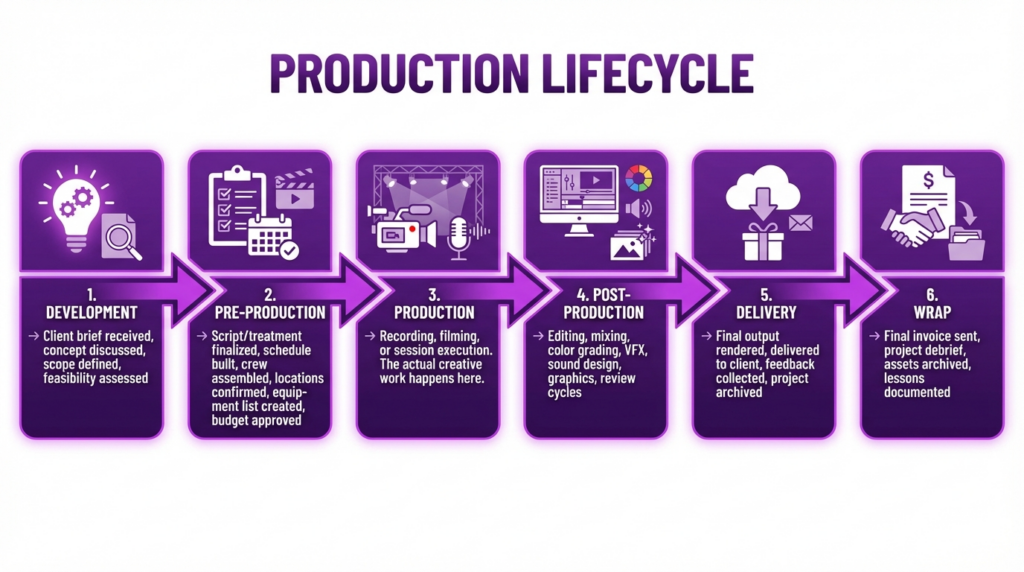
| Stage | Description |
| 1. Development | Client brief received, concept discussed, scope defined, feasibility assessed |
| 2. Pre-Production | Script or treatment finalized, schedule built, crew assembled, locations confirmed, equipment list created, budget approved |
| 3. Production | Recording, filming, or session execution. The actual creative work happens here |
| 4. Post-Production | Editing, mixing, color grading, VFX, sound design, graphics, review cycles |
| 5. Delivery | Final output rendered, delivered to client, feedback collected, project archived |
| 6. Wrap | Final invoice sent, project debrief, assets archived, lessons documented |
At each phase, the production manager coordinates tasks, people, resources, and timelines specific to that project. The studio manager, meanwhile, ensures the rooms are available, the equipment is ready, and the invoicing system is prepared to bill for the work.
Project-Level Scheduling
Production scheduling is about the project’s timeline, not the facility’s calendar. A production schedule answers: When is the shoot? When does editing start? When is the client review? When is the delivery deadline?
This is distinct from studio scheduling (which room is booked when). A production might span three weeks of editing in Edit Suite 2, but the studio scheduling system handles the room booking while the production management system handles the project milestones.
Crew Coordination for the Project
Production management assigns specific crew members to specific roles on a specific project. The gaffer for this shoot. The editor for this series. The sound mixer for this podcast recording.
Studio management maintains the crew database and handles employee scheduling across all projects. Production management draws from that database for each individual production.
When crew scheduling conflicts arise, it is often because the studio management system (who is available when) and the production management system (who is assigned to which project) are not connected. The same problem appears when managing freelance crews across overlapping productions.
Project-Level Budgeting
Production budgeting tracks the costs and revenue for one specific project. Did this music video come in under budget? Did the podcast series exceed its estimate? How much of the post-production budget remains?
This is different from studio budgeting, which tracks the facility’s overall financial position. A project can be profitable while the studio loses money (because overhead is too high). A studio can be profitable while individual projects lose money (because a few large projects subsidize many small unprofitable ones).
The distinction matters. Studios that only track finances at the facility level miss the production tracking gaps that erode margins project by project.
Deliverables and Client Approval
Production management tracks what needs to be delivered, in what format, by when, and whether the client has approved it. Revision rounds, feedback incorporation, final sign-off, and asset delivery are all production management functions.
Media asset management sits at the intersection of both disciplines. The studio manages the storage infrastructure and file organization system. The production manager uses it to track and deliver project-specific assets.
Where They Overlap
Studio management and production management are not entirely separate. They share several touchpoints where information must flow between them:
The Overlap Zones
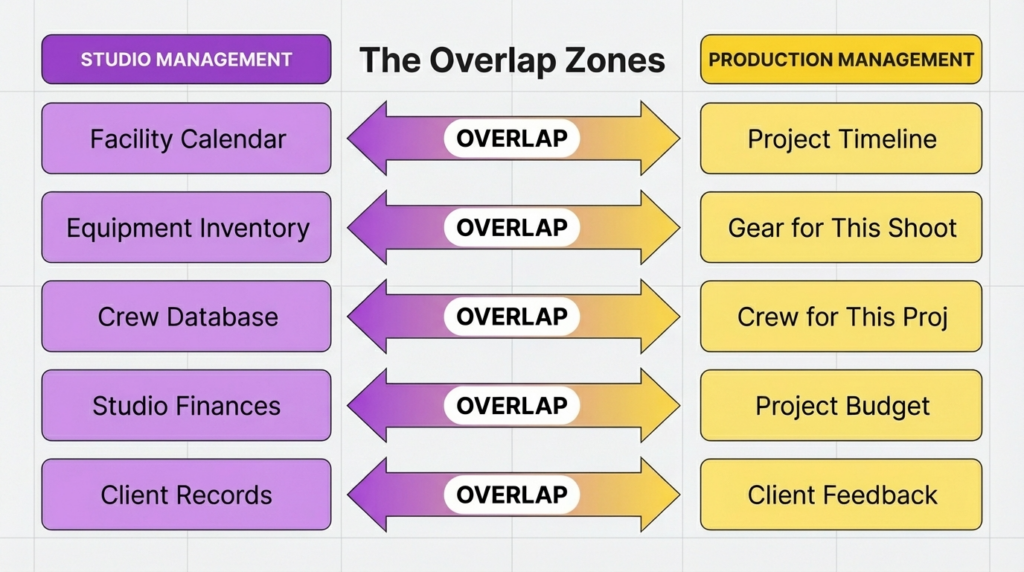
| Studio Management | Overlap Area | Production Management |
| Facility Calendar | Shared scheduling coordination | Project Timeline |
| Equipment Inventory | Gear allocation for projects | Gear for This Shoot |
| Crew Database | Crew assignment and availability | Crew for This Project |
| Studio Finances | Financial tracking and cost alignment | Project Budget |
| Client Records | Client information and communication | Client Feedback |
Scheduling overlap: A production needs Studio A on Thursday. Studio management confirms the room is available and blocks it. Production management records the shoot day on the project timeline. If these systems are disconnected, a room gets booked without the production knowing, or a production gets scheduled without checking room availability.
Equipment overlap: A production needs three wireless lavs for tomorrow’s shoot. Studio management confirms the lavs are in inventory and available. Production management adds them to the project’s equipment list. If the equipment tracking system is not connected to the production planning, gear gets double-assigned to overlapping projects.
Crew overlap: Studio management maintains the pool of available talent and their schedules. Production management pulls from that pool for each project. When these overlap without visibility, you get the scheduling conflicts that delay productions and frustrate crew.
Financial overlap: Studio invoicing generates the bill for the client. Production budgeting tracks whether the project stayed on budget. When these are disconnected, invoices do not reflect actual project costs, and profitability analysis becomes guesswork.
Client overlap: Studio management maintains the client relationship across all projects. Production management handles client communication for the current project. When the production manager does not have access to the client’s history (past projects, preferences, communication style), the client feels like they are starting over every time.
Why the Overlap Matters
The overlap zones are exactly where most studios lose efficiency. Information gets stuck on one side. A booking is made in the studio system but the production manager does not know. A budget overrun is visible in the production plan but the studio’s finance team does not see it until the invoice does not match.
This is why studios that centralize operations into one system outperform studios that manage each discipline in separate tools. When studio operations and production management share the same data, the overlap zones become connection points instead of failure points.
The Roles: Studio Manager vs. Production Manager
The two disciplines are often handled by different people with different responsibilities:
Studio Manager
| Aspect | Detail |
| Reports to | Studio owner or operations director |
| Responsible for | The facility and its day-to-day operations |
| Daily focus | Room schedules, equipment status, facility maintenance, client bookings, financial admin |
| Success measured by | Studio utilization rate, facility uptime, operational efficiency, client satisfaction with the facility |
| Works across | All projects simultaneously |
| Time horizon | Ongoing, continuous |
| Key relationships | All clients, all staff, vendors, landlord, insurance providers |
Production Manager
| Aspect | Detail |
| Reports to | Producer, director, or executive producer |
| Responsible for | The project and its delivery |
| Daily focus | Production timeline, crew coordination, budget tracking, deliverable status, client feedback on the project |
| Success measured by | On-time delivery, on-budget completion, creative quality, client satisfaction with the deliverables |
| Works across | One project (or a small number of concurrent projects) |
| Time horizon | Project lifecycle (weeks to months) |
| Key relationships | Client contact for this project, crew for this project, post-production team, vendors for this project |
In Small Studios: One Person, Both Roles
In studios with fewer than five people, the studio owner often serves as both studio manager and production manager. They manage the facility AND manage the projects. This is common and workable, but it requires awareness of when you are wearing which hat.
The risk is that production demands (urgent client deadline, creative problem to solve) consistently pull attention away from studio management tasks (equipment maintenance, financial review, schedule optimization). Over time, the studio’s operational health declines because the production fires are always louder than the facility maintenance needs.
Building systems that handle studio management routines automatically or semi-automatically is how small studios protect facility operations while the owner focuses on production. A structured studio management checklist ensures daily, weekly, and monthly facility tasks happen even during production crunch periods.
For studios seeking to run both functions more efficiently, the key is systematizing the studio management side so it requires less active attention, freeing the owner to focus on production management where human judgment matters most.
How They Differ by Industry
The balance between studio management and production management shifts depending on the type of studio:
Studios Where Studio Management Dominates
| Studio Type | Why Studio Management Is Primary | Production Management Role |
| Recording and audio studios | High session volume, room booking is the core revenue driver, equipment maintenance is critical | Lighter. Many sessions are single-day bookings, not multi-phase productions. |
| Podcast studios | Booking efficiency and room turnover drive profitability. Client self-service and scheduling automation matter most. | Minimal for rental-only studios. More relevant for studios producing their own content. |
| Photography studios | Session booking, client management, and equipment/prop tracking are the primary operational concerns. | Limited to multi-day shoots or ongoing brand projects. |
| Equipment rental houses | Inventory tracking, checkout/return, and maintenance are the entire business. | Rarely applicable. The “production” is the client’s responsibility. |
Studios Where Production Management Dominates
| Studio Type | Why Production Management Is Primary | Studio Management Role |
| Film and video production | Multi-phase productions with large crews, complex schedules, substantial budgets, and long timelines. | Important but supporting. The facility enables the production, but the production drives the schedule. |
| Broadcast TV and radio | Tight production deadlines, multiple concurrent shows, complex workflows, and crew shift management. | Equally important. Broadcast facilities run continuous operations where studio management is as demanding as production management. |
| Post-production facilities | Project pipeline management, edit suite scheduling by project, asset management, and delivery tracking. | Supporting. Room scheduling and equipment maintenance serve the production pipeline. |
Studios Where Both Are Equally Critical
| Studio Type | Why Both Matter Equally |
| Creative media agencies | The agency manages a facility (studio management) while simultaneously running multiple client projects (production management). Neither can be neglected without affecting the other. |
Understanding this balance helps you prioritize which systems to build first. If your studio is session-based with high booking volume, start with studio operations. If your studio runs complex multi-phase productions, start with production management. If both are equally important, you need a unified platform that handles both.
Common Mistakes When Confusing the Two
Mistake 1: Using a Production Management Tool for Studio Management
Project management tools like Asana, Monday.com, and Trello are designed for production management: tasks, timelines, assignments, and deliverables. They do not handle room booking, equipment checkout, invoicing, or facility operations.
Studios that force a project management tool to serve as a studio management system end up with workarounds, spreadsheet supplements, and the very operational chaos they were trying to avoid.
Mistake 2: Tracking Only Studio Metrics, Not Project Metrics
Studios that measure room utilization and monthly revenue (studio management metrics) but never calculate individual project profitability (production management metric) can look healthy on the surface while losing money on half their projects.
The studio operations metrics that matter for studio management are different from the project metrics that matter for production management. You need both.
Mistake 3: Scheduling Rooms Without Considering Production Timelines
Booking Studio A for Client X on Thursday is a studio management decision. But if Client X’s production timeline requires Studio A for the entire week because they are shooting a five-part series, and the studio manager only blocked one day, the production falls apart on Friday.
Studio scheduling and production scheduling need to communicate. The studio scheduling system needs visibility into production timelines, and the production plan needs visibility into room availability.
Mistake 4: Separating Studio Finances from Project Finances
When studio-level invoicing runs in one system and project-level budgeting runs in another, neither tells the complete story. A project might look profitable in the production budget, but when you account for the studio overhead allocated to that project (room time, equipment usage, staff hours), the margin disappears.
Connected studio finance management and project budgeting give you both perspectives in one view.
Mistake 5: One SOP Set for Both
Studio SOPs (how to open the building in the morning, how to check out equipment, how to handle a new client inquiry) are different from production SOPs (how to set up for a podcast recording, how to run a color grading session, how to deliver final masters). Studios that lump them together create confusing documentation that nobody follows.
Keep studio SOPs and production SOPs separate but cross-referenced. Our guide on essential SOPs covers the studio operations side.
How Both Work Together (The Integrated Model)
The most efficient studios do not treat studio management and production management as separate silos. They built an integrated model where both systems share data and feed each other:
Production Workflow: Studio Management vs Production Management
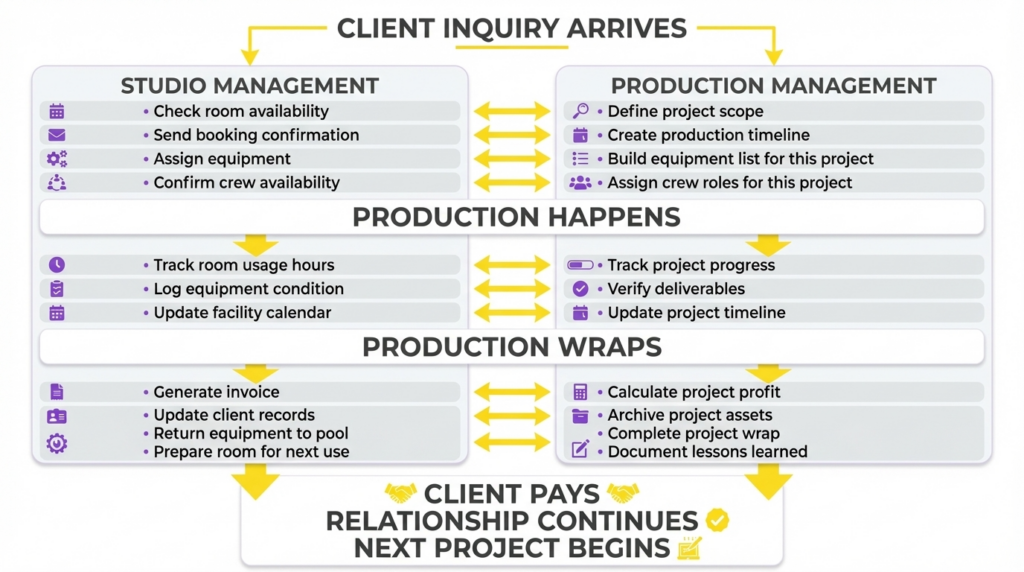
| Stage | Studio Management | Production Management |
| Client Inquiry Arrives | Check room availability | Define project scope |
| Send booking confirmation | Create production timeline | |
| Assign equipment | Build equipment list for the project | |
| Confirm crew availability | Assign crew roles for the project | |
| Production Happens | Track room usage hours | Track project progress |
| Log equipment condition | Verify deliverables | |
| Update facility calendar | Update project timeline | |
| Production Wraps | Generate invoice | Calculate project profit |
| Update client records | Archive project assets | |
| Return equipment to pool | Complete project wrap | |
| Prepare room for next use | Document lessons learned | |
| Final Outcome | Client pays, relationship continues, next project begins |
When both systems share the same data (same client record, same equipment database, same crew schedules, same financial ledger), every handoff between studio management and production management is seamless. No re-entry of data. No information is lost between systems. No version conflicts.
This is the core advantage of a platform that handles both studio operations management and production management in one place, rather than using separate tools for each.
Which one do you need?
The answer for most production studios is both. But the starting priority depends on your studio’s current situation:
Start with Studio Management If:
- Your biggest problems are scheduling conflicts, missing equipment, or disorganized finances
- You are a session-based studio (recording, podcast, photography) where booking and facility operations drive revenue
- You have never documented your operational processes
- You are still running operations on spreadsheets
- Your facility is growing (adding rooms, equipment, or staff)
Start here: Studio Operations Management
Start with Production Management If:
- Your biggest problems are missed deadlines, budget overruns, or production tracking gaps
- You are a project-based studio (film, video, broadcast) where multi-phase productions are your core work
- You have facility operations under control, but struggle with project delivery
- Your productions involve large teams and complex timelines
Start here: Production Management
You Need Both Equally If:
- You run a facility that produces its own content (not just renting space to clients)
- You manage multiple concurrent productions in a shared facility
- Your team handles both studio operations and project execution
- You want a single view of facility performance AND project performance
Both together: Studio Hero connects studio operations and production management in one platform, giving you facility-level visibility and project-level control without maintaining separate systems.
Frequently Asked Questions
Studio management focuses on the production facility and its ongoing operations, including room scheduling, equipment tracking, financial management, and facility maintenance. Production management focuses on individual projects and their delivery, including production timelines, crew assignments, project budgets, and deliverables. Studio management is continuous and facility-centered. Production management is project-based and deliverable-centered. Most production studios need both.
Yes. A unified studio management platform that includes production management capabilities handles both in one system. This eliminates the data duplication and communication gaps that occur when studios use separate tools for facility operations and project management. The shared data model means scheduling, equipment, crew, finances, and client information flows between both functions automatically.
No. A studio manager oversees the facility and its daily operations across all projects. A production manager oversees a specific project from brief through delivery. In small studios, one person may fill both roles, but the responsibilities are distinct. The studio manager ensures the building and business run smoothly. The production manager ensures the project is completed on time, on budget, and to the client’s satisfaction.
It depends on the type of work. Small studios that primarily offer session rentals (recording time, podcast room bookings, photography studio time) can operate effectively with studio management alone. Small studios that produce content for clients (corporate videos, music production, branded content) need production management to track project timelines, budgets, and deliverables, even at a simplified level. As the number and complexity of concurrent projects increase, production management becomes essential regardless of studio size.
For most recording studios, studio management is the highest priority. Room scheduling, session booking, equipment tracking, and client management are the daily operational concerns. Production management becomes relevant when the studio takes on multi-session projects like album production, podcast series, or audio post-production work that spans weeks or months with multiple phases and deliverables. Start with studio operations and add production management as project complexity grows.
Common signs include: you have to enter the same information into two or more systems, your production team books rooms without checking the studio calendar, project budgets do not match studio invoices, crew gets double-booked because project assignments and staff scheduling are tracked separately, and clients receive inconsistent communication from studio staff and production staff. If any of these happen regularly, your studio management and production management systems are disconnected and need integration.
Next Steps
Understanding the distinction between studio management and production management helps you build the right systems for your studio. Continue with these guides based on which area needs attention first:
For studio management:
- What Is Studio Management? covers the foundational definition and scope
- The Complete Guide to Studio Management covers the full operational framework
- Studio Management Best Practices covers the specific practices across every domain
- Studio Management Checklist covers the daily, weekly, and monthly operational routine
For production management:
- Project Management for Successful Production covers production project workflows
- Production Tracking Gaps covers common project visibility problems
For both together:
- How to Manage a Production Studio Efficiently covers the framework for building efficient operations across both disciplines
- Studio Operations Metrics covers the KPIs that span both studio and production management
If your studio needs a platform that connects studio operations and production management without running two separate systems, schedule a demo of Studio Hero and see how both work together for your studio type.
Studio Hero is studio management software built for film, TV, audio, video, podcast, and photography production studios. See pricing or book a free demo.