
- Supporting studio operations since 1997 ✦
- Trusted by Top Hollywood Studios
Equipment Tracking Software
Bring scattered equipment information into one operational view. Studio Hero helps production teams quickly identify gear, know where it belongs, check its current status, and keep high-value equipment organized across studios, rooms, and facilities.

Simplify Production Equipment Tracking
Spend less time searching for gear, sorting out similar assets, or discovering equipment problems when production is already moving.
Reduce Time Spent Searching
Give teams a faster way to pinpoint the right equipment instead of chasing spreadsheets, separate lists, or scattered asset information.
Avoid Equipment Mix-Ups
Make similar cameras, monitors, microphones, lighting, and technical gear easier to distinguish so teams know exactly which asset they are working with.
Catch Problems Before Production
Bring operational status and out-of-service information into view earlier so unavailable equipment does not become a last-minute production surprise.
Organize Production Equipment for Daily Use
Studio Hero gives each piece of equipment a clear identity, location, grouping, and operational state so your team can quickly see what you have and how it fits into production.
Identify the Equipment
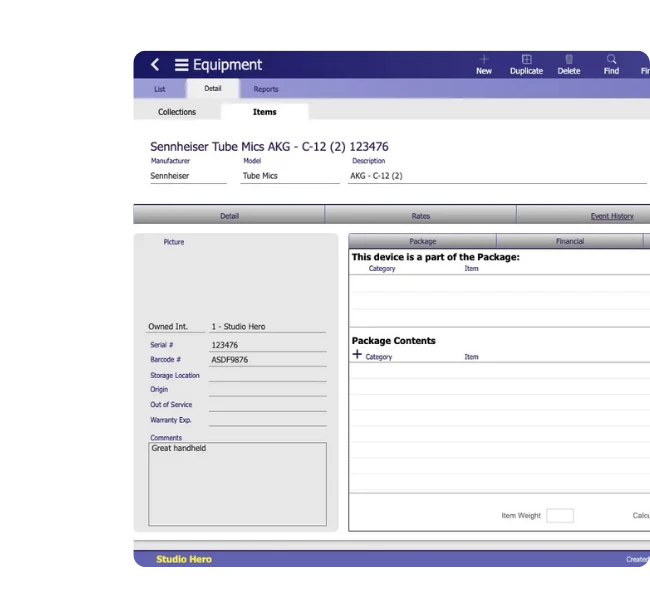
Use serial numbers, barcodes, manufacturer, model, category, and other asset details to distinguish one piece of equipment from another.

Put Gear in the Right Place
Assign storage locations, installed locations, and Room relationships so teams know where equipment belongs within the operation.

Group Gear for Real-World Use
Organize equipment by pools, categories, packages, and kits so related gear stays structured around how your team actually works with it.

Review Equipment Readiness
Check equipment and Resource status together with out-of-service information to determine which gear is ready for normal production use.

Equipment Tracking Capabilities

Identify the Right Gear Without Guesswork
Give each piece of production equipment a clear asset profile so teams can distinguish similar gear and recognize the important information attached to it.
Use Barcodes and Serial Numbers
Identify individual assets with barcode and serial number information so teams can tell one piece of equipment from another.
Distinguish Similar Equipment
Use manufacturer, model, type, category, and pool information to separate similar gear and clarify what each item is.
Keep Asset Details Together
Keep important equipment information, including cost and total value, with the asset so teams can see both what the gear is and the value attached to it.
Know Where Equipment Belongs
Give production teams a reliable way to know where gear should be stored or where fixed equipment is installed within the operation.
Assign Storage Locations
Keep the normal storage location with each equipment record so teams know where gear should be returned or found when it is not in use.
Mark Installed Equipment
Use installed-location information for equipment that stays in a fixed production, technical, or facility location.
Tie Gear to Rooms
Associate equipment with the relevant Room so teams can recognize which spaces contain installed or assigned production gear.
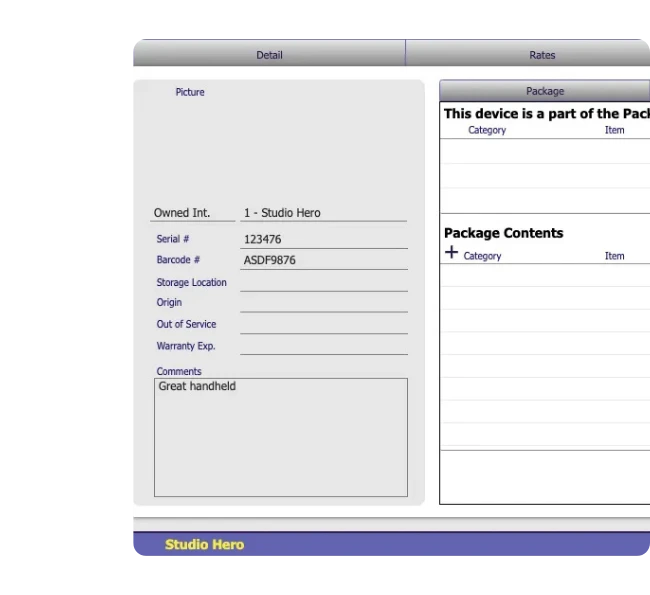

Organize Equipment Into Packages and Kits
Group gear that travels or works together so teams can see what belongs in each setup without maintaining separate equipment lists.
Know What’s Inside
View the equipment included in a package so teams can quickly confirm which items belong together.
Define Package Membership
Associate individual assets with the relevant package or kit while keeping each piece of equipment independently identifiable.
Account for Package Weight
Use individual item weights and calculated package weight to check the combined weight of grouped equipment.
Understand Equipment Readiness
See whether production gear is in service and ready for normal use or has an operational issue that needs attention.
Check Equipment Status
Use equipment and Resource status information to review the current operational state of each asset.
Spot Gear Out of Service
See when equipment has been marked out of service so teams do not treat unavailable gear as ready for production.
Review What Needs Attention
Bring status and out-of-service information together to distinguish production-ready gear from equipment that needs attention.


See When Production Gear Is Checked Out
Know when equipment is away from its normal location while keeping deeper custody activity in the dedicated checkout workflow.
See What’s Currently Out
Use checkout status to quickly distinguish equipment that is checked out from gear that is currently in.
Tie Custody to the Asset
Associate checkout activity with the relevant Equipment or Resource record so custody information stays with the gear itself.
Follow Gear Through Return
Move into the dedicated checkout workflow when your team needs deeper custody details such as who took the gear, when it is due back, and when it returned.
Review Service History and Warranty Dates
Review the maintenance work associated with each asset and when its recorded warranty period expires without separating that information from the equipment record.
See Past Service Work
Check maintenance history and summaries to see the service work already associated with an equipment item.
Compare Maintenance Costs
Compare maintenance hours, labor, parts, and total costs to see how much service work has gone into the asset.
Check Warranty Expiry
Keep the warranty expiry date with the equipment record so teams can quickly see when the recorded warranty period ends.
Turn Equipment Records Into Useful Reports
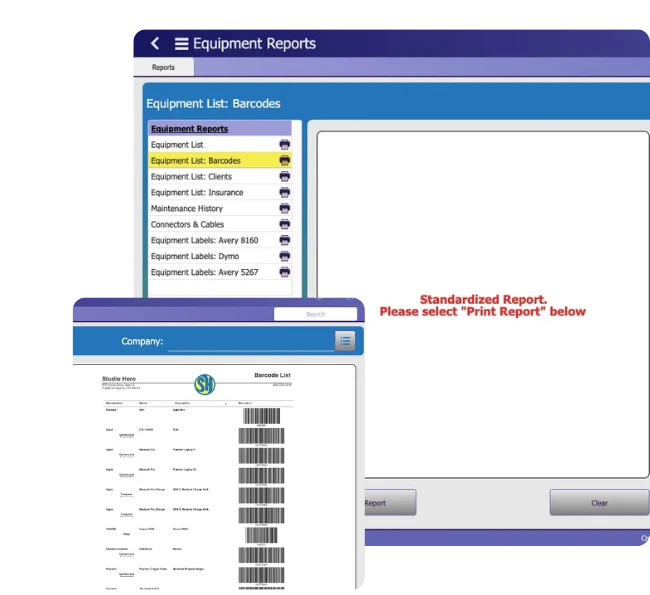
Use equipment data beyond the asset record itself with reports and printable labels that help teams review gear, prepare lists, and keep physical equipment easier to identify.
Build Equipment Reports
Review equipment, barcode, client equipment, insurance, and maintenance history reports from the same operational data.
Print Barcode Labels
Generate barcode sheets and label formats for equipment identification using supported layouts such as Avery and Dymo.
Prepare Gear Lists Faster
Use reporting views to pull together the equipment information your team needs for operational checks, documentation, or physical labeling without rebuilding lists manually.
See How Studios Keep Operations Running
See how production teams use Studio Hero as a long-term system for organizing the operational information behind their facilities, equipment, and production work.
Equipment Tracking Software vs. Spreadsheets
Spreadsheets can list equipment, but they become harder to rely on as gear, locations, packages, status, maintenance information, and asset details grow across the operation.
Spreadsheet Equipment Tracking
Studio Hero Equipment Tracking
Equipment details spread across rows, tabs, or separate files
Each asset keeps its identity, status, location, and related equipment details together
Similar gear can be difficult to distinguish
Barcodes, serial numbers, manufacturer, model, category, and pool help identify individual assets
Storage and installed locations require manual cross-checking
Storage locations, installed locations, and Room relationships stay with the equipment
Packages and kits are often maintained in separate lists
Package membership and package contents remain tied to the equipment structure
Service information can become disconnected from the asset
Maintenance summaries, costs, out-of-service state, and warranty expiry stay associated with the equipment record
Reports and labels require rebuilding data manually
Equipment data can support equipment, barcode, insurance, maintenance, and label outputs
Studio Hero replaces scattered equipment lists with a clearer operational view of your gear, where it belongs, its current status, and the information attached to each asset.
Built for Equipment-Heavy Production Teams
Support equipment tracking across studios and production businesses that need clearer visibility into valuable gear, where it belongs, and its current operational state.

Frequently Asked Questions
1. What is equipment tracking software?
Equipment tracking software helps production teams identify gear, know where it belongs, review its operational status, organize packages and kits, and keep maintenance, warranty, cost, value, and other asset information tied to each equipment record.
2. How does Studio Hero track production equipment?
Studio Hero keeps equipment identity, barcodes, serial numbers, locations, Room relationships, package membership, operational status, maintenance information, warranty expiry, and other asset details together in one equipment tracking system.
3. Can Studio Hero be used as AV equipment tracking software?
Yes. Production and AV teams can use Studio Hero to organize and track cameras, audio gear, lighting, monitors, technical equipment, and other production assets using equipment records, barcodes, locations, status, packages, and related operational information.
4. Can Studio Hero track equipment by barcode or serial number?
Yes. Equipment records can include barcode and serial number information, helping teams distinguish individual assets and find the correct piece of gear.
5. Can Studio Hero track where equipment is located?
Yes. Equipment can include storage locations, installed locations, and Room relationships so teams can see where gear normally belongs or where fixed equipment is installed.
6. Can production equipment be organized into packages or kits?
Yes. Studio Hero can associate equipment with packages and show the items that belong within them, helping teams organize related gear while preserving the identity of each asset.
7. Does Studio Hero show equipment maintenance and warranty information?
Yes. Equipment records can include maintenance history and cost summaries, out-of-service information, and warranty expiry dates so teams can review important service information alongside the asset.
8. Does equipment tracking include check-in and checkout?
Equipment Tracking shows the broader equipment record and checkout status. For deeper custody details such as who took the gear, when it is due back, and when it returned, use Equipment Check-In & Checkout Software.

Take Control of Production Equipment
Give your team a faster way to find, organize, and account for production gear without relying on scattered equipment records.