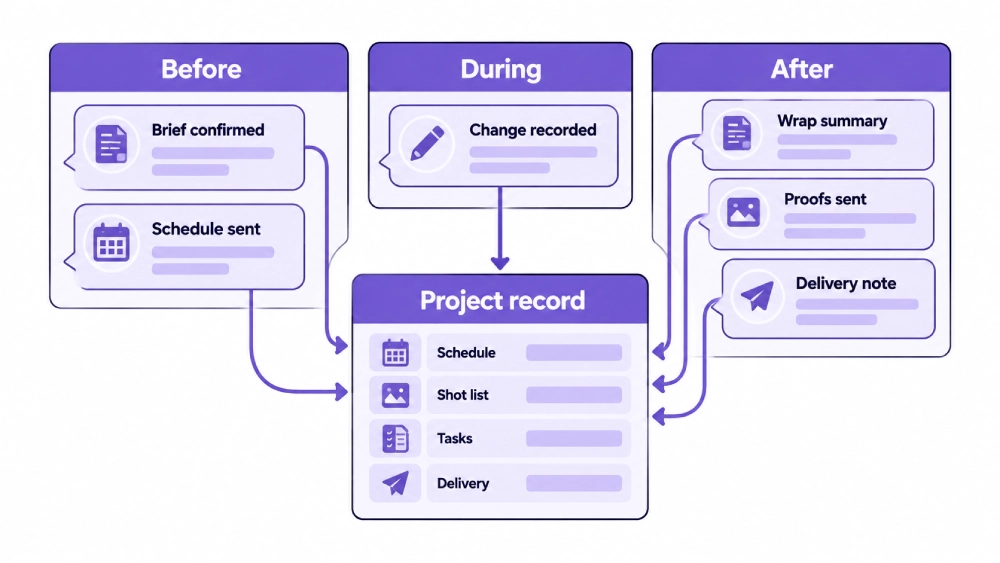
A photography client communication checklist should make every confirmed decision update the record it affects, not just inform the client. Confirm the brief, schedule, crew, and deliverables before the shoot; record changes during it; and close the project only when the booking, tasks, and delivery records match what happened.
Photography projects rarely break down because nobody spoke to the client.
They break down because the confirmed information never reached the people doing the work.
A client moves their arrival time, but the studio schedule stays unchanged. An agency contact requests another product setup through email, while the photographer works from the original shot list. A crop receives approval in a chat message, but the retoucher reviews an older project note.
The conversation happened. The production record did not change.
StudioHero helps photography studios connect client contacts, booking details, schedules, crew assignments, project tasks, media records, approvals, and delivery activity. Our photography studio management software keeps confirmed client instructions attached to the work they affect.
A useful communication process should answer:
- Who is the working client contact?
- Who can approve changes during the shoot?
- What has the studio promised to deliver?
- Which information is still missing?
- What changed during production?
- What does the client need to do next?
- Where has the final decision been recorded?
Good Communication Must Update the Project
Sending a clear message is only half the job.
When a client decision affects the date, room, crew, equipment, shot list, file requirements, or delivery deadline, your team must update the related record.
Suppose the client confirms that ten additional products will arrive on shoot day. That change may affect preparation time, shot count, table space, styling, image volume, and the expected finish.
The producer should not leave that information inside an email thread. The shot list, schedule, project scope, and assigned tasks must reflect the revised plan.
The same rule applies after the shoot. When a client approves an image version, the media status and revision task should change. When final files are sent, the delivery record should show what left the studio and who received it.
Communication is complete only when the confirmed information reaches the people and records that depend on it.
Name Every Client Contact and Their Role
Commercial photography projects often involve several people from the same company or agency.
Record:
- Working client contact
- Billing contact
- Creative reviewer
- Shoot day decision maker
- Final approver
- Delivery recipients
- Access or location contact where required
These roles may belong to one person or several people.
The working contact handles regular questions and project updates. The creative reviewer comments on the images. The final approver can close the review stage. The billing contact may never attend the shoot but still needs the correct project and purchase information.
Do not assume that the person who submitted the first request can approve every later decision.
StudioHero’s crew and contact management software keeps client, crew, freelancer, vendor, and agency profiles connected to project assignments and working records.
Choose Where Official Decisions Will Be Recorded
Your studio may use email, a client portal, project notes, phone calls, or another agreed channel.
The method can vary. The rule should remain fixed:
Any message that changes the production must be recorded under the project.
A client may approve a setup during a phone call. The producer should add that approval to the project afterward. A schedule change may arrive through text. The studio calendar must still be updated.
This prevents private messages from becoming the only record of a production decision.
Tell the client where they should send final selections, revision notes, and approvals. Several communication channels can support the relationship, but one recorded location should hold the confirmed decision.
Before the Shoot
Acknowledge the Inquiry
When a client submits a request, confirm that your team received it.
The first response should state:
- What information arrived
- Which details are missing
- Who will review the request
- What happens next
- When the client can expect another update
StudioHero’s client booking portal lets clients submit dates, rooms, crew, equipment needs, custom details, and supporting files through a guided request.
The acknowledgment should not imply that the requested date has already been reserved.
Confirm the Booking Status
The client should know the current status of the request.
Useful booking statuses include:
- Inquiry received
- More information required
- Availability under review
- Temporary hold
- Awaiting client action
- Confirmed
A requested date is not a confirmed shoot.
If the studio is waiting for a brief, purchase order, deposit, approval, or another requirement, state that plainly. Tell the client what action is needed and whether the requested resources are being held.
The full process belongs in Photography Studio Booking Workflow: From Inquiry to Confirmed Shoot, while the communication checklist makes sure the client understands each stage.
Confirm the Creative Brief
Before your team plans the shoot, confirm what the client wants to create.
Record:
- Project purpose
- Intended image use
- Visual direction
- Subject or product details
- Required shots
- Client priorities
- Reference images
- Known restrictions
- Delivery deadline
- Required output types
Do not rely on a collection of reference images without a written explanation of what the client likes about them.
One reference may guide the lighting. Another may show the crop. A third may communicate the background treatment.
Write down the decision.
Confirm the Shoot Scope
The client should understand what the studio will provide.
Depending on the project, the scope may include:
- Studio room or location support
- Photographer
- Assistants
- Digital tech
- Equipment
- Styling support
- Set preparation
- Number of final images
- Retouching level
- Proof review stages
- Delivery groups
- Project deadline
Do not let the client assume that room rental includes crew, equipment, retouching, or every final format unless those items appear in the agreed scope.
If the client changes the scope later, record the new request before your team starts the added work.
Confirm the Schedule
Send the client a schedule that includes more than the camera start time.
Confirm:
- Shoot date
- Studio access time
- Crew call time
- Client arrival time
- Talent arrival time
- Product or wardrobe arrival
- Planned shooting period
- Review points
- Expected finish
- Teardown period
- Any deadline affecting the day
Keep this information connected to your studio scheduling software so client changes do not remain separate from room, crew, and equipment reservations.
If the client asks to arrive earlier, check whether the room and team are available before confirming the change.
Confirm Location and Access Details
Send the client the practical information they need to arrive and work without delay.
Include:
- Studio or location address
- Room or stage name
- Parking information where supplied
- Loading instructions
- Entry process
- Access contact
- Product delivery process
- Changing and makeup areas
- Client seating or review space
- Accessibility information recorded for the project
- Any known location restrictions
If the shoot takes place outside the studio, confirm the onsite contact, access time, equipment loading process, and who controls the location.
Confirm Client, Talent, Product, and Prop Arrival
Photography shoots often depend on people or items arriving before the camera work can start.
Confirm:
- Number of client attendees
- Talent names and arrival times
- Product delivery date and time
- Wardrobe arrival
- Props and set pieces
- Outside vendors
- Client supplied equipment
- Person responsible for each arrival
- Storage needs before the shoot
- Pickup or return plan
When a product, model, or wardrobe item arrives late, the entire shot sequence may change. Your production team needs the same arrival information the client received.
Confirm the Shot List and Priorities
The shot list should tell the team what must be completed and what can move if the schedule becomes tight.
Confirm:
- Required shots
- Priority order
- Alternate shots
- Product or talent sequence
- Client review points
- Onsite approval needs
- Items that can move to another session
- Person who can change the priority
A long shot list without priorities leaves the team guessing when time runs short.
Connect confirmed changes to production management software so the project tasks, files, deadlines, and assigned people stay aligned.
Confirm the Approval Process
Before the shoot, tell the client how review and approval will work.
Confirm:
- Who receives the proofs
- Who may comment
- Who submits the final selects
- Who gives final approval
- What action is required at each review stage
- How comments should be submitted
- When the review is expected
- What happens after approval
The full decision process belongs in Photography Client Approval Workflow: Proofs, Selects, Revisions, and Final Files.
At this stage, the client only needs to understand who will review what and how their decision will move the project forward.
Send One Final Pre Shoot Confirmation
Before the production day, send one message containing the current plan.
Include:
- Confirmed date and location
- Access and arrival times
- Client contacts
- Studio contact
- Current schedule
- Crew summary
- Room and equipment summary
- Required client items
- Open questions
- Attached brief, shot list, or schedule
The client should not need to search several old messages to understand the final plan.
Mark any unresolved item clearly. State who owns it and when the answer is due.
During the Shoot
Start With a Short Client Check In
At the beginning of the day, confirm:
- Current schedule
- Priority shots
- Shoot day decision maker
- Planned review points
- Any changes since the final confirmation
- Any item that has not arrived
This conversation should be brief and practical.
Its purpose is to make sure the studio and client are working from the same plan before the first setup begins.
Use One Client Contact for Shoot Day Decisions
Several people may attend the shoot and offer opinions.
Your team should know who can:
- Change shot priority
- Approve a setup
- Add a request
- Remove a planned shot
- Extend the session
- Accept a production compromise
Other attendees may still comment. One named contact should settle conflicting instructions.
When that person approves a change, record the decision under the project.
Record Changes as They Happen
A new client request can affect several parts of the production.
Record:
- What changed
- Who requested it
- When it was requested
- Who approved it
- Which shots are affected
- Whether the schedule changes
- Whether crew or equipment needs change
- Whether the final deliverables change
- Whether another client decision is required
Do not wait until the end of the day to reconstruct every conversation.
A quick record made during the shoot is more reliable than memory.
Report Delays Before They Become Surprises
Weather, access, equipment, product arrival, talent, or another issue may affect the planned schedule.
Tell the client:
- What happened
- Which part of the plan is affected
- What can still be completed
- Which choice the client needs to make
- Whether the expected finish has changed
Avoid telling the client that everything is fine when the original plan can no longer be completed.
A direct update gives the decision maker time to change priorities.
Record Onsite Reviews Carefully
Some clients review images during the shoot.
They may approve:
- Lighting direction
- Product position
- Background choice
- Camera angle
- Crop direction
- Talent position
- Completed shot setup
Record the approved choice and the name of the person who approved it.
Onsite approval of a setup does not always equal approval of the retouched final image. Keep those decisions separate.
End With a Wrap Summary
Before the client leaves, confirm:
- Work completed
- Outstanding shots
- Added requests
- Known production issues
- Items moving to another session
- Next production stage
- Expected next update
- Client action still required
This prevents the studio and client from leaving with different ideas about what happened during the day.
After the Shoot
Send a post-shoot update.
Send a short update after the session.
Include:
- Confirmation that the shoot is complete
- Any unresolved item
- What happens next
- Expected proof or review timing
- Client action still required
- Working studio contact
The client should not have to ask whether the files are being processed.
Do not promise a proof date until your team has checked the actual workload and project plan.
Confirm Changes to the Deliverables
If the shoot changed what your studio can or should deliver, record it.
Examples include:
- Fewer completed setups
- Added image variations
- Additional crops
- More retouching
- Rescheduled shots
- Missing client supplied products
- New approval requirements
- Changed delivery deadline
The final project record should match the work completed, not the original plan when the two are no longer the same.
Communicate the Proof Review
When proofs are ready, tell the client:
- What they are reviewing
- Which images appear in the set
- What decision they must make
- Who should submit it
- When the response is due
- What happens after the selects arrive
Avoid a vague message asking the client to share their thoughts.
Ask for a defined action, such as confirmed selects or image specific comments.
StudioHero’s media asset management software connects media records with projects, clients, metadata, QC notes, supporting files, and delivery activity.
Keep Revision Messages Attached to the Correct Image
Every revision message should identify:
- Image identifier
- Current version
- Requested change
- Reviewer
- Due date
- Approval status
- Next action
Do not rely on descriptions such as “the second image” when the order can change.
Client comments should become assigned project work with an owner and deadline.
Send a clear final delivery message.
When the final files are ready, tell the client:
- Project name
- What the package contains
- Which folders serve which uses
- Where the usage information appears
- How to access the files
- Any access deadline
- Expected file count
- Contact for access problems
The complete handoff process belongs in Image Delivery Checklist for Photography Studios: Specs, Rights, and Handoff.
The communication message should help the client understand what they received and what they should do next.
Confirm Project Closeout
Close the communication record only after:
- Final files have been delivered
- Required client receipt has been recorded
- Open corrections are complete
- Usage documents are attached
- Delivery recipients are recorded
- Project tasks have reached their final status
- The archive record has been updated
- The client knows who to contact later
A project should not appear closed while a correction, replacement delivery, or approval issue remains open.
Common Photography Client Communication Failures
Several Staff Members Send Conflicting Updates
The client receives different schedules or instructions from the photographer, producer, and studio coordinator.
Decisions Stay Inside Private Messages
The client confirms a change with one person, but the rest of the team never sees it.
A Date Is Confirmed Before Resources Are Checked
The client believes the shoot is booked while the studio is still checking the room, photographer, or equipment.
No Final Pre Shoot Summary Is Sent
The client and crew arrive with different times, shot priorities, or access information.
Shoot Day Changes Are Not Recorded
Added work affects the schedule and deliverables, but the project record keeps the original plan.
Proof Instructions Are Vague
The client does not know whether to choose favorites, final selects, or approve the full set.
Revision Comments Arrive Through Several Channels
The editor works from an incomplete collection of client notes.
Delivery Has No Handoff Message
The client receives files without knowing which versions belong to print, web, or another use.
The Project Closes With an Open Issue
A missing file, correction, or access problem remains unresolved after the project status changes to complete.
Photography Client Communication Checklist
| Project Stage | Communication | Required Details | Owner | Complete When |
| Inquiry | Acknowledge request | Information received, missing details, next update | Booking coordinator | Client knows the request is under review |
| Missing information | Request required details | Questions, attachments, response deadline | Booking coordinator | Studio can review the request |
| Booking status | Explain current stage | Inquiry, hold, pending action, or confirmed | Booking coordinator | Client understands whether the date is reserved |
| Confirmation | Confirm the shoot | Date, time, room, crew, equipment, next action | Producer | The client and studio have the same booking record |
| Creative brief | Confirm project direction | Purpose, visual direction, references, priorities | Producer | The production team has an approved brief |
| Scope | Confirm studio responsibilities | Services, crew, equipment, deliverables, reviews | Producer | The project record reflects the agreed work |
| Schedule | Send the production timeline | Access, arrivals, shooting, reviews, finish | Studio coordinator | Client and crew follow the same schedule |
| Location | Send access information | Address, entry, loading, rooms, contact | Studio coordinator | Everyone can reach and enter the location |
| Talent and products | Confirm arrivals | Names, times, deliveries, responsible contacts | Producer | Required people and items have an arrival plan |
| Shot list | Confirm priorities | Required shots, order, decision points | Photographer or producer | The team knows what must be completed |
| Approval process | Explain review roles | Reviewers, approver, actions, deadlines | Producer | Client knows how decisions will be recorded |
| Final pre shoot | Send consolidated plan | Current schedule, contacts, resources, open issues | Producer | No important detail remains scattered |
| Shoot start | Complete client check in | Priorities, decision maker, changes | Photographer or producer | The day starts from the confirmed plan |
| Shoot change | Record a change | Request, approval, schedule and scope effect | Producer | Project records reflect the new decision |
| Delay | Report the issue | Cause, impact, options, decision required | Producer | Client has chosen the next action |
| Onsite review | Record the decision | Setup, angle, crop, background, approver | Photographer or producer | The approved production choice is recorded |
| Wrap | Summarize the shoot | Completed work, open items, next stage | Producer | Client and studio agree on what happened |
| Post shoot | Send status update | Completion, open issue, proof timing | Producer | Client knows what happens next |
| Proof release | Request a defined action | Proof set, instructions, reviewer, deadline | Client contact | Client review begins with clear instructions |
| Revision | Send version update | Image ID, version, changes, action required | Producer | Client knows which file is under review |
| Final approval | Request signoff | Exact images, versions, approver | Producer | Approved versions are recorded |
| Delivery | Send final handoff | Package, access, usage notes, contact | Client contact | Client can access and understand the files |
| Receipt | Confirm access | Download, reply, issue, or handoff status | Client contact | Required receipt is recorded |
| Closeout | Send final project status | Completed work, delivery, later contact | Producer | No open action remains |
Client Contact Roles
| Contact Role | Person to Record | Decisions They Can Make |
| Working contact | Main project contact | Answers routine questions and coordinates information |
| Billing contact | Accounts or purchasing contact | Handles purchase and billing requirements |
| Creative reviewer | Art director, manager, or agency contact | Comments on creative work |
| Shoot day decision maker | Authorized onsite contact | Changes priorities and approves production choices |
| Final approver | Named client representative | Gives final image approval |
| Delivery recipient | Person receiving final files | Accesses the approved delivery package |
| Production partner | Printer, agency, publication, or vendor | Receives only the files and instructions approved for their role |
How StudioHero Supports Photography Client Communication
StudioHero keeps confirmed client information connected to the wider photography workflow.
Your team can manage:
- Client and contact profiles
- Booking requests
- Studio schedules
- Crew assignments
- Project records
- Tasks and deadlines
- Supporting files
- Media records
- Review notes
- Approval activity
- Delivery records
- Project history
StudioHero does not need to replace every email or phone call. It gives your team one connected project record where confirmed decisions can update the booking, schedule, crew, tasks, media, approvals, and delivery process.
Good Communication Leaves a Usable Record
Photography client communication should do more than keep the client informed.
It should confirm decisions, assign actions, update production records, and make the next step visible.
Before the shoot, communication prepares the client and production team. During the shoot, it records changes and protects priorities. After the shoot, it controls review, approval, delivery, and closeout.
StudioHero connects client instructions with bookings, schedules, tasks, crew, media, approvals, and final delivery so your team does not have to rebuild the project history from scattered messages.
Book a StudioHero demo to see how your studio can manage client communication alongside photography bookings, projects, schedules, files, approvals, and delivery activity.