A photography image delivery checklist should confirm the approved image identifiers, final versions, file formats, dimensions, resolution, color profiles, crops, naming rules, usage information, recipients, delivery method, access period, and final quality review status. The studio should also record what was delivered, when it was sent, who received it, and where the approved masters and project documents were archived.
Sending a download link does not complete a photography project.
The wrong revision may enter the delivery folder. Print files and website files may carry unclear names. Usage details may remain buried in an older email. A client may forward the package to a printer or agency without knowing which files belong to which use.
Weeks later, the studio may struggle to confirm what it actually sent.
StudioHero connects photography projects with media records, file status, quality review notes, supporting documents, delivery activity, and archive locations. Our photography studio management software helps your team keep the final package tied to the approved images and the client project.
A reliable image handoff should answer:
- Which images received approval?
- Which exact versions are being delivered?
- What specification applies to each file group?
- What usage information travels with the files?
- Who can access the package?
- What did the studio send?
- Where are the retained masters and delivery records stored?
Start With the Final Approval Record
Do not build the delivery folder by browsing for files that look finished.
Start with the approval record.
Confirm:
- Approved image identifiers
- Approved version numbers
- Name of the approver
- Approval date
- Any approval conditions
- Final quality review status
- Intended image uses
- Required export groups
A folder named Final does not prove that every file inside received approval.
The previous Photography Client Approval Workflow: Proofs, Selects, Revisions, and Final Files should establish which version can move forward. The delivery process begins only after that decision is clear.
Where a client approved an image subject to one remaining correction, complete and review that correction before creating delivery exports.
Confirm the Agreed Deliverables
Review the project scope before exporting files.
The agreed package may include:
- A stated number of final images
- High resolution files
- Website files
- Print files
- Ecommerce exports
- Cropped and uncropped versions
- Alternate orientations
- Transparent background files
- Product specific naming
- Press files
- Social media crops
- Supporting documents
Do not assume that RAW files, layered working files, unedited captures, or every possible export belong in the package.
Deliver what the project record requires.
StudioHero’s production management software can connect deliverables with the project, assigned work, deadlines, files, and completion status.
Create a Delivery Specification for Each Use
One export rarely fits every purpose.
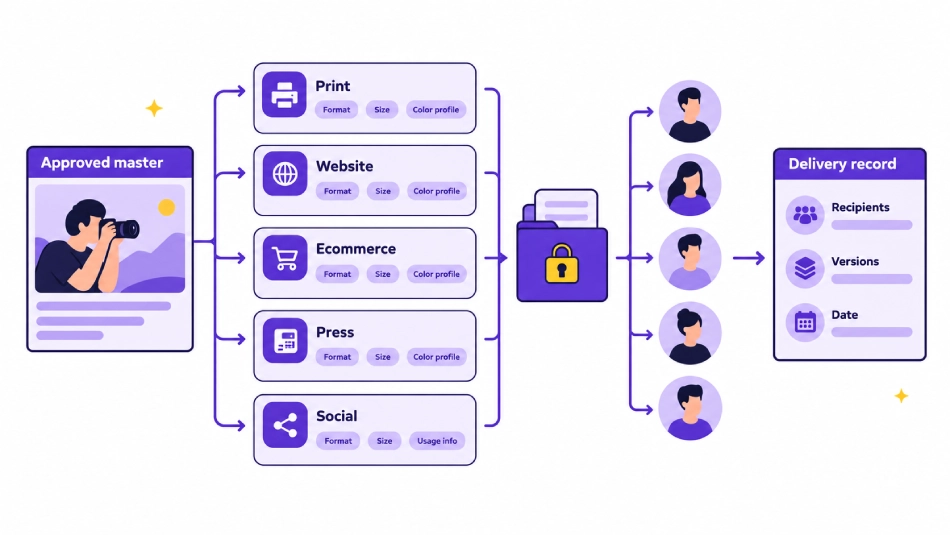
A website image, print file, ecommerce product image, and press image may come from the same approved master, but each can require a different output.
Create a delivery specification for each file group.
Record:
- Intended use
- File format
- Pixel dimensions
- Print dimensions where required
- Resolution field where relevant
- Color profile
- Crop ratio
- Background requirement
- File size limit
- Compression setting where recorded
- Naming rule
- Metadata requirement
The client brief, platform requirement, printer specification, or project agreement should define the actual values.
Do not apply one fixed specification to every photography project.
Separate Approved Masters From Delivery Exports
An approved master and a delivery export perform different jobs.
Approved Master
The accepted high quality image retained by the studio. It becomes the reference for future approved outputs.
Delivery Export
A copy created for a stated use, such as print, ecommerce, website, social media, press, or client archive.
One approved master may produce several delivery exports.
Every export should remain linked to:
- The approved master
- The image identifier
- The approved version
- The intended use
- The export specification
- The quality review result
Do not overwrite the approved master while creating smaller files, alternate crops, or compressed versions.
Check the File Format
Confirm the required format for each delivery group.
Depending on the project, the package may contain:
- JPEG files
- TIFF files
- PNG files
- Another agreed format
- RAW files only when specifically included
- Layered working files only when specifically included
The file format should match the recorded requirement.
A transparent background request may need a format that supports transparency. A print partner may provide its own requirement. An ecommerce system may restrict file type or file size.
Do not choose the format from habit.
Check Dimensions, Resolution, and Crop
Review each export against its intended use.
Confirm:
- Pixel width and height
- Print dimensions where supplied
- Resolution setting where relevant
- Landscape, portrait, square, or custom crop
- Product framing
- Safe area requirements
- Bleed or layout instructions where supplied
- Alternate sizes
- File size limits
- Orientation
A client may approve the full image but request several crops for different placements. Each crop should remain connected to the same approved master.
Avoid applying a fixed print resolution or web dimension to every project. Use the requirement recorded for the client and destination.
Check the Color Profile
Confirm the expected color profile for each export group.
The correct choice may depend on:
- Website use
- Ecommerce platform
- Commercial printer
- Publication
- Advertising placement
- Client archive
- Another named destination
The studio should not guess.
Record the output purpose beside the color profile so the editor and delivery coordinator understand why the file exists.
If a printer or production partner provides a specification, keep that document attached to the project.
Apply Clear File Names
The client should be able to identify files without opening each one.
A delivery naming rule may include:
- Client code
- Project code
- Image identifier
- Approved version
- Crop
- Intended use
- Sequence number
Keep the names readable.
Avoid names such as:
Final New
Final Latest
Use This One
Final Corrected Again
Those names do not show which image or version the studio approved.
The delivery filename should connect back to the internal image record without exposing unnecessary internal notes.
Package Files Around Client Use
The delivery folder should reflect how the client will use the images.
Possible groups include:
- Website
- Ecommerce
- Social
- Press
- Approved masters where included
- Alternate crops
- Usage information
- Delivery notes
Do not send the full internal production folder.
The client does not need rejected proofs, working retouching versions, internal comments, temporary exports, or outdated approvals.
A clean package reduces uncertainty and lowers the chance that someone publishes the wrong file.
Check Metadata and Credit Information
Some projects require information embedded in the files or supplied alongside them.
Confirm whether the delivery needs:
- Client name
- Project name
- Photographer name
- Copyright notice
- Credit line
- Image identifier
- Caption
- Product identifier
- Campaign information
- Usage notes
Use the information already approved in the project brief, agreement, or client instructions.
Do not invent a credit line during export.
The same naming should appear across the delivery note, usage record, and file metadata where required.
Attach the Agreed Usage Information
Delivery does not create or change image rights by itself.
The handoff should carry the usage information already agreed for the project.
The delivery record or attached document may need to state:
- Approved use
- Media or channels
- Territory where applicable
- Usage period where applicable
- Exclusivity where applicable
- Required credit
- Limits on third party sharing
- Renewal information where recorded
- Contact for additional use requests
- Related agreement or license document
This is an operating record, not a replacement for a photography agreement.
Your studio should use professional legal advice when drafting license terms, ownership clauses, restrictions, or contract language.
The delivery team should not reinterpret the agreement. It should pass the recorded information to the client with the correct files.
Confirm the Recipients
Commercial photography work may involve several recipients.
These may include:
- Primary client contact
- Marketing team
- Creative team
- Agency producer
- Printer
- Ecommerce manager
- Publication contact
- Another approved production partner
Record who should receive each file group.
The printer may need print exports but not website files. An ecommerce team may need product images but not campaign masters. A public relations contact may need only the press package.
Do not give every person unrestricted access simply because they appear on the project email.
Check Access Permissions
Before release, confirm:
- Who can open the package
- Who can download files
- Which folders each recipient can access
- Whether the link expires
- Whether the client may share access
- Whether outside partners have been approved
- Whether access should remain available after project closeout
The access settings should match the recorded project requirements.
A correct file package sent to the wrong person is still a failed handoff.
Choose the Delivery Method
The delivery method should fit the package and the client process.
Consider:
- Total file volume
- Individual file size
- Number of recipients
- Client access requirements
- Recorded security requirements
- Download period
- Need for a physical drive
- Client preference
- Whether a production partner needs separate access
This article does not require one preferred transfer platform.
The studio needs to record which method it used and confirm that the recipient can access the files.
Test the Package Before Sending
Review the handoff from the client’s position.
Check:
- The link or drive opens
- Permissions work
- Folder names make sense
- The correct files are present
- The delivery record matches the package
- No internal files appear
- Usage information is included
- Download instructions are clear
- Any access deadline appears in the message
- Recipient details are correct
- File counts match the agreed deliverables
- Sample files open correctly
The person who created the exports should not assume that upload or transfer happened correctly.
A second review can catch a missing folder, broken permission, outdated image, or incorrect recipient before the client sees it.
Send a Clear Delivery Note
The delivery message should help the client understand the package.
Include:
- Project name
- What the package contains
- Which folders serve which uses
- Where the usage information appears
- How to access the files
- Any access deadline
- The expected file count
- Contact details for access problems
- Any remaining project action
Keep the message direct.
The client needs to know what they received and how to use the package. They do not need promotional copy during the final handoff.
Record the Delivery
The project record should show exactly what left the studio.
Capture:
- Client
- Project
- Delivered image set
- Image identifiers
- Approved versions
- Export groups
- Recipients
- Delivery date
- Delivery method
- Delivery location
- Person completing the handoff
- Access status
- Client receipt or confirmation where recorded
StudioHero’s media asset management software connects media records with clients, projects, metadata, QC information, supporting files, movement history, and delivery activity.
A delivery record means the studio does not have to search an employee’s inbox months later to find out what happened.
Confirm Client Receipt Where Required
Some studios treat successful access as enough. Other projects require a written client acknowledgment.
Your process may record:
- Link accessed
- Files downloaded
- Drive delivered
- Client reply received
- Access problem reported
- Replacement package sent
- Handoff complete
Use the confirmation level agreed for the project.
Do not leave the delivery task open indefinitely when no further action is required. At the same time, do not close it before known access problems have been resolved.
Handle Corrected Deliveries Carefully
A studio may discover a problem after the initial handoff.
The issue could involve:
- Incorrect crop
- Wrong file format
- Missing image
- Old version
- Naming error
- Color profile issue
- Incorrect recipient package
- Updated client instruction
When replacing a delivered file:
- Record the reason
- Identify the original delivered version
- Create the corrected version
- Complete quality review again
- Update the delivery package
- Inform every affected recipient
- Mark the replaced file clearly
- Update the delivery history
Do not silently replace a file while leaving the old version available.
The client should know which version now applies.
Update the Archive After Delivery
The project archive should preserve the records needed under the studio’s policy.
It may contain:
- Approved masters
- Delivery exports
- Final approval record
- Quality review record
- Usage documents
- Delivery note
- Recipient record
- Delivery history
- Corrected delivery records
- Project documents
- Archive location
- Retention details
The recorded archive location must match where the files now live.
The previous How Photography Studios Organize RAW Files, Selects, and Final Deliverables should control the wider file organization and archive structure. This checklist confirms that the final handoff records enter that archive.
Photography Image Delivery Checklist
| Delivery Check | What to Verify | Required Record | Responsible Role | Complete When |
| Final approval | Exact images and versions received approval | Approval record | Producer | Every delivered image has clear approval |
| Image identifiers | Files match the selected image list | Image record | Media coordinator | No unapproved image appears |
| Approved versions | Delivery uses the current approved version | Version record | Editor | Every file traces to the approved master |
| Deliverable count | Package matches the agreed quantity | Project scope | Producer | File count matches the project record |
| File formats | Each export uses the required format | Export specification | Editor | Formats match the intended uses |
| Dimensions | Pixel or print dimensions are correct | Export specification | Editor | Every file passes the recorded requirement |
| Resolution | Required setting has been checked | Export specification | Editor | The destination requirement is met |
| Color profile | Profile matches the stated output purpose | Export specification | Editor | The correct profile is recorded |
| Crop | Orientation and framing match the brief | Crop record | Editor | Every required crop is included |
| File naming | Names identify project, image, and use | Naming rule | Media coordinator | The client can identify each file |
| Folder packaging | Files are grouped by intended use | Delivery package | Producer | The package contains no internal files |
| Metadata | Required information is present | Metadata record | Media coordinator | Metadata matches the project |
| Usage information | Agreed terms travel with the package | Usage record | Producer | The client receives the correct record |
| Credit line | Approved wording appears where required | Project document | Producer | Credit information matches the agreement |
| Recipients | Only approved people receive access | Recipient record | Client contact | Every recipient has the correct package |
| Permissions | Access settings match recipient roles | Access record | Delivery coordinator | Files open only for intended recipients |
| Delivery method | Method suits file volume and client needs | Delivery record | Delivery coordinator | The package can be accessed |
| Package test | Links, folders, files, and permissions work | Final check record | Assigned reviewer | The package passes a client view test |
| Delivery note | Message explains contents and access | Delivery note | Client contact | The client has clear instructions |
| Delivery record | Date, files, versions, and recipients are recorded | Delivery history | Producer | The studio can trace the handoff |
| Client receipt | Access or acknowledgment is recorded where required | Receipt status | Client contact | The required confirmation is complete |
| Archive update | Masters, exports, approvals, and records are stored | Archive record | Media manager | The stored files match the recorded location |
Delivery Export Specification Template
| Export Group | Intended Use | Format | Dimensions or Crop | Color Profile | Naming Rule |
| Website | Client website | Follow client brief | Follow placement requirement | Follow client or platform requirement | Project code, image ID, web |
| Ecommerce | Product listing | Follow platform requirement | Follow product template | Follow platform requirement | Product ID, view, version |
| Printed material | Follow printer specification | Follow layout requirement | Follow printer specification | Project code, image ID, print | |
| Press | Publication or media use | Follow publication requirement | Follow supplied specification | Follow publication requirement | Campaign, image ID, press |
| Social | Social media placement | Follow channel requirement | Follow approved crop | Follow client requirement | Campaign, crop, sequence |
| Client archive | Client retained package | Follow agreement | Approved master dimensions where included | Follow project record | Project, image ID, approved version |
The actual values must come from the client brief, production partner, platform requirement, or project agreement.
Usage Information Handoff Record
| Usage Field | What to Record |
| Client | Legal or approved client name |
| Project | Campaign, assignment, or project name |
| Approved images | Image identifiers covered by the record |
| Permitted use | The use already agreed for the project |
| Media | Website, print, advertising, press, social, or other recorded channels |
| Territory | Geographic area where applicable |
| Duration | Usage period where applicable |
| Exclusivity | Any recorded exclusivity term |
| Credit line | Approved photographer or studio credit |
| Third party access | Approved agency, printer, publisher, or production partner |
| Additional use contact | Person or team handling new use requests |
| Related agreement | Contract, license, purchase order, or project document |
Studios should obtain professional legal advice when drafting agreements, licenses, or rights clauses.
How StudioHero Supports Photography Image Delivery
StudioHero helps photography studios keep the final handoff attached to the wider project.
Your team can manage:
- Media records linked to clients and projects
- Searchable metadata
- Image status
- Version context
- Quality review records
- Corrective action notes
- Supporting project documents
- Media packages and batches
- Movement history
- Access records
- Delivery activity
- Archive locations
StudioHero does not create every export or decide legal usage terms. It gives your team a connected record of the approved asset, project, quality review, supporting documents, recipients, delivery, and archive location.
Delivery Ends When Both Sides Have the Same Record
A photography project is not complete because someone sent a link.
The handoff is complete when your studio has verified the approved images, prepared the correct exports, attached the agreed usage information, delivered the package to the right recipients, and recorded what the client received.
That record should remain connected to the project and the retained approved files.
StudioHero keeps final media, QC notes, project documents, delivery history, and archive locations together so your team can confirm the full handoff without searching through folders and old messages.
Book a StudioHero demo to see how your studio can manage photography deliverables, QC records, client handoffs, and archived media in one system.