A photography shoot planning checklist should confirm the client brief, required images, shot list, shoot date, studio or location, crew, talent, equipment, props, products, schedule, client review points, delivery requirements, and backup plan. Every open item should have an owner and deadline. Before production begins, the studio should complete a final readiness review to confirm that no major resource, access, or approval issue remains unresolved.
A confirmed date is not a complete shoot plan.
The studio may be reserved while the required lighting kit is assigned to another project. The client may approve the visual direction but delay the final product list. The photographer may be confirmed while the assistants have not received their call times.
Each part of the project can look ready on its own while the full production is still at risk.
StudioHero connects client records, studio bookings, schedules, crew, equipment, inventory, project tasks, and production status. Our photography studio management software gives studio teams one place to check whether the people, space, resources, and client information needed for the shoot are ready.
A useful shoot plan should answer:
- What must the studio produce?
- Which shots have the highest priority?
- Where and when will the work happen?
- Who needs to attend?
- Which equipment and supplies are required?
- What must the client provide?
- Which decisions must happen before or during the shoot?
- What could stop the production?
- Who owns each open task?
- Can the shoot proceed as planned?
A Calendar Booking Is Not a Shoot Plan
A calendar entry confirms that time has been set aside.
It does not confirm that every production need has been checked.
A photography shoot may still fail because:
- The selected room does not support the planned setup.
- Setup and teardown time were left outside the booking window.
- Required equipment is unavailable.
- The shot list is too long for the schedule.
- Products or props have not arrived.
- Talent has not confirmed.
- The client has not approved a key background or visual direction.
- Location access remains uncertain.
- Crew roles are unclear.
- Nobody has reviewed the full plan.
The booking starts the planning process. It does not finish it.
The wider booking process belongs in Photography Studio Booking Workflow: From Inquiry to Confirmed Shoot. This checklist begins when the studio has enough confirmed information to build the production plan.
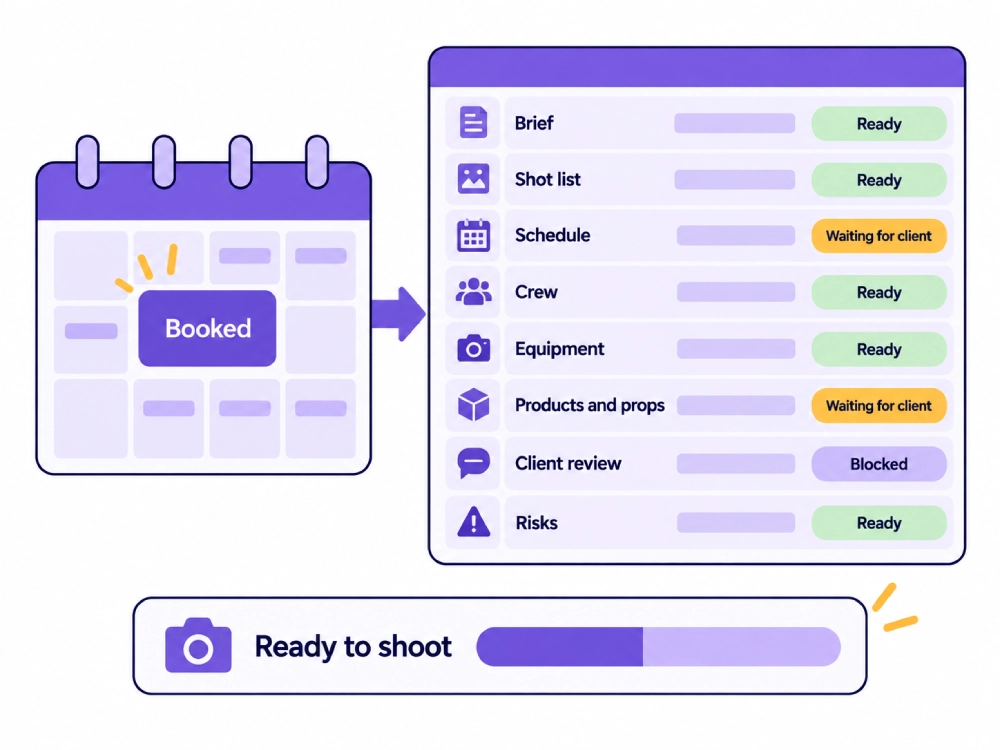
Create One Shoot Plan Record
The shoot plan should connect every part of the production.
It should include or link to:
- Client and project details
- Current creative brief
- Shoot date
- Studio room or location
- Production schedule
- Shot list
- Assigned crew
- Talent and client attendees
- Equipment requirements
- Products, props, wardrobe, and backgrounds
- Client review points
- Open tasks
- Known risks
- Backup options
- Current readiness status
Specialist teams may still use separate documents for styling, equipment, or shot details. The main project record should show where those documents are stored, which version applies, and who owns the next action.
Stage 1: Confirm the Project Purpose
Before discussing cameras, lenses, or lighting, confirm why the client needs the images.
Record:
- Project purpose
- Intended audience
- Planned image use
- Products, people, or services that must appear
- Required visual result
- Brand requirements
- Delivery deadline
- Production restrictions
A brief that says only “product shoot” does not give the team enough information.
Product images for an ecommerce catalog may need consistent angles, backgrounds, dimensions, and product naming. Campaign images may need more setup time, talent, props, and client review.
The intended use affects the shot list, equipment, crew, schedule, and delivery requirements.
Stage 2: Lock the Current Creative Brief
The team needs one approved brief version to plan against.
The creative brief should record:
- Visual direction
- Reference images
- Background treatment
- Framing preferences
- Brand requirements
- Product details
- Talent requirements
- Wardrobe or styling direction
- Required image uses
- Client priorities
- Items still waiting for approval
Locked does not mean the client can never request a change.
It means the team knows which brief version controls the current plan. If the client changes the concept later, the producer must review the effect on the shot list, schedule, equipment, crew, set preparation, and deadline.
A changed brief with an unchanged schedule is not a valid production plan.
Stage 3: Build the Shot List
The shot list turns the brief into production work.
Each shot should record:
- Shot identifier
- Subject or product
- Required setup
- Orientation
- Framing
- Background
- Props
- Talent
- Equipment needs
- Priority
- Estimated production time
- Client review requirement
- Planned deliverable
The purpose is not to decide which image looks best. The purpose is to make sure the studio can plan the people, equipment, time, and space needed to produce each required image.
A useful shot list helps the producer see where setup changes occur and how long the day may take.
Stage 4: Rank the Shots by Priority
Not every shot has equal production value.
Separate the list into:
- Required shots
- Secondary shots
- Optional variations
- Shots that can move to another session
Priority becomes important when the day loses time.
A late product delivery, talent delay, weather change, equipment issue, or long setup can reduce the available shooting window. The team should already know which images to protect first.
The producer and client decision maker should agree on these priorities before the shoot.
Stage 5: Confirm the Studio or Location
For a studio shoot, record:
- Room or stage
- Booking start and end time
- Setup period
- Shooting period
- Teardown period
- Installed equipment
- Prep area
- Makeup or wardrobe space
- Client review area
- Storage space
- Access restrictions
- Other bookings that affect the room
Use studio scheduling software to connect the room booking with the people, equipment, and project using it.
For a location shoot, record:
- Address
- Access contact
- Access time
- Loading process
- Parking
- Available power
- Working space
- Light conditions
- Weather exposure
- Permit or approval status where required
- Noise or public access restrictions
- Backup location
Do not assume that a visually suitable location is ready for production.
Stage 6: Build the Shoot Day Schedule
The production schedule should reflect the actual work.
Include:
- Access time
- Equipment load in
- Setup period
- Crew call times
- Talent arrival
- Client arrival
- Product or wardrobe arrival
- Testing period
- Shooting blocks
- Setup changes
- Client review points
- Breaks where planned
- Pack down
- Expected finish
The shot list and the schedule must agree.
If the team adds another setup, background change, or product group, the producer must review the time required. Adding work without changing the schedule creates a plan that cannot be followed.
Stage 7: Assign the Crew
Confirm the people needed for the work.
This may include:
- Photographer
- Producer
- Photography assistants
- Digital tech
- Stylist
- Hair and makeup artist
- Set or prop support
- Studio coordinator
- Retoucher where planning input is needed
- Client decision maker
For each person, record:
- Role
- Availability
- Call time
- Expected finish
- Assigned tasks
- Preparation work
- Project responsibility
StudioHero’s crew management software helps studios organize crew profiles, availability, rates, project assignments, and responsibilities.
A person appearing on the project does not prove they have confirmed their availability. The producer should verify each assignment.
Stage 8: Confirm Talent and Client Attendees
Record the people attending the shoot and what they need.
For talent, confirm:
- Name
- Role
- Call time
- Wardrobe requirements
- Hair and makeup needs
- Expected finish
- Preparation instructions
- Documents handled under the studio’s process
For client attendees, confirm:
- Names
- Roles
- Arrival times
- Onsite decision maker
- Review responsibilities
- Workspace needs
- Access instructions
- Any remote reviewer
Several client attendees may give feedback. The project should still name the person who can approve a setup, change priorities, or make a final shoot day decision.
Stage 9: Reserve the Required Equipment
Build the equipment requirement from the shot list, location, schedule, and expected output.
The list may include:
- Camera bodies
- Lenses
- Lighting units
- Modifiers
- Grip equipment
- Stands
- Tethering equipment
- Monitors
- Storage media
- Power supplies
- Backup equipment
- Transport cases
The planning record should show whether each item or kit is:
- Available
- Reserved
- Assigned to the project
- Returning from another shoot
- Waiting for maintenance
- Rented
- Supplied by the client
- Still unresolved
Use studio equipment management to connect equipment availability, storage, maintenance, kits, and project use.
The physical inspection, testing, packing, and release process belongs in Photography Gear Checkout Checklist for Studio and Location Shoots.
Stage 10: Confirm Products, Props, Wardrobe, and Backgrounds
Production items need the same level of planning as cameras and lights.
For each item, record:
- Item name
- Owner
- Quantity
- Arrival date
- Arrival time
- Current condition where needed
- Preparation work
- Storage location
- Setup assignment
- Return or collection plan
This may include client products, studio props, wardrobe, background materials, set pieces, packaging, labels, and styling items.
If a product must arrive before set preparation, record that dependency. If a background must be approved before purchase, record the client action and deadline.
Do not leave these items inside a general note.
Stage 11: Check Consumables and Small Supplies
Small missing items can stop a setup even when every major asset is available.
Check:
- Background paper
- Tape
- Cleaning supplies
- Batteries managed as stock
- Labels
- Protective materials
- Styling supplies
- Fasteners
- Packaging
- Other project specific materials
The planning record should show:
- Required quantity
- Available quantity
- Storage location
- Restock requirement
- Person responsible
StudioHero’s inventory management software helps teams track stock quantities, storage locations, reservations, usage, and reorder needs.
Stage 12: Plan the File and Tethering Setup
File handling should be planned before the first capture.
Confirm:
- Capture method
- Tethering requirement
- Laptop or workstation
- Review monitor
- Storage media
- Project folder setup
- File naming reference
- Person responsible for file handling
- Client review setup
- Post shoot handoff
- Output requirement affecting capture
Keep this section focused on readiness.
The full post shoot process belongs in How Photography Studios Organize RAW Files, Selects, and Final Deliverables.
Stage 13: Define Client Review Points
Some decisions need to happen during production.
These may include:
- Lighting direction
- Background choice
- Product position
- Talent styling
- Camera angle
- Crop direction
- First completed setup
- Change to the planned output
Record:
- What the client must review
- When the review happens
- Who can approve it
- What happens if approval is delayed
- Whether remote review is available
An onsite setup approval does not always mean approval of the final retouched image.
The later proof and revision process belongs in Photography Client Approval Workflow: Proofs, Selects, Revisions, and Final Files.
Stage 14: Record Production Dependencies
A dependency is something that must happen before another task can begin.
Examples include:
- Product delivery before styling
- Wardrobe approval before the final fitting
- Location access before equipment load in
- Background approval before purchase
- Equipment return before project reservation
- Talent confirmation before call times are final
- Client shot list approval before the schedule is locked
Each dependency should record:
- Required input
- Task waiting on it
- Owner
- Due date
- Current status
- Effect if delayed
A task should not appear ready while the item it depends on remains unresolved.
Use production management software to connect project tasks, owners, deadlines, dependencies, files, and status updates.
Stage 15: Plan for Known Risks
The producer does not need to predict every possible problem.
The team should identify the risks most likely to affect the project.
These may include:
- Weather
- Delayed products
- Talent cancellation
- Equipment conflict
- Location access failure
- Power limits
- Client approval delay
- Limited setup time
- Fragile products
- Schedule overrun
For each relevant risk, record:
- What may happen
- What part of the shoot it affects
- Backup option
- Decision owner
- Deadline for using the backup plan
The response may include another date, backup room, replacement equipment, alternate shot order, remote reviewer, or reduced priority list.
Stage 16: Hold a Production Planning Review
Before the final confirmation, review the full plan with the responsible studio team.
Check:
- Current brief
- Shot list
- Shot priorities
- Schedule
- Studio room or location
- Crew assignments
- Equipment
- Products and props
- Talent and wardrobe
- Client review points
- Open tasks
- Dependencies
- Risks and backup options
The purpose is to find contradictions.
If one setup requires forty minutes but the schedule allows fifteen, the team must resolve the problem before shoot day.
If the selected room cannot hold the planned set, change the room or the plan.
Stage 17: Complete the Final Readiness Review
Give each planning area a clear status.
Recommended statuses include:
- Ready
- Waiting for studio action
- Waiting for client action
- Blocked
- Approved with condition
- Removed from current shoot
The review should record:
- Planning area
- Current status
- Open item
- Responsible person
- Required action
- Deadline
- Effect if unresolved
- Final decision to proceed
Do not mark the shoot ready while a major issue remains hidden inside a note.
Stage 18: Send the Confirmed Plan to the Team
The final internal plan should include:
- Client and project
- Shoot date
- Location or studio room
- Current schedule
- Crew and call times
- Shot priorities
- Equipment summary
- Product, prop, wardrobe, and talent arrivals
- Client review points
- Open conditions
- Responsible contacts
- Backup plan
The client facing confirmation belongs in Photography Client Communication Checklist: Before, During, and After a Shoot.
The internal version should tell every team member what they need to know and what they own.
Common Photography Shoot Planning Failures
Treating the Booking as the Full Plan
The date is confirmed, but the shot list, crew, and equipment remain incomplete.
Planning From an Old Brief
The client updates the visual direction, but the team prepares the original setup.
Building a Shot List Without Time Estimates
The required images cannot fit inside the available production window.
Reserving the Room but Not the Equipment
The studio space is available, but the required kit is not.
Assigning Crew Without Confirming Availability
Names appear on the project, but the people have not accepted the assignment.
Leaving Out Setup and Teardown Time
The room booking begins when shooting starts and ends before equipment can be packed.
Failing to Rank Priorities
The team does not know which shots to protect when the schedule changes.
Ignoring Client Supplied Items
Products, props, or wardrobe arrive late or in an unusable condition.
Keeping Dependencies in Email
The person responsible for the next task does not know what they are waiting for.
Skipping the Final Readiness Review
The team discovers unresolved access, resource, or approval problems on shoot day.
Photography Shoot Planning Checklist
| Planning Area | What to Confirm | Required Record | Owner | Ready When |
| Project purpose | Intended use, audience, required result | Project brief | Producer | The team understands what must be produced |
| Creative brief | Current visual direction and references | Approved brief version | Producer | One brief version controls the plan |
| Client contact | Working contact and decision maker | Client record | Producer | Roles and authority are clear |
| Shoot date | Confirmed date and booking window | Schedule | Studio coordinator | Time is reserved for setup, shooting, and teardown |
| Studio or location | Space, access, facilities, restrictions | Location record | Studio coordinator | The planned setup can operate there |
| Shot list | Required images and setups | Shot list | Photographer or producer | Every required shot is documented |
| Shot priority | Required, secondary, and optional work | Priority list | Producer and client | The team knows what to protect first |
| Schedule | Call times, setups, reviews, finish | Production schedule | Producer | Available time matches planned work |
| Photographer | Availability and assignment | Crew record | Producer | Photographer has confirmed |
| Crew | Roles, call times, and tasks | Crew assignments | Producer | Every required role is covered |
| Talent | Names, arrival, preparation | Talent record | Producer | Talent needs and timing are confirmed |
| Client attendees | Names, roles, and review authority | Client contact record | Producer | Onsite decision maker is known |
| Equipment | Assets and kits required | Equipment reservation | Equipment manager | Required items are available and assigned |
| Backup equipment | Replacement items for key risks | Backup list | Equipment manager | Critical needs have a fallback |
| Products | Quantity, arrival, storage, setup | Product record | Producer | Products are available and prepared |
| Props | Owner, arrival, setup, return | Prop record | Stylist or producer | Props are ready for use |
| Wardrobe | Items, fitting, arrival, storage | Wardrobe record | Stylist | Required wardrobe is confirmed |
| Backgrounds | Type, size, approval, availability | Background record | Producer | Materials are ready |
| Consumables | Required and available quantities | Inventory record | Equipment or studio manager | Missing stock has been replaced |
| File setup | Tethering, storage, naming, handoff | File plan | Digital tech | Capture and review systems are ready |
| Client review points | Decision, timing, approver | Review plan | Producer | Every onsite decision has an owner |
| Access | Entry, loading, parking, contacts | Access record | Studio coordinator | Team and equipment can enter on time |
| Contingency | Known risk and backup option | Risk record | Producer | Relevant fallback plans are usable |
| Dependencies | Inputs, owners, and deadlines | Task record | Producer | No major required input remains unresolved |
| Final readiness | Status of all planning areas | Readiness review | Producer | The shoot has approval to proceed |
Shoot Readiness Status
| Readiness Status | Meaning | Required Action |
| Ready | The planning area is complete | No further action before production |
| Waiting for studio action | The studio must complete a task | Assign an owner and deadline |
| Waiting for client action | The client must provide information or approval | Send a clear request and deadline |
| Blocked | The shoot cannot proceed as planned | Resolve the issue or change the plan |
| Approved with condition | Production can proceed only if a named condition is met | Track the condition through completion |
| Removed from current shoot | The item will not be completed in this session | Update the shot list, schedule, and client record |
Photography Shot List Planning Template
| Shot Field | What to Record |
| Shot identifier | A clear reference used across the project |
| Subject or product | Person, product, or scene being photographed |
| Setup | Required set, room, surface, or position |
| Orientation | Portrait, landscape, square, or another agreed format |
| Background | Color, material, location, or set requirement |
| Props | Items required inside the image |
| Talent | Person or model required |
| Equipment requirement | Camera, lens, lighting, grip, or tethering needs |
| Priority | Required, secondary, optional, or moveable |
| Estimated time | Setup and shooting time |
| Client review point | Decision required during production |
| Planned deliverable | Final use, crop, format, or image group |
How StudioHero Supports Photography Shoot Planning
StudioHero connects the records that studio teams need before production starts.
Your team can manage:
- Client and project records
- Client booking requests
- Studio room schedules
- Photographer and crew availability
- Crew assignments
- Project tasks and deadlines
- Resource reservations
- Equipment availability
- Equipment kits
- Inventory quantities
- Supporting project files
- Production status
StudioHero does not choose the visual concept, create artistic shot lists, or decide camera settings. It gives the studio team a connected operating record for the client, schedule, people, space, equipment, stock, and tasks needed to complete the project.
The Shoot Is Ready When Every Dependency Has an Owner
A useful photography shoot plan does not describe only what the team hopes to create.
It confirms that the required room, people, equipment, products, schedule, approvals, and backup options are ready.
Every unresolved item should have an owner and deadline. Every change should update the schedule, shot list, resources, or tasks it affects.
StudioHero connects the brief, booking, schedule, crew, equipment, inventory, tasks, client details, and readiness status so the team can identify problems before the production day begins.
Book a StudioHero demo to see how your studio can plan photography shoots, assign resources, track dependencies, and confirm production readiness in one system.