Photography studios manage multiple shoots in one day by building one daily operations schedule across every room, crew member, equipment package, client arrival, setup period, shooting block, review point, and teardown window. Each shoot should keep its own project record, while shared resources and transition times remain visible across the full day. The studio should also assign a daily operations lead, protect buffer time, track live status, and record delays before they affect the next client.
A studio can avoid a direct double booking and still create an unworkable day.
Two shoots may use different rooms but require the same lighting kit. One photographer may finish before another begins, but the shared digital tech may still be transferring files. The first client may leave on time while equipment, products, and furniture remain inside the room needed for the next setup.
Each booking can look valid on its own. The conflict appears only when the studio views the whole day.
StudioHero connects rooms, photography projects, clients, crew, equipment, tasks, and media across one operating schedule. Our photography studio management software helps studio managers see how several shoots use the same facility without losing the separate plan for each project.
A busy photography day needs to answer:
- Which shoot is using each room now?
- Which crew members are moving between projects?
- When will shared equipment become available?
- How much time is reserved for setup and teardown?
- Which client or talent group arrives next?
- What happens if one shoot runs late?
- When is a room truly ready for the next project?
- Which tasks remain open after camera work ends?
One Busy Day Can Fail Without a Double Booking
A double booking is a direct scheduling conflict.
A same day operating problem can happen even when the calendar shows no overlap.
Examples include:
- Room A and Room B need the same lighting package.
- One digital tech has overlapping setup responsibilities.
- The first shoot ends when the second setup should begin.
- Products from another client block the shared preparation area.
- Two clients arrive at the same loading entrance.
- The only review monitor is still being used by the morning project.
- The equipment team has no time to inspect a kit before its next assignment.
- The first crew leaves files on the shared workstation without a project handoff.
The studio needs more than separate calendar entries.
Every shoot requires its own plan, but the studio also needs one daily operations view that shows how all confirmed work fits together.
The difference is important.
How to Prevent Double Bookings in a Busy Photography Studio should control conflicts before a booking is confirmed. This article begins after several valid shoots already exist on the same day.
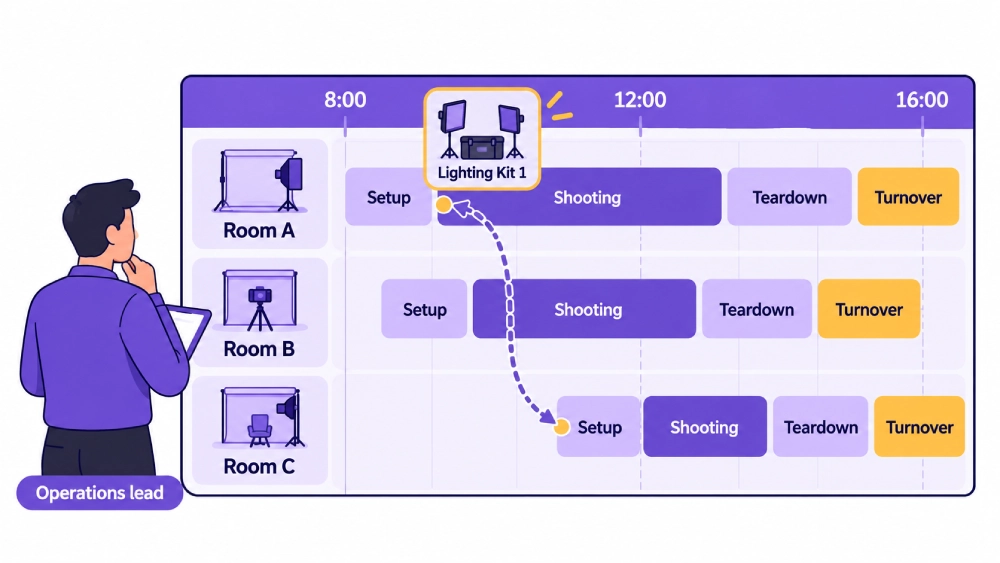
Build One Daily Operations Board
The studio manager should not need to open several projects to understand what is happening across the facility.
Create one daily operations board showing:
- Project and client
- Assigned room
- Setup start
- Crew call times
- Client arrival
- Talent arrival
- Shooting period
- Client review point
- Teardown window
- Shared equipment
- Current status
- Open issue
- Person responsible
Use the day view for live studio control. Keep each shoot’s creative brief, shot list, tasks, files, and deliverables inside its own project record.
StudioHero’s studio scheduling software connects room availability, bookings, people, and resources across day, week, and month calendar views.
Separate Fixed Commitments From Flexible Work
Some parts of the day cannot move easily.
Fixed commitments may include:
- Client arrival
- Talent booking
- Location access
- Room reservation
- Live review meeting
- Product delivery
- Equipment collection
- External vendor time
Other tasks may have more flexibility.
These can include:
- Equipment preparation
- Background setup
- File transfer
- Room cleaning
- Internal image review
- Product movement
- Some crew preparation tasks
The daily operations lead should know which tasks can move when a delay occurs.
A five minute delay in an internal equipment check may be manageable. A five minute delay at a shared loading entrance may affect several clients and product deliveries.
Stagger Setup, Client Arrival, and Shooting Times
Do not give every shoot the same start time.
A shoot scheduled to begin at 10:00 may require:
- Equipment preparation at 8:30
- Crew call at 9:00
- Lighting setup at 9:10
- Client arrival at 9:45
- Camera start at 10:00
Another shoot may use the room from 10:30 but need makeup, styling, or product preparation much earlier.
Stagger:
- Equipment team arrival
- Photographer call times
- Assistant call times
- Talent arrival
- Client arrival
- Makeup and styling
- Product loading
- Camera start
This reduces pressure on reception, loading areas, prep rooms, makeup stations, and shared crew.
Protect Setup, Teardown, and Buffer Time
The visible shooting period is only one part of the booking.
Reserve time for:
- Equipment movement
- Lighting setup
- Background installation
- Set preparation
- Client and talent entry
- File setup
- Room cleaning
- Equipment count
- Product removal
- Unexpected delays
A shoot ending at 1:00 does not mean the room is ready for another client at 1:00.
The studio may need thirty minutes to remove equipment, reset furniture, replace a background, clean the room, and confirm readiness.
Follow the buffer rules described in studio scheduling best practices rather than placing shoots directly against each other without a transition plan.
Assign a Daily Operations Lead
One person should control the shared studio day.
This may be:
- Studio manager
- Operations coordinator
- Senior producer
- Assigned project coordinator
The daily operations lead should:
- Watch the live schedule
- Confirm room readiness
- Check crew arrivals
- Check client and talent arrivals
- Resolve shared resource conflicts
- Record delays
- Update affected teams
- Approve room release
- Track equipment movement
- Review end of day issues
This person does not replace each project producer.
The project producer controls the individual shoot. The operations lead controls the relationships between all active shoots.
Give Every Shoot a Named Owner
Each shoot still needs one person responsible for the project.
The project owner should control:
- Client communication
- Shot priorities
- Crew direction
- Client decisions
- Delay reporting
- Open project tasks
- Shoot wrap
- Post shoot handoff
Without a named owner, the operations lead may receive conflicting updates from several photographers, assistants, and client contacts.
StudioHero’s production management software connects projects with assigned people, tasks, timelines, files, and status changes.
Confirm Room Readiness Before Client Arrival
A scheduled room is not always a ready room.
Before the client enters, confirm:
- The previous shoot has cleared the space.
- The room has been cleaned.
- The required background or set is ready.
- Reserved equipment has arrived.
- Installed equipment is available.
- Cables and access routes are clear.
- Client seating or review space is prepared.
- Product and wardrobe areas are ready.
- The room status has changed to ready.
- The assigned producer has accepted the room.
Do not use the scheduled start time as proof of readiness.
A clear room status gives reception, production, and crew the same information.
Control Shared Equipment Movement
Major equipment needs its own same day movement plan.
This may include:
- Camera packages
- Lighting kits
- Large modifiers
- Grip equipment
- Tethering workstations
- Client monitors
- Portable power
- Background systems
Record:
- Current project
- Expected release time
- Next project
- Inspection or reset requirement
- Person moving the equipment
- Setup time at the next room
- Backup option
A lighting kit cannot leave Room A at the exact time Room B expects to begin shooting with it.
The schedule must include release, inspection, movement, and setup time.
Use equipment tracking software to connect assets and kits with projects, locations, assignments, and movement records.
The complete custody process belongs in Photography Equipment Checkout and Return: A Complete Tracking Workflow.
Prevent Hidden Crew Overlap
Crew conflicts often hide outside the camera schedule.
A digital tech may finish shooting at 12:00 but still need to:
- Verify the capture
- Transfer files
- Complete the media handoff
- Clear the workstation
- Prepare for the next project
An assistant may need to break down lights before moving to another room. A producer may need to complete a client wrap before checking in the next client.
Schedule the full working period, including:
- Setup
- Client check in
- Camera work
- Review
- File transfer
- Teardown
- Equipment movement
- Breaks
- Project handoff
StudioHero’s crew management software helps studios track availability, assignments, roles, rates, and working time across projects.
Plan Shared Studio Areas
A multi room studio shares more than shooting stages.
Track:
- Reception
- Loading entrance
- Parking
- Makeup stations
- Wardrobe area
- Product holding area
- Client lounge
- Review monitors
- Equipment preparation zone
- Kitchen or break area
A shoot may have a free room but still start late because its products cannot enter the loading area or its talent cannot access makeup.
Add shared spaces to the daily plan when they can limit capacity.
Separate Client Arrival Windows
Give each client a clear arrival time and destination.
Record:
- Arrival time
- Entry point
- Studio contact
- Assigned waiting area
- Assigned room
- Review location
- Expected finish
- Loading or parking instructions
Avoid bringing several client groups into reception at the same time without a plan.
Use the communication process from Photography Client Communication Checklist: Before, During, and After a Shoot to confirm arrivals and report any changes.
Keep Shot Priorities Visible
Each project should enter the day with an agreed priority order.
The project owner should know:
- Which shots must be completed
- Which shots are secondary
- Which variations are optional
- Which setup can move to another session
- Which change requires client approval
When a shoot loses time, the producer should not spend the remaining window on low priority variations while the next booking waits.
The full planning process belongs in Photography Shoot Planning Checklist for Studio Teams.
Use Live Shoot Statuses
A live status should show what is happening now.
Useful statuses include:
- Setup in progress
- Ready for client
- Waiting for client
- Shooting
- Client review
- Delayed
- Teardown
- Turnover
- Complete
- Blocked
The original schedule may say shooting, but the actual room may still be waiting for products.
Live statuses help the operations lead identify problems before they spread.
Control Delays Before They Affect the Next Shoot
When a project runs late, record:
- Cause
- Expected time loss
- Room affected
- Shared crew affected
- Shared equipment affected
- Client affected
- Next shoot affected
- Response owner
- Revised plan
- Updated finish time
Possible responses include:
- Removing optional shots
- Changing the shot order
- Moving an internal task
- Assigning another crew member
- Using backup equipment
- Moving a setup to another room
- Asking the client to choose between priorities
- Adjusting the next setup window
Do not let a delay continue without checking the effect on the rest of the day.
Create a Delay Escalation Point
Each project owner should know when to alert the daily operations lead.
Escalation may be required when:
- Setup exceeds the allowed time.
- Client or talent arrival changes the camera start.
- Shared equipment will miss its next assignment.
- The expected finish enters the next booking.
- A required shot cannot be completed.
- The room turnover window will be reduced.
- Another crew member is needed.
This prevents a producer from waiting until the next client has already arrived.
Handle Early Finishes and Cancellations
An early finish or same day cancellation changes studio capacity.
Update:
- Room availability
- Crew assignments
- Equipment availability
- Client spaces
- Prep areas
- Turnover tasks
- Current daily schedule
Released capacity may help another shoot.
A delayed project may gain more setup time. Another crew may use the room for an additional setup. Equipment may become available earlier.
The operations lead should decide how the released capacity is used.
Keep Project Files Separate
Several shoots may use the same workstation, server location, or digital tech.
Each shoot needs its own:
- Project identifier
- Capture location
- File naming reference
- Storage destination
- Media handoff
- Responsible person
- Post shoot task
Do not place files from several clients into one unlabelled transfer folder.
StudioHero’s media asset management software connects media records with clients, projects, metadata, QC notes, movement, and delivery activity.
The full file process belongs in How Photography Studios Organize RAW Files, Selects, and Final Deliverables.
Manage Room Turnover as a Task
Room turnover begins when one project stops using the space. It ends when the next project can enter.
Turnover may include:
- Equipment removal
- Equipment count
- Background replacement
- Cleaning
- Furniture reset
- Product removal
- Consumable replacement
- New equipment setup
- Cable and safety check
- Room readiness confirmation
Assign:
- Turnover owner
- Start time
- Deadline
- Required equipment
- Required supplies
- Completion status
Use inventory management software when turnover requires replacement background paper, tape, cleaning supplies, batteries, labels, or other stock.
Close Each Shoot Before Removing It From the Board
A shoot is not complete because camera work ended.
Confirm:
- Client received the next step.
- Actual finish time was recorded.
- Equipment moved to the correct status.
- Room was released.
- Files reached the assigned location.
- Open tasks have owners.
- Product or wardrobe collection is clear.
- Client issues are visible.
- The turnover team has accepted the space.
The project may continue into culling, editing, approval, and delivery. Its physical production work should still close correctly.
Complete an End of Day Reconciliation
At the end of the day, review:
- Planned and actual shoot times
- Delays and causes
- Room turnover performance
- Crew overtime
- Missed breaks
- Equipment not returned
- Missing or damaged items
- Media handoffs
- Client updates still required
- Tasks moving to the next day
- Open product or prop collections
- Unresolved room issues
This does not need to become a long report.
The goal is to prevent today’s unfinished work from becoming tomorrow’s first problem.
Review Daily Capacity Patterns
After several busy days, compare:
- Which rooms experience the most delays
- Which turnovers need more time
- Which equipment creates repeated conflicts
- Which crew roles become overloaded
- Which client arrival windows create congestion
- How often shoots finish within the planned time
- Which shared spaces limit capacity
A full calendar does not always mean productive capacity.
Use the studio utilization calculator to compare available room time with actual booked or used time.
Common Multiple Shoot Management Failures
Viewing Every Project Separately
Each shoot appears organized, but nobody controls shared rooms, crew, equipment, or client spaces.
Scheduling Only Camera Time
Setup, teardown, file transfer, and room turnover have no reserved time.
Giving Several Clients the Same Arrival Time
Reception, parking, loading, and client areas become congested.
Sharing Equipment Without Movement Time
One project releases a kit when another project already expects to use it.
Scheduling Crew Only During Shooting
Assistants and digital techs have overlapping preparation or handoff work.
Leaving Turnover Unassigned
The first shoot leaves, but nobody prepares the room for the next client.
Ignoring Live Delays
The calendar keeps the original times even when the day has changed.
Mixing Project Files
Images from several clients enter the same folder or workstation handoff.
Closing a Shoot Too Early
The camera stops, but equipment, files, products, and client tasks remain open.
Ending the Day Without Reconciliation
Missing equipment, client updates, and unfinished tasks carry into the next day without owners.
Daily Photography Studio Operations Board
| Time Block | Shoot or Project | Room | Current Activity | Crew | Shared Equipment | Client Status | Next Handoff | Live Status |
| 8:00 to 9:00 | Product Campaign A | Room A | Lighting and set preparation | Producer, photographer, assistants | Lighting Kit 1 | Client arriving at 9:15 | Room ready check | Setup in progress |
| 8:30 to 9:30 | Corporate Portrait B | Room B | Background and tethering setup | Photographer, assistant, digital tech | Review Monitor 1 | Client arriving at 9:45 | Client check in | Setup in progress |
| 9:30 to 12:00 | Product Campaign A | Room A | Main shooting block | Full project crew | Lighting Kit 1 | Client onsite | Equipment release at 12:20 | Shooting |
| 10:00 to 12:00 | Corporate Portrait B | Room B | Portrait sessions | Photographer and assistant | Review Monitor 1 | Client onsite | File handoff at 12:15 | Shooting |
| 12:00 to 12:45 | Corporate Portrait B | Room B | File handoff and room turnover | Digital tech and studio assistant | Review Monitor 1 | Client departed | Room ready for Project C | Turnover |
| 12:20 to 1:00 | Product Campaign A | Room A | Equipment count and teardown | Assistants and equipment lead | Lighting Kit 1 | Client wrap in progress | Lighting kit to Room C | Teardown |
| 1:00 to 4:00 | Fashion Editorial C | Room C | Main shooting block | Photographer, stylist, assistants | Lighting Kit 1, Review Monitor 1 | Client and talent onsite | Final client review | Shooting |
The daily board gives the studio one operating view without merging the individual project records.
Same Day Resource Conflict Check
| Shared Resource | Current Assignment | Release Time | Next Assignment | Preparation Needed | Movement Owner | Backup Option |
| Lighting Kit 1 | Product Campaign A | 12:20 | Fashion Editorial C | Count, inspect, move, reset | Equipment assistant | Lighting Kit 2 |
| Camera Package 2 | Corporate Portrait B | 12:15 | Internal Product Test | Battery and media check | Digital tech | Camera Package 3 |
| Digital Tech | Corporate Portrait B | 12:30 | Fashion Editorial C | File handoff and workstation reset | Operations lead | Second digital tech |
| Makeup Station | Corporate Portrait B | 11:30 | Fashion Editorial C | Clean and restock | Studio assistant | Secondary prep room |
| Review Monitor 1 | Corporate Portrait B | 12:15 | Fashion Editorial C | Disconnect, move, test | Digital tech | Room C wall display |
| Loading Area | Product Campaign A collection | 12:45 | Fashion Editorial wardrobe | Clear products and cases | Studio coordinator | Side entrance |
| Prep Room | Product Campaign A | 12:30 | Fashion Editorial C | Remove products and reset tables | Production assistant | Room C holding area |
Live Delay Response Record
| Delay Field | What to Record |
| Affected shoot | Project and room experiencing the delay |
| Time reported | When the issue became known |
| Cause | Client, talent, equipment, setup, access, or another issue |
| Expected delay | Estimated time loss |
| Room impact | Effect on shooting and turnover |
| Crew impact | People whose assignments may change |
| Equipment impact | Shared assets that may miss another assignment |
| Next booking impact | Project or client that may be affected |
| Client decision required | Priority, scope, timing, or another decision |
| Agreed response | Change approved by the project and operations leads |
| Updated finish time | Current expected end |
| Responsible person | Person managing the response |
How StudioHero Supports Multiple Photography Shoots
StudioHero gives studio teams a connected view of the bookings and resources moving through one day.
Your team can manage:
- Day, week, and month calendar views
- Photography rooms and cycloramas
- Real time room availability
- Resource conflict checks
- Project linked bookings
- Photographer and crew assignments
- Crew availability and working time
- Equipment and kit availability
- Equipment check in and check out records
- Project tasks and timelines
- Client booking requests
- Room profiles
- Inventory quantities
- Media connected to projects
- Status and reporting across active work
StudioHero does not replace the studio manager. It gives that person the booking, room, crew, equipment, task, client, and project information needed to manage the day.
One Daily Schedule Must Control the Shared Studio
Every photography shoot needs its own brief, plan, client contact, crew, equipment, and project tasks.
The studio also needs one daily view controlling every shared room, person, asset, preparation area, transition, and delay.
A busy day works when setup times are visible, client arrivals are staggered, shared resources have movement windows, room turnovers have owners, and delays update the rest of the schedule before they spread.
StudioHero connects all active photography shoots with rooms, crew, equipment, tasks, clients, inventory, and media so your studio can manage the full day without losing control of each project.
Book a StudioHero demo to see how your team can manage several photography shoots, shared resources, room schedules, crew assignments, and live production status in one system.