Photography shoot cost tracking should include every direct and assigned cost connected to the project. Track planning time, crew labor, overtime, studio space, owned equipment use, rentals, talent, styling, props, wardrobe, travel, transport, consumables, vendors, retouching, revisions, delivery, and client changes. Each entry should show the planned amount, committed amount, actual cost, billable amount, owner, supporting document, and payment status.
A fully booked photography studio can still lose money.
The client may pay the agreed fee while the project uses more crew time, equipment, retouching, travel, and vendor support than expected. Small purchases may sit across company cards, petty cash, and employee receipts. Extra client requests may enter production without reaching the budget or final invoice.
The studio sees the revenue. It does not see the full cost.
StudioHero connects photography projects with budgets, expenses, crew, equipment, purchase orders, client billing, and project profitability. Our photography studio management software helps your team see what each shoot costs before the project is financially closed.
A complete shoot cost record should answer:
- What did the studio plan to spend?
- What has already been approved or committed?
- What did the project actually cost?
- What work or expense remains?
- Which costs can be billed to the client?
- Which costs must the studio absorb?
- What revenue belongs to the project?
- Did the shoot make a profit?
Revenue Does Not Show the Full Cost of a Shoot
A client invoice shows what the studio charged.
It does not show what the studio spent to complete the work.
A project may appear profitable while important costs remain outside the project record.
Examples include:
- Producer time used before the shoot
- Assistant setup and pack down hours
- Studio room time
- Owned camera and lighting use
- Equipment maintenance caused by project use
- Small purchases made during production
- Additional client revisions
- File handling and final delivery work
- Vendor invoices that have not arrived
- Unrecorded overtime
The studio already owning a room, camera, computer, or lighting kit does not make its use free.
The same applies to permanent employees. Their time still has a cost, even when no separate freelancer invoice arrives.
Your studio can choose its own internal costing method. The method should remain consistent across similar projects.
Start the Cost Record During Planning
Do not wait until the shoot ends.
Create the financial record when the project enters planning.
Record:
- Client
- Project name
- Project code
- Shoot date
- Producer
- Quoted amount
- Approved internal budget
- Cost categories
- Budget owner
- Client billing rules
- Reimbursable expense rules
- Current financial status
The original budget gives your team a baseline.
When a client adds products, extends the shoot, requests more final images, or changes the location, the producer can compare the new cost with the approved plan.
StudioHero’s studio budgeting software connects project budgets with expenses, petty cash, purchase orders, vendors, receipts, and budget comparisons.
Track Four Cost Stages
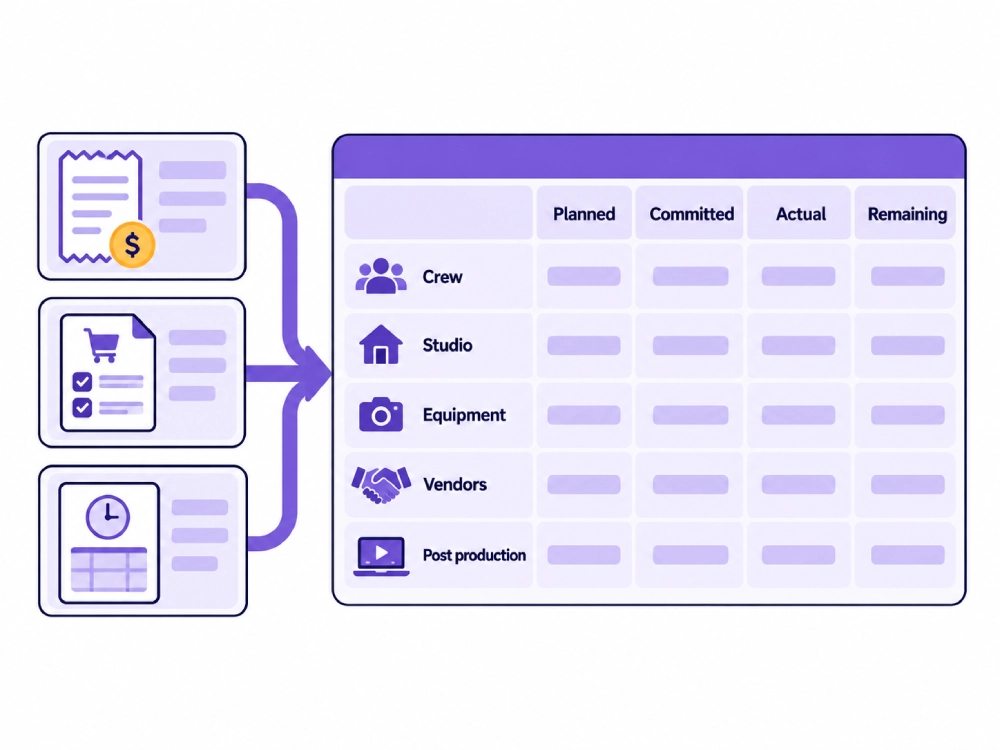
Every project cost should have a clear financial status.
Planned Cost
The amount expected when the budget was created.
For example, the studio may plan for one photographer, two assistants, a lighting rental, and a fixed number of retouching hours.
Committed Cost
An amount the studio has approved or agreed to pay.
The final invoice may not have arrived yet, but the cost already belongs to the project.
Examples include:
- A booked freelancer
- An approved equipment rental
- A signed location agreement
- An issued purchase order
- A confirmed prop order
Actual Cost
The final amount charged or assigned to the project.
This may differ from the planned and committed amount because the quantity, hours, rental period, or scope changed.
Remaining Cost
Work or expenses still expected before financial closeout.
A project may have completed the shoot while retouching, revisions, delivery, vendor billing, and equipment returns remain open.
Tracking only paid costs gives the studio an incomplete view. Planned, committed, actual, and remaining amounts show where the project is heading.
Track Pre Production Labor
Photography projects create costs before the production day.
Track time spent on:
- Client calls
- Brief review
- Reference image review
- Shot list preparation
- Schedule planning
- Crew booking
- Equipment planning
- Vendor sourcing
- Location coordination
- Product receiving
- Prop sourcing
- Production meetings
- Client follow up
- Approval tracking
For each entry, record:
- Person
- Role
- Task
- Planned time
- Actual time
- Internal rate
- Actual cost
- Client billable status
Producer and coordinator time should not disappear because it happens before the photographer arrives.
The [Photography Shoot Planning Checklist for Studio Teams] should define the resources and work needed. The cost record should show the financial effect of those plans.
Track the Full Shoot Day Labor
Record the complete working period for everyone assigned to the project.
This may include:
- Photographer
- Producer
- Photography assistants
- Digital tech
- Stylist
- Hair and makeup artist
- Set assistant
- Studio assistant
- Talent coordinator
- Other project crew
Do not track only camera time.
Include:
- Preparation
- Setup
- Waiting time
- Client check in
- Shooting
- Client review
- Pack down
- Equipment return
- File handoff
- Wrap tasks
StudioHero’s crew management software helps connect people, roles, availability, rates, working time, and project assignments.
Record Overtime and Extended Sessions
A project can exceed its labor budget even when the client booking appears close to schedule.
Track:
- Planned hours
- Actual hours
- Overtime start
- Extended session time
- Person approving the extension
- Reason for the overrun
- Added cost
- Billable status
- Client approval where required
The reason matters.
A project may run late because the client arrived late, the shot list changed, equipment failed, or the original schedule was too short.
The studio should use the rates and working time rules approved for its employees and freelancers.
Track Studio Room and Facility Use
A studio owned room still has a project cost.
Your internal method may account for:
- Room time
- Setup time
- Teardown time
- Cleaning
- Utilities
- Installed equipment
- Client areas
- Reception support
- Storage
- Additional room hours
If the room comes from an outside facility, record:
- Rental fee
- Deposit
- Setup access
- Overtime
- Cleaning charge
- Equipment included
- Damage charge
- Refund
Do not count deposits and final charges twice.
The studio does not need one universal room costing formula. It needs one documented method used across comparable projects.
Track Owned Equipment Use
Owned equipment should not become financially invisible.
The project may use:
- Camera bodies
- Lenses
- Lighting
- Modifiers
- Grip equipment
- Stands
- Monitors
- Tethering systems
- Computers
- Storage media
- Transport cases
- Power equipment
Depending on your costing method, the assigned project cost may account for:
- Use
- Wear
- Maintenance
- Calibration
- Repair exposure
- Insurance
- Replacement planning
Record the asset or kit, project, use period, internal cost, and client charge.
Use studio equipment management and equipment tracking software to keep equipment use connected to project assignments and movement.
Tax treatment and depreciation should be handled with your accountant.
Track External Equipment Rentals
For rented equipment, record:
- Supplier
- Item or package
- Rental period
- Base cost
- Insurance or waiver
- Delivery or pickup cost
- Extension fee
- Damage fee
- Missing item charge
- Purchase order
- Final invoice
- Client billing status
The committed rental cost should enter the project before payment.
When a schedule change extends the rental period, update the budget as soon as the change is known.
Track Talent, Styling, and Makeup Costs
Record costs for:
- Models or talent
- Agency fees
- Casting support
- Stylist
- Hair and makeup
- Wardrobe sourcing
- Fittings
- Talent travel
- Holding time
- Cancellation or extension fees
Keep the approved amount, committed amount, final invoice, and payment status attached to the project.
The cost record should also show whether the client will be charged separately or whether the amount is included in the project fee.
Track Props, Sets, Wardrobe, and Backgrounds
These costs often appear across several small transactions.
Track:
- Props
- Set materials
- Furniture rental
- Background paper
- Custom surfaces
- Wardrobe purchases
- Wardrobe rentals
- Styling supplies
- Fabrication labor
- Return shipping
- Restocking fees
- Damage fees
- Items retained by the studio
If a purchased item becomes studio inventory after the shoot, record the original project purchase and update the inventory management software record.
Do not remove the expense from the project simply because the item may be reused later.
Track Locations, Access, and Permits
Location shoots may create costs for:
- Location rental
- Permit
- Access charge
- Security
- Parking
- Power
- Cleaning
- Overtime
- Holding space
- Site representative
- Weather backup
- Damage deposit
Record deposits, final charges, and refunds separately.
A deposit may affect cash flow without becoming the final project cost. A retained damage charge does become a project cost.
Track Travel, Transport, and Shipping
Record:
- Crew travel
- Mileage under company policy
- Vehicle rental
- Taxi
- Equipment transport
- Parking
- Tolls
- Accommodation
- Product shipping
- Prop collection
- Courier fees
- Freight
- Return shipping
Every receipt should carry a project reference.
A general travel cost that cannot be assigned to a shoot will not help your team measure project profit.
Track Consumables and Petty Cash
Small purchases can become a large hidden cost when they repeat across several shoots.
Track:
- Tape
- Cleaning supplies
- Batteries treated as stock
- Background materials
- Labels
- Protective packaging
- Craft supplies
- Crew meals
- Local transport
- Emergency purchases
- Printing
- Other shoot supplies
Each entry should include:
- Project
- Category
- Amount
- Purchaser
- Date
- Receipt
- Payment method
- Billable status
Do not leave petty cash outside the project simply because the individual amount is small.
Use Purchase Orders for External Commitments
A purchase order or another approval record should show what the studio has agreed to buy.
Record:
- Vendor
- Item or service
- Quote
- Approved amount
- Project
- Cost category
- Requesting person
- Approval date
- Expected delivery
- Received status
- Final invoice
- Payment status
- Billable amount
- Difference from the quote
Committed vendor costs should appear in the project budget before the invoice arrives.
This helps the producer see expected spending rather than only amounts already paid.
Track Post Production Costs
Photography cost tracking continues after the production day.
Track:
- File ingest
- Media handling
- Culling
- Proof preparation
- Color correction
- Retouching
- Client revisions
- Quality review
- Export creation
- Delivery preparation
- Archive work
- Corrected deliveries
For each task, record:
- Person or vendor
- Planned hours
- Actual hours
- Rate
- Image count where useful
- Revision round
- Rush requirement
- Actual cost
- Client charge
Post production often creates the largest difference between the original plan and the final cost.
A project that includes ten retouched images may become more expensive when the client submits twenty selects or requests several additional revisions.
Give Client Changes Their Own Cost Record
Client changes should not disappear inside the original budget.
Examples include:
- Additional products
- Added shots
- New setups
- Extended studio time
- Extra crew
- Rush retouching
- More final images
- Additional revision rounds
- New export sizes
- Reshoot requests
Record:
- Request
- Requesting person
- Date
- Approved change
- Added time
- Added crew
- Added equipment or vendor needs
- Estimated added cost
- Actual added cost
- Billable status
- Client billing reference
The production change should remain connected to production management software, while the financial record shows what the decision costs.
Do not start added work without understanding whether the studio or client will carry the cost.
Separate Studio Cost From Client Charge
A project cost and a client charge are not always the same.
For every item, distinguish:
- Studio cost
- Client billable amount
- Reimbursable amount
- Markup where used
- Non billable amount
- Invoiced amount
- Payment status
A vendor may charge the studio one amount while the client receives a different production charge under the project agreement.
A crew member may have an internal cost rate and a separate client rate.
A room may carry an internal assigned cost even when it is included inside a package price.
Use studio invoicing software to connect project charges, rate cards, invoices, payment tracking, and client billing.
Assign Overhead With One Consistent Method
Direct costs connect clearly to the project.
Overhead may include:
- Rent
- Utilities
- Software
- Insurance
- Administration
- Permanent staff support
- General maintenance
- Shared equipment costs
- Other business expenses
A studio may assign part of these costs to projects when measuring profit.
There is no single method that suits every business.
Choose one documented approach for comparable projects and review it with your accountant. Changing the method between shoots will make project comparisons unreliable.
Review Costs During the Project
Do not wait for the final invoice.
Review the cost record:
- After the original budget is approved
- After crew and vendors are booked
- Before the shoot
- After the production day
- After client selects arrive
- After revisions
- Before client invoicing
- During financial closeout
Compare:
- Planned cost
- Committed cost
- Actual cost
- Remaining cost
- Expected final cost
- Budget difference
- Reason for the difference
- Billable change
The producer should know that a project is moving over budget while there is still time to respond.
The budget tracking glossary explains how budget records compare planned spending with actual results.
Complete the Financial Closeout
Before marking the shoot financially complete, confirm:
- Crew time is final
- Overtime is recorded
- Room use is recorded
- Equipment use is recorded
- Rentals have been returned
- Vendor invoices have arrived or remain listed as commitments
- Petty cash and receipts are assigned
- Post production work is complete
- Client changes are recorded
- Billable costs reached the invoice
- Remaining cost is zero or explained
- Project revenue is final
- Outstanding client payments are visible
- Outstanding vendor payments are visible
- Profit and margin have been calculated
A project should not show final profit while vendor invoices or post production costs remain outside the record.
Use Previous Shoots to Improve Future Budgets
After several projects, compare actual costs by:
- Client
- Shoot type
- Studio room
- Photographer
- Crew structure
- Equipment package
- Product volume
- Retouching level
- Revision count
- Location type
- Delivery type
This shows which projects regularly exceed plan.
Your studio may discover that product intake takes longer than expected, a specific client requires more revisions, or one location type creates repeated transport costs.
Use the production budget calculator during early planning and the studio profitability calculator when comparing final revenue and cost.
Photography Shoot Cost Tracking Table
| Cost Category | What to Track | Planned Cost | Committed Cost | Actual Cost | Billable Amount | Supporting Record | Owner |
| Pre production labor | Planning, calls, shot lists, schedules | Enter budget | Enter approved work | Enter final time cost | Enter client charge | Time record | Producer |
| Photographer labor | Preparation, shoot, review, wrap | Enter budget | Enter booking amount | Enter final time cost | Enter client charge | Crew record | Producer |
| Producer labor | Planning, shoot control, closeout | Enter budget | Enter assigned cost | Enter final time cost | Enter client charge | Time record | Studio manager |
| Assistants and digital tech | Setup, shooting, files, teardown | Enter budget | Enter booking amount | Enter final time cost | Enter client charge | Crew record | Producer |
| Styling and makeup | Service, preparation, overtime | Enter budget | Enter vendor commitment | Enter final invoice | Enter client charge | Vendor invoice | Producer |
| Talent and agency | Talent, agency, travel, extension | Enter budget | Enter approved booking | Enter final invoice | Enter client charge | Agreement and invoice | Producer |
| Studio room | Setup, shoot, teardown, overtime | Enter budget | Enter reservation | Enter assigned cost | Enter client charge | Room record | Studio manager |
| Owned equipment | Asset or kit use | Enter internal estimate | Enter project assignment | Enter assigned cost | Enter client charge | Equipment record | Equipment manager |
| Equipment rentals | Rental, delivery, extension, damage | Enter budget | Enter purchase order | Enter final invoice | Enter client charge | PO and invoice | Equipment manager |
| Location | Fee, permit, access, cleaning | Enter budget | Enter approved booking | Enter final charge | Enter client charge | Location record | Producer |
| Props and sets | Purchase, rental, fabrication | Enter budget | Enter approved order | Enter final cost | Enter client charge | Receipt or invoice | Producer |
| Wardrobe | Purchase, rental, fitting, return | Enter budget | Enter approved order | Enter final cost | Enter client charge | Receipt or invoice | Stylist |
| Backgrounds | Paper, surfaces, fabrication | Enter budget | Enter approved order | Enter final cost | Enter client charge | Inventory or receipt | Studio manager |
| Consumables | Tape, batteries, cleaning, labels | Enter estimate | Enter reserved stock | Enter used cost | Enter client charge | Inventory record | Studio assistant |
| Travel and transport | Travel, parking, vehicle, tolls | Enter budget | Enter booking amount | Enter final cost | Enter client charge | Receipt | Producer |
| Shipping and courier | Products, props, delivery, returns | Enter budget | Enter shipping commitment | Enter final charge | Enter client charge | Courier record | Coordinator |
| Crew meals | Meals and refreshments | Enter budget | Enter approved amount | Enter final cost | Enter billable amount | Receipt | Producer |
| Vendor services | External production support | Enter budget | Enter PO amount | Enter final invoice | Enter client charge | PO and invoice | Producer |
| File handling | Ingest, storage, handoff | Enter budget | Enter assigned hours | Enter final time cost | Enter client charge | Task record | Digital tech |
| Retouching | Image count, time, rate | Enter budget | Enter approved work | Enter final cost | Enter client charge | Retouching record | Producer |
| Revision rounds | Added edits and review work | Enter allowance | Enter approved revision | Enter final cost | Enter client charge | Approval record | Producer |
| Quality review | Final file review | Enter budget | Enter assigned work | Enter final cost | Enter client charge | QC record | Media manager |
| Delivery and archive | Exports, transfer, archive | Enter budget | Enter assigned work | Enter final cost | Enter client charge | Delivery record | Media manager |
| Client changes | Added work and resources | Enter added estimate | Enter approved change | Enter final added cost | Enter client charge | Change record | Producer |
| Assigned overhead | Shared business costs | Enter assigned amount | Not always required | Enter final allocation | Usually included | Costing record | Finance manager |
Photography Cost Status
| Cost Status | Meaning | Required Action |
| Planned | Included in the original budget | Confirm the estimate |
| Awaiting approval | Cost has been requested but not approved | Obtain the required approval |
| Committed | Studio has agreed to pay | Reserve the amount in the project |
| Received | Goods or services have arrived | Confirm quantity and condition |
| Actual recorded | Final amount has been entered | Compare with the budget |
| Partly paid | Part of the amount has been paid | Track the remaining balance |
| Paid | Studio payment is complete | Retain the supporting record |
| Billable | Cost can be charged to the client | Add it to client billing |
| Invoiced | Charge appears on the client invoice | Track payment |
| Client reimbursed | Client payment has covered the expense | Close the billing item |
| Non billable | Studio will absorb the cost | Include it in project profitability |
| Closed | No further financial action remains | Include it in final reporting |
Shoot Financial Closeout
| Closeout Field | What to Confirm |
| Quoted project amount | Original amount offered to the client |
| Approved budget | Internal cost plan approved for production |
| Final crew cost | All labor and overtime recorded |
| Final room cost | Studio or external facility use recorded |
| Final equipment cost | Owned and rented equipment costs recorded |
| Final vendor cost | Final invoices and open commitments recorded |
| Final post production cost | Editing, retouching, revisions, QC, and delivery recorded |
| Client approved additions | Added scope and approval recorded |
| Unbilled client costs | Billable items not yet added to an invoice |
| Total project cost | Direct costs and assigned overhead |
| Project revenue | Final client revenue assigned to the shoot |
| Project profit | Revenue minus total cost |
| Project margin | Project profit compared with project revenue |
| Outstanding vendor payment | Amount still owed to suppliers or freelancers |
| Outstanding client payment | Amount still owed by the client |
| Closeout date | Date the project financial record became final |
How StudioHero Supports Photography Shoot Cost Tracking
StudioHero keeps project costs connected to the photography work that created them.
Your team can manage:
- Shoot level expenses
- Project cost categories
- Planned and actual costs
- Petty cash
- Receipt attachments
- Purchase orders
- Vendor records
- Crew rates and time
- Equipment and resource use
- Budget comparisons
- Client billable costs
- Project invoices
- Outstanding payments
- Project profitability
- Financial reporting
StudioHero does not decide accounting treatment, payroll rules, taxes, or the correct overhead method for your company. It gives your team a connected project record for costs, resources, vendor activity, billing, and final results.
A Shoot Is Financially Complete Only When Every Cost Has a Project
A client payment does not show whether a photography shoot made money.
The studio must account for the people, rooms, equipment, vendors, purchases, travel, post production, and client changes required to complete the work.
Every cost should carry a project, category, status, owner, supporting record, and billable decision.
StudioHero connects shoot budgets with expenses, purchase orders, crew, equipment, actual production work, invoices, and profitability so your team can see what each project really costs.
Book a StudioHero demo to see how your studio can track photography project costs, expenses, vendor commitments, client billing, and final profit in one system.