Photography invoice line items may include a creative or session fee, pre production, studio rental, photographer and crew time, equipment, talent, props, travel, editing, retouching, extra revisions, final image quantities, usage fees, rush work, delivery costs, and approved expenses. Each line should state what was provided, the quantity or billing unit, the rate, and the total. The invoice should match the accepted quote, completed work, and approved client changes.
A photography invoice should help the client understand what they are paying for.
One line called “photography services” may look simple, but it creates questions.
Does it include planning? How many shoot hours were billed? Was the studio included? Were retouching and final files part of the same fee? Why is the final amount higher than the quote?
The studio can also miss valid charges when completed work is not tied to the invoice.
StudioHero connects photography projects with rate cards, shoot hours, crew, equipment, retouching, deposits, invoices, and payment records. Our photography studio management software helps your team build invoices from the work and resources recorded against each project.
A useful invoice should answer:
- What service or resource was provided?
- Which project does the charge belong to?
- What quantity or period was billed?
- Which rate was applied?
- Was the item included in the original quote?
- Was it approved as additional work?
- How were deposits or previous payments applied?
- What amount remains due?
Start With the Accepted Quote
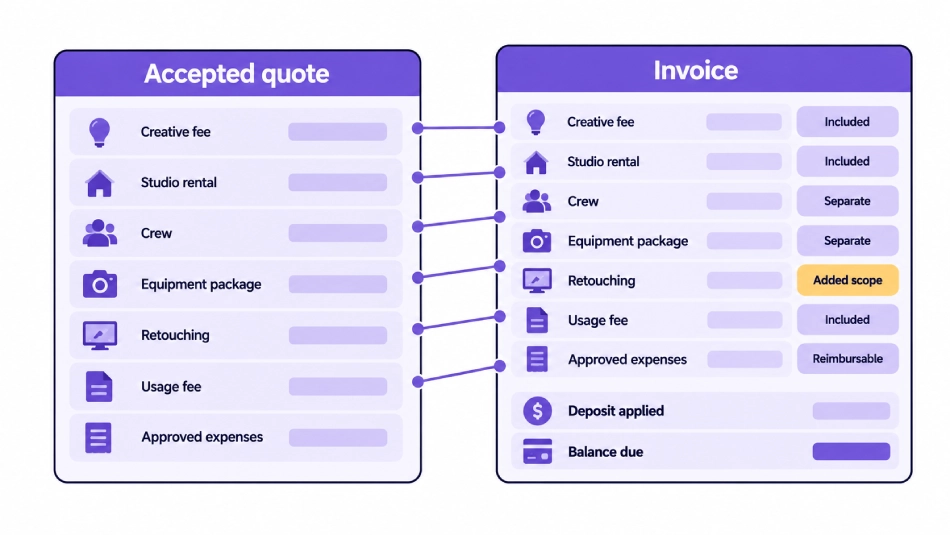
The invoice should follow the pricing structure the client already accepted.
Build it from:
- Accepted quote
- Project record
- Completed services
- Actual quantities where billing depends on usage
- Approved client changes
- Approved expenses
- Final deliverables
- Deposit and payment history
- Client billing details
- Purchase order where required
Do not create a new billing structure after the project is complete.
If the accepted quote used one project fee, the final invoice should not suddenly break the same work into unexpected hourly charges.
If the quote separated studio rental, crew, equipment, and retouching, those categories should remain easy to identify on the invoice.
Separate Studio Cost From Client Charge
What a shoot costs the studio is not always what the studio bills the client.
Your internal project cost may include:
- Staff time
- Room cost
- Owned equipment use
- Software
- Administration
- General overhead
The client may be billed through:
- A fixed project fee
- A session fee
- A day rate
- Hourly charges
- Per image charges
- Equipment packages
- Usage fees
- Approved expenses
A cost does not automatically need its own invoice line.
For example, the studio may assign an internal cost to its room but include room use inside the session fee. Producer time may be included inside the creative fee. Equipment may be billed as one package rather than listing every light and stand.
The guide Photography Studio Cost Tracking: What to Track on Every Shoot covers what the studio spends. This article covers what the client is charged.
Decide What Belongs in the Package
Before adding invoice lines, classify each item.
Included in the Main Fee
Work covered by the accepted project, creative, or session fee.
Separate Billable Item
A service or resource with its own quantity, rate, or approved charge.
Reimbursable Expense
An outside cost passed to the client under the agreed project terms.
Added Scope
Work requested after the original quote and approved for additional billing.
Non Billable Studio Cost
A cost the studio absorbs or includes inside another charge.
Credit or Adjustment
A deposit, discount, correction, refund, or other approved change to the amount due.
This check prevents duplicate billing.
If basic editing is included in the session fee, it should not appear again as a separate line unless the client requested work outside that included scope.
Use Specific Line Item Names
Each invoice line should state what the client received.
A useful line item can include:
- Service or resource name
- Project or shoot reference
- Service date
- Quantity
- Unit
- Short scope description
Avoid descriptions such as:
- Photography
- Extra work
- Editing
- Equipment
- Expenses
Those labels do not explain the charge.
A better description might identify a full day commercial photography session, an additional assistant for a stated period, or retouching for a stated number of approved images.
Keep the wording short enough for the client and accounts team to scan.
Creative Fee or Session Fee
The creative or session fee may cover the photographer’s main work.
Depending on the studio’s pricing model, it may include:
- Creative direction
- Standard preparation
- Shoot time
- Photographer time
- Basic capture work
- A stated number of final images
- Basic editing
Common billing units include:
- Fixed project
- Session
- Hour
- Half day
- Full day
- Product
- Setup
The invoice description should state what the fee covers.
Do not use the creative fee as a vague line that hides every other charge. If the client accepted a separate studio, crew, equipment, or retouching charge, keep those lines visible.
Pre Production
Pre production can appear as a separate line when the quote treats planning as a billable service.
It may include:
- Creative planning
- Production meetings
- Shot list development
- Schedule planning
- Crew coordination
- Location research
- Vendor coordination
- Product intake planning
- Prop sourcing
- Call sheet preparation
Billing may use a fixed project fee, hourly amount, day rate, or production package.
If pre production is already included in the creative fee, do not add it again.
Photographer and Production Crew
Photography invoices may include separate crew lines.
Possible roles include:
- Photographer
- Producer
- Photography assistant
- Digital tech
- Stylist
- Hair and makeup artist
- Set assistant
- Talent coordinator
The line should identify:
- Role
- Date
- Planned or actual period being billed
- Quantity
- Billing unit
- Rate
- Overtime where applicable
The studio may bill each role separately or use one production crew package.
StudioHero’s crew management software connects people, project assignments, rates, scheduled time, and actual working time.
Studio Rental
Studio charges may include:
- Shooting room
- Cyclorama
- Prep room
- Makeup area
- Client lounge
- Edit bay
- Setup hours
- Teardown hours
- Overtime
- Cleaning or reset work where agreed
The invoice should show the room, date, hours, and rate when billing depends on time.
Do not list every studio area separately when the accepted package included them together.
If the project used extra time beyond the booked period, show the added hours as a separate line when the agreement allows it.
Setup and Teardown
Some studios include setup and teardown inside the booked period. Others bill these periods separately.
Possible line items include:
- Studio setup
- Lighting setup
- Set preparation
- Equipment load in
- Room reset
- Pack down
- Equipment load out
The invoice should follow the quoted structure.
Do not charge setup time separately when it was included in the room or session fee.
Overtime and Extended Sessions
Overtime should be easy to connect to the project record.
The line should show:
- Shoot or service
- Date
- Standard period completed
- Additional time
- Billing unit
- Overtime rate
- Client approval where required
Do not use “extra time” without explaining which service ran over.
The client may need to know whether the overtime applied to the room, photographer, assistants, talent, equipment rental, or several resources.
Equipment and Technical Resources
Equipment may be billed as one package or several agreed categories.
Possible lines include:
- Camera package
- Lens package
- Lighting package
- Grip package
- Tethering workstation
- Client review monitor
- Background system
- Portable location kit
- External equipment rental
- Equipment delivery or pickup
Avoid listing every cable, stand, clamp, and battery unless the quote was structured that way.
A package description can state the main equipment included while keeping the invoice readable.
Use studio equipment management to connect equipment and kits with photography projects and recorded use.
External Equipment Rentals
Third party rentals may appear as:
- Reimbursable expense
- Marked up production item
- Included project cost
- Separate equipment charge
The line should identify:
- Rental package
- Supplier where needed
- Rental period
- Delivery or pickup
- Approved extension
- Client billing method
The studio should not bill the same rental once as an equipment line and again as an expense line.
Talent, Styling, and Makeup
Possible invoice lines include:
- Talent fee
- Model agency fee
- Casting
- Styling
- Hair and makeup
- Wardrobe sourcing
- Fitting
- Talent travel
- Holding time
- Approved extension
The invoice may show the studio’s production service separately from third party talent or agency expenses.
Keep the line consistent with the quote and project agreement.
Props, Sets, Wardrobe, and Backgrounds
Production materials may appear as billable services or reimbursable expenses.
Possible lines include:
- Prop sourcing
- Prop rental
- Set materials
- Set fabrication
- Furniture rental
- Wardrobe purchase
- Wardrobe rental
- Background paper
- Custom surface
- Return handling
- Damage or restocking charge where agreed
Do not combine unrelated purchases under one line called materials when the client requires itemization.
Location and Access Charges
Location work may create lines for:
- Location fee
- Permit
- Access charge
- Location management
- Security
- Parking
- Power
- Cleaning
- Overtime
- Holding area
The invoice should state whether the charge is a studio service or a third party expense.
Do not provide legal or tax interpretation on the invoice. Use the project documents and advice from the studio’s accountant or legal adviser where needed.
Travel, Transport, and Shipping
Possible lines include:
- Travel time
- Mileage under the agreed terms
- Vehicle hire
- Equipment transport
- Parking
- Tolls
- Accommodation
- Product shipping
- Courier
- Freight
- Return shipping
- Prop collection
The invoice should follow the agreement and internal policy.
Do not add a travel charge that the client did not agree to.
Basic Editing
Basic editing may be part of the main fee or billed separately.
Possible lines include:
- Image culling
- Basic color correction
- Exposure balancing
- Proof preparation
- Standard editing package
The line should identify the included image count or batch where possible.
Do not use “editing” when the client cannot tell whether it refers to proofs, final files, color work, or detailed retouching.
Retouching
Retouching should be separate from basic editing when the studio prices the services differently.
Possible billing units include:
- Per image
- Per hour
- Per batch
- Fixed project
Possible services include:
- Standard retouching
- Product cleanup
- Skin retouching
- Background replacement
- Compositing
- Color matching
- Detailed correction
The line should show the image quantity or approved batch.
Do not set one retouching rate for every type of work. The invoice should use the accepted rate card or quote.
Additional Revision Rounds
Revisions become separate invoice lines when they move beyond the work included in the original scope.
Record:
- Revision round
- Image quantity
- Requested changes
- Billing unit
- Rate
- Client approval
- Rush status where applicable
Revisions included in the package should not be billed again.
The dedicated Photography Client Approval Workflow: Proofs, Selects, Revisions, and Final Files explains how the studio records client comments and approval stages.
Final Images and Deliverable Quantities
Some studios bill by final image, product, setup, or completed batch.
Possible lines include:
- Final retouched image
- Product image set
- Additional final image
- Alternate crop
- Transparent background version
- Print export
- Website export
- Social crop
- Press file
- Client archive package
The invoice should show the deliverable count when quantity affects price.
The delivery record should match the invoiced quantity.
Use Image Delivery Checklist for Photography Studios: Specs, Rights, and Handoff to verify what the client received.
Usage and Licensing
A usage fee may appear as a separate line when the project includes agreed image use terms.
The line may identify:
- Images covered
- Approved use
- Media
- Territory where applicable
- Duration where applicable
- Exclusivity where applicable
- Related agreement
- Usage fee
The invoice should refer to the related license or project document. It should not replace the full agreement.
Studios should obtain professional legal advice for licensing and contract wording.
Rush Work and Priority Delivery
Rush charges may apply when the client requests a faster schedule than the original project plan.
Possible lines include:
- Rush shoot scheduling
- Priority culling
- Rush retouching
- Weekend work
- Overnight turnaround
- Priority export preparation
- Priority delivery
The line should state which work received the faster deadline.
Do not add a rush charge unless it was included in the quote or approved as a client change.
Client Requested Additions
Added work should create new invoice lines when the project terms support additional billing.
Examples include:
- Additional products
- Extra shots
- New setup
- Extended shoot time
- Added crew
- Added equipment
- More final images
- Additional revision rounds
- New export sizes
- Reshoot work
Each added line should connect to a recorded client request and approval.
StudioHero’s production management software helps connect client changes with project tasks, owners, deadlines, and completed work.
The communication process in Photography Client Communication Checklist: Before, During, and After a Shoot should confirm the change before the studio bills for it.
Reimbursable Expenses
Approved expenses may include:
- Travel
- Parking
- Courier
- Equipment rental
- Prop purchase
- Location expense
- Printing
- Shipping
- Approved meals
- Other project purchases
Each expense line should identify:
- Expense category
- Short description
- Date
- Approved amount
- Receipt or vendor invoice where required
- Markup where agreed
- Client approval
Do not mix unrelated expenses into one unexplained amount.
StudioHero’s studio budgeting software connects project expenses, receipts, purchase orders, vendors, and approved spending.
Deposits and Progress Payments
Previous payments should be easy to understand on the final invoice.
The invoice may show:
- Booking deposit
- Retainer applied
- Progress payment received
- Previous invoice payment
- Credit note
- Approved discount
- Refund adjustment
- Remaining balance
The final amount due should clearly show how previous payments were applied.
Do not count the same deposit as both a payment and a second credit.
Credits and Adjustments
A credit or adjustment may be needed for:
- Cancelled work
- Reduced deliverables
- Corrected invoice
- Approved discount
- Duplicate charge removal
- Returned expense
- Deposit adjustment
The line should state why the amount is being reduced.
Do not edit a sent invoice without preserving the billing history required by the studio’s process.
Required Invoice Details
A photography invoice may need:
- Studio business details
- Client billing details
- Invoice number
- Invoice date
- Due date
- Project name
- Project code
- Purchase order
- Currency
- Line items
- Subtotal
- Discount
- Applicable tax
- Deposit or credit applied
- Total due
- Payment instructions
- Payment terms
Tax and invoice rules vary by location, business registration, service type, and client.
Confirm the required fields and tax treatment with a qualified accountant or the relevant local authority.
Match Quantities With the Project Record
Where billing depends on quantity, verify:
- Actual shoot hours
- Overtime
- Crew hours
- Studio hours
- Equipment use
- Products photographed
- Final image count
- Retouched image count
- Revision rounds
- Export groups
- Travel or delivery quantities
The invoice should use recorded project quantities rather than memory.
StudioHero’s studio invoicing software connects photography rate cards with project work, actual session hours, retouching counts, resource use, deposits, and final balances.
Check for Duplicate Charges
Common duplicate billing problems include:
- Pre production included in the package and added again
- Studio rental included in the session fee and repeated
- Editing included per image and billed again by hour
- Equipment included in the production package and listed separately
- Reimbursable expense already included in the quoted project fee
- Deposit applied twice
- Overtime included in a day rate and billed again
- Revision work included in the package and charged separately
Compare the draft invoice with the accepted quote and rate card before sending it.
Review the Invoice Before Sending
Confirm:
- Correct client
- Correct billing entity
- Correct project
- Correct purchase order
- Accepted rates
- Recorded quantities
- Approved client changes
- Approved expenses
- Deposits applied correctly
- Tax treatment reviewed
- Due date
- Payment instructions
- Supporting documents attached where required
- No duplicate lines
- No completed billable work missing
The invoice should match both the project record and the client agreement.
Photography Invoice Line Items
| Line Item Category | Possible Billing Unit | What the Description Should State | Supporting Project Record | Bill Separately When |
| Creative fee | Project, session, day | Creative work and included scope | Accepted quote | It is the main agreed service fee |
| Session fee | Session, hour, half day, full day | Shoot date, period, and included work | Booking and schedule | The pricing model uses session time |
| Pre production | Project, hour, day | Planning and production work included | Production tasks | It is not included in the main fee |
| Photographer | Hour, day, project | Photographer, date, and working period | Crew record | Quoted separately |
| Producer | Hour, day, project | Production role and period | Crew and task record | Quoted separately |
| Assistant | Hour or day | Role, date, and working period | Crew record | Additional crew is billable |
| Digital tech | Hour or day | Capture and file support period | Crew record | Quoted separately |
| Styling | Hour, day, project | Styling work and scope | Crew or vendor record | Not included in the main fee |
| Hair and makeup | Person, session, day | Service and talent covered | Vendor record | Quoted separately |
| Studio rental | Hour, half day, day | Room, date, and booked period | Studio booking | Not included in the session fee |
| Setup and teardown | Hour or fixed fee | Setup, reset, or pack down work | Schedule and task record | The quote separates this time |
| Overtime | Hour | Resource and additional time | Actual time record | Approved time exceeds the package |
| Equipment package | Project, day, package | Main equipment group included | Equipment assignment | Quoted separately |
| Equipment rental | Rental period | External rental and period | PO and vendor invoice | Approved as a separate cost |
| Talent | Person, hour, day | Talent, period, and project | Talent record | Billed through the studio |
| Props and sets | Item, project, expense | Materials, rental, or fabrication | Expense and vendor record | Approved outside the package |
| Wardrobe | Item, rental, project | Purchase, rental, or sourcing | Expense record | Approved as separate work or expense |
| Location | Hour, day, project | Location and access period | Location record | Not included in the main fee |
| Travel and transport | Hour, distance, expense | Travel, transport, or delivery details | Travel record | Allowed by the agreement |
| Basic editing | Image, batch, project | Editing level and image quantity | Post production record | Not included in the session fee |
| Retouching | Image, hour, batch | Service level and quantity | Retouching task | Quoted separately |
| Additional revisions | Image, hour, round | Revision round and affected images | Approval record | Included rounds have been used |
| Final images | Image, product, batch | Number and type of final files | Delivery record | Pricing depends on quantity |
| Alternate exports | Image, format, batch | Crop, format, or output purpose | Delivery specification | Not included in standard delivery |
| Usage fee | Project, image set, term | Use and related agreement | Usage record | The agreement separates usage |
| Rush work | Project, hour, task | Service receiving priority treatment | Approved change | Client approved the faster deadline |
| Delivery | Project, drive, shipment | Delivery method or physical handoff | Delivery record | Quoted separately |
| Reimbursable expense | Expense | Approved vendor cost or purchase | Receipt or invoice | Client terms allow reimbursement |
| Client addition | Project, item, hour | Added work and approval reference | Change record | Added after the original scope |
| Credit or adjustment | Fixed amount | Reason for the reduction | Billing record | An approved correction is required |
Photography Invoice Line Item Template
| Invoice Field | What to Enter |
| Item name | Short name for the service, resource, or expense |
| Description | What was provided and what the charge covers |
| Project | Client project or shoot reference |
| Service date | Date or billing period |
| Quantity | Number of hours, days, images, items, or units |
| Unit | Hour, day, image, project, batch, or expense |
| Rate | Accepted price for one unit |
| Discount | Approved reduction where applicable |
| Tax treatment | Tax category confirmed under the studio’s process |
| Line total | Quantity multiplied by the applied rate after adjustments |
| Related approval | Quote, change approval, purchase order, or usage record |
| Supporting document | Time record, receipt, vendor invoice, delivery record, or other evidence |
Invoice Review Status
| Invoice Status | Meaning | Required Action |
| Draft | Invoice is still being prepared | Add and review line items |
| Waiting for project closeout | Final quantities or work remain open | Complete the project records |
| Waiting for client change approval | Added work has not received billing approval | Obtain the required decision |
| Waiting for vendor amount | External cost is not final | Record the commitment and wait for the final amount |
| Ready for internal review | Invoice lines are complete | Check quote, rates, quantities, and credits |
| Approved to send | Internal review is complete | Release the invoice |
| Sent | Client has received the invoice | Track the due date |
| Partly paid | Client paid part of the balance | Track the remaining amount |
| Paid | Full payment has been received | Update the project financial record |
| Overdue | Due date has passed | Follow the studio’s collection process |
| Disputed | Client questioned one or more charges | Review the quote and supporting records |
| Credited | A credit or adjustment has been issued | Update the balance |
| Closed | No billing action remains | Retain the final record |
How StudioHero Supports Photography Invoice Line Items
StudioHero connects photography billing with the project records behind each charge.
Your team can manage:
- Photography rate cards
- Creative and session fees
- Studio hourly rentals
- Crew rates
- Retouching rates
- Usage based pricing
- Client specific pricing
- Project invoices
- Actual session hours
- Retouching quantities
- Resource usage
- Tax and discount rules
- Booking deposits
- Progress payments
- Final balances
- Payment tracking
- Overdue reminders
- Project financial history
StudioHero does not decide what every photography studio should charge. It gives your team a billing record connected to the accepted rate, completed work, actual usage, approved changes, invoice, and payment.
Every Charge Should Connect to Completed Work
Photography studios may bill through packages, hourly rates, day rates, per image fees, usage fees, or a combination.
The invoice should follow the accepted pricing structure and the work actually delivered.
Every line should tell the client what they are paying for without exposing unnecessary internal costs or repeating services already included in a package.
StudioHero connects project work, rate cards, shoot hours, crew, resources, retouching, approved additions, invoices, deposits, and payments so your team can bill each project from recorded work rather than memory.
Book a StudioHero demo to see how your studio can connect photography projects, rate cards, invoices, deposits, and payment tracking in one system.