Photography shoot profit margin is calculated by subtracting total shoot cost from net project revenue, dividing the remaining profit by net project revenue, and multiplying the result by 100. Net project revenue should include final approved client charges after discounts and credits. Total shoot cost should include crew, studio time, equipment, rentals, vendors, travel, consumables, post production, delivery, and any assigned overhead used by the studio.
A photography shoot can bring in strong revenue and still produce a weak result.
The client may approve the full invoice, but the project may use more crew time, equipment, retouching, travel, and vendor support than expected. Extra client requests may add revenue while creating almost the same amount of cost. A room may look free because the studio owns it, even though the space still carries operating costs.
Profit margin shows how much of the project revenue remains after those costs are included.
StudioHero connects photography projects with budgets, expenses, crew time, equipment use, purchase orders, invoices, and project profitability. Our photography studio management software helps your team see whether a shoot is meeting its financial target while the work is still active.
A reliable margin calculation should answer:
- What revenue belongs to this shoot?
- Which costs were required to complete it?
- What profit amount remains?
- What percentage of revenue remains as profit?
- Has the margin changed since the original estimate?
- Are any costs or billable items still missing?
Start With Two Numbers
Every shoot margin calculation needs:
- Net shoot revenue
- Total shoot cost
Shoot Profit
Shoot profit equals net shoot revenue less total shoot cost.
Photography Shoot Profit Margin
Photography shoot profit margin equals shoot profit divided by net shoot revenue, multiplied by 100.
The formula is simple.
The difficult part is building complete and consistent revenue and cost figures.
A margin calculated from the client invoice but missing producer time, equipment use, vendor commitments, or post production work will make the project look healthier than it really is.
Profit Amount and Profit Margin Are Different
Profit amount shows how much money remains after project costs.
Profit margin shows what percentage of revenue remains.
Suppose one project produces a profit of 5,000 and another produces a profit of 3,000. The first project has the larger profit amount.
That does not automatically mean it has the stronger margin.
The first project may have required much more revenue and cost to produce that result. Margin lets the studio compare projects of different sizes.
Studio owners need both values:
- Profit amount shows the money earned.
- Profit margin shows how efficiently the project turned revenue into profit.
Profit Margin and Markup Are Not the Same
Studios often use margin and markup as though they mean the same thing.
They use different calculation bases.
Profit Margin
Profit divided by revenue.
Markup
Profit divided by cost.
Consider a shoot with:
- Net revenue of 10,000
- Total cost of 6,000
- Profit of 4,000
The profit margin is 40 percent.
The markup on cost is about 66.7 percent.
Both percentages describe the same project, but they answer different questions.
Margin asks what share of revenue remains.
Markup asks how much profit was added above cost.
These numbers are only an illustration. They are not recommended photography rates or margin targets.
Use Three Margin Views
Do not wait until project closeout to calculate margin.
Track it at three stages.
Estimated Margin
Estimated margin uses quoted revenue and planned costs.
It shows whether the original project plan meets the studio’s target before work begins.
Forecast Margin
Forecast margin uses:
- Current approved revenue
- Committed costs
- Actual costs already recorded
- Expected remaining costs
This is the most useful operating view.
It shows where the project is heading while the producer can still respond.
Final Margin
Final margin uses final net revenue and final actual cost after financial closeout.
This result should be used when comparing past projects and improving future estimates.
A project may begin with a strong estimated margin and finish with a weaker final margin because the shoot ran late, the client added work, or retouching took longer than planned.
Decide Which Margin You Are Measuring
Photography studios may need two project margin views.
Direct Project Margin
Direct project margin includes the costs created directly by the shoot.
These may include:
- Crew
- Equipment rental
- Vendors
- Travel
- Props
- Consumables
- Post production
- Delivery
This view shows how well the project covered the expenses caused directly by the work.
Fully Loaded Shoot Margin
Fully loaded shoot margin also includes assigned overhead.
This may include an approved share of:
- Facility costs
- Administration
- Software
- Insurance
- Permanent staff support
- General equipment maintenance
- Other operating costs
This view shows whether the project contributed enough to support the wider studio.
Name the margin being reported.
Do not compare a direct margin from one project with a fully loaded margin from another as though they use the same cost base.
Build Net Shoot Revenue
Net shoot revenue should represent the final value earned from the project.
Possible revenue items include:
- Creative fee
- Session fee
- Studio rental
- Crew charges
- Equipment charges
- Editing and retouching
- Final image charges
- Usage fees
- Rush work
- Approved client additions
- Billable expenses
- Delivery or archive services where billed
Reduce the revenue figure for:
- Approved discounts
- Credits
- Refunds
- Removed work
- Invoice corrections
- Written off charges where included in the studio’s reporting method
Use studio invoicing software to connect accepted rates, completed work, deposits, invoices, and payment records to the photography project.
The article Photography Invoice Line Items: What Studios Should Bill For explains how completed services and approved additions become client charges.
Do Not Count Deposits Twice
A booking deposit is part of the project payment.
It is not additional revenue on top of the full project value.
Suppose:
- Final project revenue is 8,000.
- The client paid a 2,000 deposit.
- The final balance is 6,000.
Project revenue remains 8,000.
It does not become 10,000.
The deposit reduces the amount still owed. It does not increase the value of the shoot.
Handle Tax Carefully
An invoice may include sales tax or another collected tax that does not belong to studio revenue.
The correct accounting treatment depends on the studio’s location, registration, client, and reporting method.
Confirm the treatment with a qualified accountant.
For internal project analysis, do not assume that every amount collected from the client becomes shoot revenue.
Decide How to Handle Reimbursable Expenses
A reimbursable expense may appear in both revenue and cost.
Suppose the studio pays a location or rental expense and bills the client for it.
There are two common internal approaches.
Include Revenue and Cost
Include the client charge in revenue and the vendor amount in cost.
This shows whether the studio earned a markup or absorbed a difference.
Exclude Pure Pass Through Amounts
Exclude the matching revenue and cost when the studio treats the expense as a pure pass through item with no margin effect.
Neither method should be applied randomly.
Choose one method, document it, and use it consistently across comparable projects.
Build Total Shoot Cost
The supporting article Photography Studio Cost Tracking: What to Track on Every Shoot should own the complete cost record.
For margin calculation, group the costs into the following areas.
Pre Production
Include:
- Client calls
- Producer time
- Brief review
- Shot list work
- Scheduling
- Crew booking
- Location planning
- Vendor sourcing
- Product receiving
- Production meetings
Shoot Day Labor
Include:
- Photographer
- Producer
- Assistants
- Digital tech
- Stylist
- Hair and makeup
- Set support
- Studio support
- Overtime
- Wrap and handoff work
StudioHero’s crew management software connects roles, assignments, rates, scheduled time, and actual working time.
Studio and Location
Include:
- Assigned studio room cost
- Setup time
- Teardown time
- Cleaning
- External location fee
- Access charge
- Permit
- Security
- Overtime
- Holding space
Equipment
Include:
- Assigned owned equipment cost
- External rentals
- Delivery and pickup
- Insurance or waiver charges
- Rental extensions
- Damage charges
- Missing item charges
- Equipment transport
Use studio equipment management to connect equipment and kits with project use, availability, maintenance, and movement.
Production Materials
Include:
- Props
- Set materials
- Wardrobe
- Backgrounds
- Styling supplies
- Packaging
- Printing
- Consumables
- Emergency purchases
- Retained project items
Use inventory management software to track stock, usage, retained purchases, and storage locations.
Travel and Transport
Include:
- Crew travel
- Vehicle hire
- Parking
- Tolls
- Accommodation
- Equipment movement
- Product shipping
- Courier
- Freight
- Return shipping
Post Production
Include:
- File handling
- Culling
- Proof preparation
- Editing
- Retouching
- Revision rounds
- Quality review
- Export creation
- Delivery preparation
- Archive work
Client Changes
Include the added costs created by:
- Extra products
- Added shots
- New setups
- Extended shoot time
- Additional crew
- More equipment
- Added final images
- More revision rounds
- New export requirements
- Reshoot work
Financial Costs
Where included in the studio’s project analysis, record:
- Payment processing fees
- Currency conversion fees
- Other project assigned transaction costs
Assigned Overhead
Use the studio’s documented method for allocating wider operating costs.
Do not change the method between comparable shoots.
Use Internal Labor Cost, Not Client Billing Rate
The rate billed to the client is revenue.
It is not the labor cost.
Suppose the studio bills a photographer at one rate but pays or assigns a lower internal cost. Use the approved internal cost in the project expense calculation.
For freelancers, this may be the final approved invoice.
For employees, the studio may use a documented loaded labor cost.
For owners, unpaid working time should not automatically be treated as free when calculating the true project result.
Establish the internal method with the studio’s accountant or finance team.
Assign Room Cost Consistently
An owned room still carries operating costs.
The studio may assign room cost through:
- An hourly internal rate
- A half day internal rate
- A full day internal rate
- A facility allocation
- Another documented method
There is no single correct method for every photography studio.
The important point is consistency.
A room should not appear free on one commercial shoot and carry a full cost on another similar project.
Assign Owned Equipment Cost Consistently
Owned cameras, lenses, lights, grip, computers, and tethering systems support the project even when no rental invoice exists.
The studio may assign:
- Internal package rate
- Usage cost
- Maintenance allowance
- Replacement allowance
- Another approved amount
This is not a tax or depreciation calculation.
It is an internal project costing decision used to prevent owned equipment from disappearing from margin analysis.
Include Remaining Work in Forecast Margin
A project may look highly profitable immediately after the production day because later costs have not entered the record.
Forecast margin should include the expected cost of:
- Retouching
- Client revisions
- Quality review
- Delivery exports
- Vendor invoices not yet received
- Rental extensions
- Equipment damage
- Corrected delivery work
- Other open project tasks
Use studio budgeting software to compare planned, committed, actual, and remaining cost while the project remains active.
Forecast margin gives the producer a chance to respond before the final result becomes fixed.
Measure the Effect of Client Changes
Added client work can increase revenue while reducing margin.
Suppose the client approves an additional charge of 1,000.
The added crew, equipment, overtime, and retouching cost 900.
The project gains 100 in profit from that change.
The added work has a 10 percent margin.
Record:
- Added revenue
- Added cost
- Added profit
- Margin on the added work
- Effect on the full project margin
A client addition should update the project scope, tasks, cost forecast, and billing record.
Use production management software to connect the change with people, resources, deadlines, and completed work.
Track Unbilled Work
Completed work can reduce project margin before it reaches the invoice.
Examples include:
- Unbilled overtime
- Additional final images
- Extra revision rounds
- Added crew
- Rush delivery
- New export formats
- Reshoot work
- Approved expenses not yet billed
The project already carries the cost.
Until the billable amount reaches the client invoice, margin remains lower than expected.
Add a margin status such as Waiting for Billing when completed work has not reached the invoice.
Profitability and Cash Collection Are Different
Project profitability asks:
Did the shoot earn more revenue than it cost to complete?
Cash collection asks:
Has the client paid?
A profitable shoot can create a cash problem when the invoice remains overdue.
An unprofitable shoot may still show cash coming in after a deposit.
Track margin and payment status separately.
StudioHero’s studio finance management connects budgets, expenses, invoices, payments, receivables, and financial reporting.
Photography Shoot Profit Margin Example
The following numbers explain the calculation only. They are not suggested prices or margin targets.
Revenue
| Revenue Item | Amount |
| Creative and shoot fee | 8,000 |
| Approved additional images | 1,200 |
| Usage fee | 1,000 |
| Approved discount | 200 reduction |
| Net Shoot Revenue | 10,000 |
Cost
| Cost Item | Amount |
| Pre production and crew | 2,800 |
| Studio and equipment | 1,200 |
| Vendors, props, and travel | 900 |
| Post production and delivery | 800 |
| Assigned overhead | 300 |
| Total Shoot Cost | 6,000 |
Result
Shoot profit equals 10,000 less 6,000.
Shoot profit equals 4,000.
Photography shoot profit margin equals 4,000 divided by 10,000, multiplied by 100.
Photography shoot profit margin equals 40 percent.
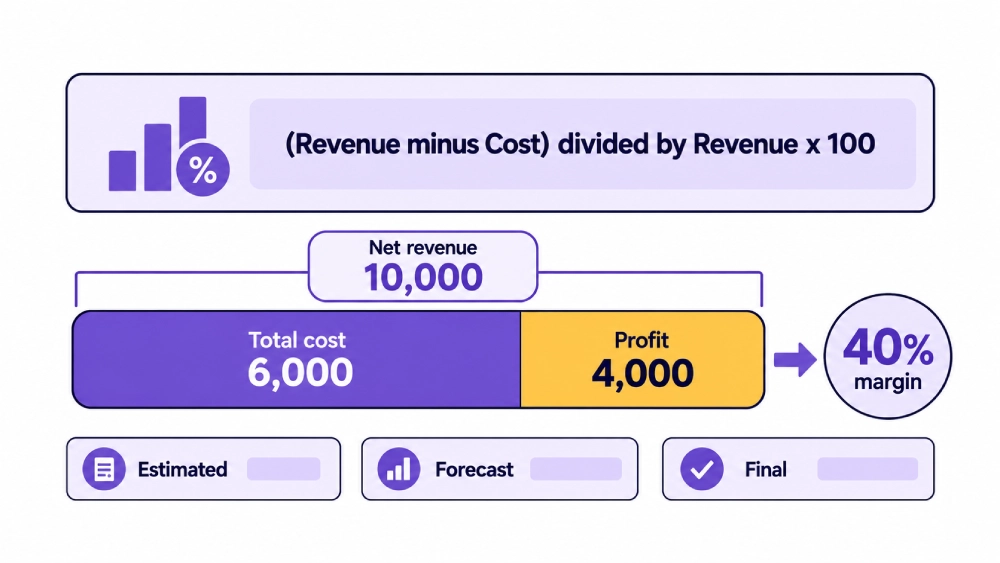
Use the studio profitability calculator to compare revenue, cost, and profit results after confirming which project values belong in the calculation.
Photography Shoot Margin Calculation
| Calculation Input | What to Include | Planned Amount | Current Amount | Final Amount | Source Record | Owner |
| Creative and session revenue | Main project and shoot fees | Enter quote | Enter approved amount | Enter final amount | Quote and invoice | Producer |
| Studio and equipment revenue | Billable room and resource use | Enter quote | Enter approved usage | Enter final amount | Booking and invoice | Studio manager |
| Retouching revenue | Editing and approved image work | Enter quote | Enter approved work | Enter final amount | Retouching record | Producer |
| Usage revenue | Agreed image use charge | Enter quote | Enter approved amount | Enter final amount | Usage record | Producer |
| Approved additions | Added client work | Enter estimate | Enter approved additions | Enter final amount | Change record | Producer |
| Billable expenses | Client approved project expenses | Enter estimate | Enter approved costs | Enter final amount | Expense and invoice | Finance team |
| Discounts and credits | Approved reductions | Enter planned reduction | Enter current reduction | Enter final reduction | Billing record | Finance team |
| Pre production cost | Planning and coordination | Enter budget | Enter actual and remaining | Enter final cost | Time and task record | Producer |
| Shoot day labor | Photographer, producer, crew | Enter budget | Enter actual and committed | Enter final cost | Crew record | Producer |
| Studio room cost | Assigned facility use | Enter internal budget | Enter actual use | Enter final cost | Room record | Studio manager |
| Owned equipment cost | Assigned asset and kit use | Enter budget | Enter actual usage | Enter final cost | Equipment record | Equipment manager |
| Rental equipment | External rental and related charges | Enter budget | Enter commitments | Enter final invoice | PO and vendor record | Equipment manager |
| Talent and vendors | Talent, agency, styling, services | Enter budget | Enter commitments | Enter final cost | Vendor record | Producer |
| Props and consumables | Materials and used stock | Enter budget | Enter actual use | Enter final cost | Inventory and receipts | Studio manager |
| Travel and transport | Travel, vehicles, shipping, freight | Enter budget | Enter actual and committed | Enter final cost | Expense record | Producer |
| Post production | Editing, retouching, QC | Enter budget | Enter actual and remaining | Enter final cost | Task and time record | Producer |
| Revision work | Client requested changes | Enter allowance | Enter current work | Enter final cost | Approval record | Producer |
| Delivery and archive | Exports, transfer, closeout | Enter budget | Enter expected work | Enter final cost | Delivery record | Media manager |
| Payment processing cost | Project assigned transaction fees | Enter estimate | Enter actual fees | Enter final cost | Payment record | Finance team |
| Assigned overhead | Approved share of wider costs | Enter allocation | Enter current allocation | Enter final allocation | Costing record | Finance team |
Project Margin Status
| Margin Status | Meaning | Required Action |
| Estimated | Uses quoted revenue and planned costs | Review before approving the project |
| On Target | Forecast margin meets the approved target | Continue tracking open work |
| Margin at Risk | Open work or cost increases may reduce margin | Review scope, cost, and billing |
| Waiting for Cost | A vendor or project cost remains unknown | Record the commitment and obtain the final amount |
| Waiting for Billing | Completed billable work has not reached the invoice | Add the approved charge |
| Over Budget | Expected final cost exceeds the approved budget | Review the cause and client impact |
| Pending Closeout | Production is complete but records remain open | Finish revenue and cost reconciliation |
| Final | Revenue and cost records are closed | Use the result for reporting and comparison |
Shoot Margin Review
| Review Field | What to Confirm |
| Final net project revenue | All approved client charges after discounts and credits |
| Discounts and credits | Every reduction appears once |
| Deposit applied once | Deposit reduces the balance without increasing revenue |
| Approved client additions | Added work appears in revenue and cost |
| Unbilled work | Completed billable work has entered the invoice |
| Final crew cost | All regular time and overtime are recorded |
| Final room and equipment cost | Assigned studio and resource costs are complete |
| Vendor commitments | Final invoices or remaining commitments are visible |
| Final post production cost | Editing, retouching, revisions, QC, and delivery are complete |
| Remaining cost | No expected expense is missing |
| Assigned overhead | The approved method has been applied |
| Shoot profit | Net revenue less total cost |
| Profit margin | Shoot profit divided by net revenue |
| Margin target | Internal target used by the studio |
| Reason for variance | Explanation for the difference from plan |
| Financial closeout date | Date the margin became final |
What Causes Photography Shoot Margin to Fall
Common causes include:
- Planning time was not included in the estimate.
- Crew worked longer than planned.
- Equipment rental required an extension.
- The client added work without a billing update.
- Retouching used more hours than expected.
- Extra revisions remained non billable.
- The invoice was discounted after costs were committed.
- Rush vendors or shipping increased the cost.
- Room and owned equipment use were ignored during estimating.
- A reshoot created cost without enough added revenue.
- Payment or currency fees were not included.
- The project closed before every vendor invoice arrived.
Not every margin problem should be solved by cutting costs.
Some projects need clearer scope, better pricing, different resources, stronger change approval, or a more realistic production schedule.
Compare Final Margin by Shoot Type
After several projects, compare margin by:
- Client
- Photography service
- Shoot type
- Studio room
- Project size
- Crew structure
- Equipment package
- Retouching level
- Revision count
- Location type
- Usage structure
- Delivery requirement
One unusual project may not show a useful pattern.
Repeated results show which estimates, pricing decisions, or production plans need attention.
Use the same margin method across all projects included in the comparison.
How StudioHero Supports Photography Shoot Profit Margin Tracking
StudioHero connects the financial and production records needed for shoot level profitability.
Your team can manage:
- Quoted project revenue
- Shoot level charges
- Expenses
- Purchase orders
- Vendor costs
- Crew rates and actual time
- Equipment and resource use
- Client additions
- Planned and actual budgets
- Project invoices
- Deposits and payment records
- Outstanding balances
- Project profit and loss
- Profitability by client, campaign, or shoot
- Financial reports
StudioHero does not decide the correct accounting method, overhead allocation, tax treatment, or target margin for every studio. It gives your team one connected project record for revenue, costs, resources, billing, and final results.
Every Margin Result Depends on the Records Behind It
Photography shoot profit margin is easy to calculate when the revenue and cost records are complete.
The difficult part is making sure every approved charge, discount, crew hour, room use, equipment assignment, vendor commitment, client change, and post production task belongs to the project.
A margin calculated from missing costs gives the studio false confidence.
StudioHero connects project revenue, budgets, actual expenses, crew, equipment, vendors, invoices, and final profitability so your team can see what each shoot earned and why the result changed.
Book a StudioHero demo to see how your studio can track photography project revenue, costs, budgets, invoices, and profit margin in one system.