A photography studio inventory checklist should include cameras, lenses, lighting, grip equipment, tethering gear, backdrops, props, furniture, wardrobe, surfaces, storage media, tools, cleaning materials, packaging, and shoot supplies. High value assets should have individual records with serial numbers, condition, location, availability, warranty, and maintenance history. Reusable props and backdrops should have photos, dimensions, storage locations, and condition notes. Consumables should be tracked by quantity, reserved amount, minimum stock level, and reorder status.
A list of item names does not give a photography studio enough control over its inventory.
The studio may know that it owns three grey backdrops, several light stands, two white plinths, and a cabinet of styling supplies. That does not tell the team whether those items are ready, damaged, reserved, missing, or stored in the correct place.
An inventory record should answer:
- What is the item?
- How many are available?
- Where is it stored?
- What condition is it in?
- Is another shoot using or reserving it?
- Who is responsible for it?
- Does it need cleaning, repair, replacement, or replenishment?
StudioHero connects photography inventory with equipment, storage locations, projects, reservations, maintenance, budgets, and purchasing. Our photography studio management software helps studio teams see what they own, what is available, and what needs attention before the next shoot.
Choose the Right Tracking Method for Each Item
Not every item needs the same type of record.
A camera body, paper backdrop roll, sofa, and roll of tape behave differently inside a studio. Using one tracking method for all of them creates unnecessary work in some areas and missing information in others.
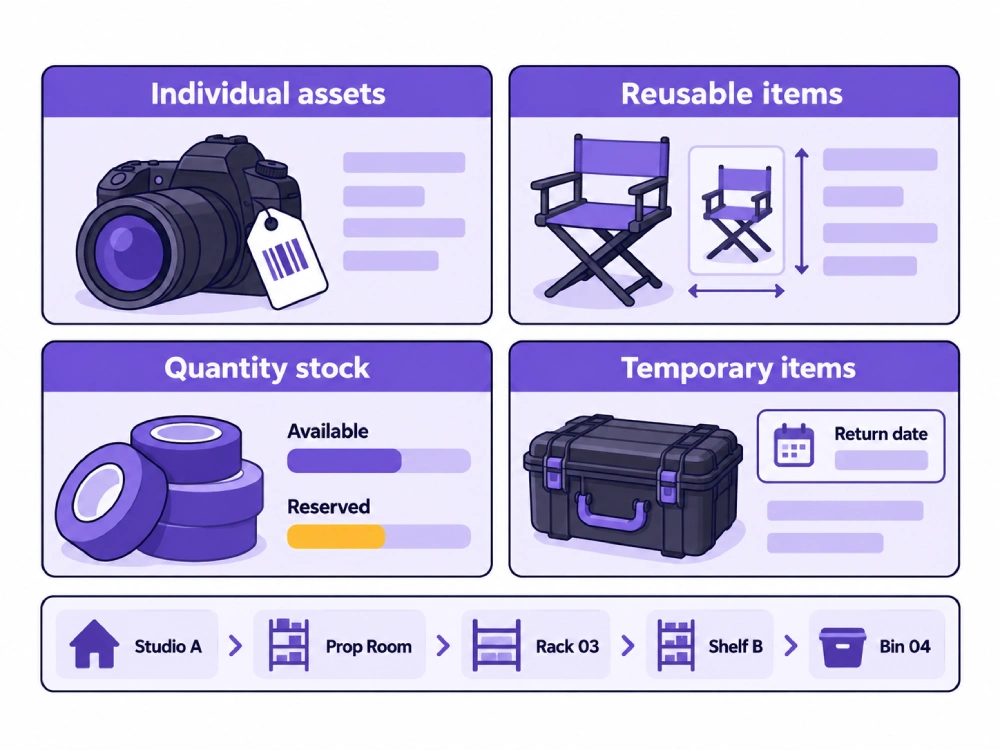
Separate the inventory into four main tracking groups.
Individually Tracked Assets
Use individual records when the item:
- Has a serial number
- Has high value
- Moves between projects or locations
- Requires maintenance
- Has warranty or insurance information
- Can be assigned to one person or shoot
Examples include cameras, lenses, lighting units, computers, monitors, printers, storage drives, and specialty equipment.
Reusable Inventory Items
Use reusable item records when the item:
- Has no serial number
- Still needs a clear identity
- Has a fixed or controlled storage location
- Can be reserved for a shoot
- Needs condition checks
Examples include props, furniture, plinths, surfaces, wardrobe, fabric backdrops, and set pieces.
Quantity Based Stock
Use quantity records when the item:
- Is consumed during work
- Is replaced regularly
- Is interchangeable
- Needs a minimum stock level
- Does not need its own unique identity
Examples include tape, labels, cleaning materials, background paper, gels, packaging, and styling supplies.
Temporary Inventory
Use temporary records for:
- Rented items
- Client supplied products
- Client supplied props
- Borrowed equipment
- Vendor supplied materials
These records need arrival dates, project assignments, storage locations, owners, and return deadlines.
Build the Main Inventory Categories
The studio should group inventory according to how the team stores and uses it.
Recommended categories include:
- Cameras and lenses
- Lighting
- Light modifiers
- Grip and support
- Tethering and computers
- Monitors and printers
- Storage media
- Backdrops and support systems
- Props and set pieces
- Furniture and posing equipment
- Wardrobe and styling inventory
- Product photography surfaces
- Tools and maintenance items
- Cases and transport equipment
- Cleaning materials
- Consumables
- Packaging supplies
- Facility assets
- Rented items
- Client supplied items
A small portrait studio and a large ecommerce studio may use different categories. The structure should match the work, storage areas, and responsibilities inside the business.
Cameras and Lenses
Cameras and lenses should normally have individual asset records.
Record:
- Item name
- Asset number
- Serial number
- Manufacturer
- Model
- Lens mount
- Storage location
- Current availability
- Condition
- Assigned kit
- Maintenance status
- Calibration status where tracked
- Purchase date
- Vendor
- Warranty
- Replacement information
A camera can be inside the studio and still be unavailable because it is reserved, in maintenance, incomplete, or waiting for inspection.
Use equipment tracking software to connect equipment records with assignments, availability, condition, barcodes, and project use.
Lighting Equipment
Lighting inventory may include:
- Strobes
- Continuous lights
- Flash units
- Power packs
- Triggers
- Receivers
- Cables
- Batteries
- Chargers
- Cases
High value lighting units should have individual records.
Small interchangeable accessories may be tracked by quantity or included inside a named lighting kit.
Each lighting record should show compatibility, condition, storage location, assigned project, and maintenance status.
Light Modifiers
Track:
- Softboxes
- Umbrellas
- Reflectors
- Beauty dishes
- Grids
- Snoots
- Flags
- Scrims
- Diffusion frames
- Gels
Record the type, size, mount, condition, storage location, and compatible lighting system where useful.
A medium softbox and a large softbox should not share one vague inventory entry.
Gels and diffusion rolls may need quantity tracking when they are cut or consumed.
Grip and Support Equipment
Grip inventory may include:
- Light stands
- C stands
- Tripods
- Boom arms
- Grip heads
- Clamps
- Support arms
- Sandbags
- Plates
- Safety cables
- Product tables
- Posing supports
The studio may track larger stands and specialty items individually while counting smaller interchangeable items by type and size.
The record should show whether all required parts remain together.
An incomplete stand or support system should not remain marked as available.
Tethering, Computers, and Review Equipment
Track:
- Laptops
- Workstations
- Tethering cables
- Cable support
- Card readers
- Portable drives
- Client review monitors
- Calibration tools
- Adapters
- Power supplies
Computers, monitors, and storage drives should usually have individual records.
Small cables and adapters may be grouped inside named kits if the team checks the kit contents before and after each shoot.
Use studio equipment management to connect durable equipment with storage, maintenance, warranties, purchase details, and project use.
Backdrops and Background Systems
Backdrops need more than a color name.
Separate them by type:
- Seamless paper
- Fabric
- Painted canvas
- Vinyl
- Collapsible backgrounds
- Textured surfaces
- Cyclorama accessories
- Support systems
For every backdrop, record:
- Type
- Color
- Material
- Width
- Length
- Remaining usable amount where relevant
- Reference photo
- Storage location
- Condition
- Cleaning status
- Support requirement
- Reserved project
- Replacement status
A paper roll and a painted canvas should not use the same inventory method.
Paper is consumed over time. Its record should show remaining usable quantity and reorder status.
A painted canvas is reusable. Its record should focus on condition, cleaning, storage, and reservations.
Props and Set Pieces
Props may include:
- Decorative objects
- Product props
- Seasonal items
- Plants
- Mirrors
- Frames
- Display blocks
- Plinths
- Tables
- Chairs
- Fabrics
- Small set pieces
For each prop, record:
- Reference photo
- Item name
- Category
- Color
- Material
- Dimensions
- Quantity
- Storage location
- Condition
- Cleaning requirement
- Reservation status
- Usage restrictions
A reference photo helps the producer identify the correct item.
Descriptions such as white cube, brown chair, or glass vase may match several items in the same studio.
Furniture and Posing Equipment
Track:
- Chairs
- Stools
- Benches
- Ottomans
- Tables
- Platforms
- Posing blocks
- Ladders
- Apple boxes
- Specialty posing equipment
Record dimensions, condition, assigned room, storage location, and safe use notes where the studio keeps them.
Large furniture may remain assigned to a room rather than moving through general storage. The inventory record should still show whether the item is ready, reserved, damaged, or removed from use.
Wardrobe and Styling Inventory
Wardrobe and styling inventory may include:
- Clothing
- Shoes
- Jewelry
- Accessories
- Fabric
- Clips
- Pins
- Steamers
- Hangers
- Styling tools
Record:
- Item or category
- Size
- Color
- Material
- Quantity
- Condition
- Cleaning status
- Storage location
- Reserved project
- Owner type
Client supplied or stylist supplied wardrobe should remain separate from studio owned items.
Do not make temporary items available for another project.
Product Photography Surfaces
Product photography inventory may include:
- Sweep surfaces
- Acrylic sheets
- Wood panels
- Stone surfaces
- Tiles
- Reflective boards
- Foam boards
- Color cards
- Diffusion materials
- Tabletop backgrounds
Record size, color, finish, storage location, condition, and compatibility with common setups.
Surface damage that looks minor in storage may become visible in close product images. Condition notes should be specific enough for the producer to choose the correct material before setup.
Storage Media and Data Accessories
Physical media inventory may include:
- Memory cards
- Card readers
- Portable drives
- Backup drives
- Drive cases
- Media wallets
- Labels
- Adapters
High value or uniquely assigned storage devices should have individual records.
Lower value cards may be tracked individually or inside controlled media kits.
Keep this record separate from the file organization process. The article How Photography Studios Organize RAW Files, Selects, and Final Deliverables should own digital folder structure and media workflow.
Tools and Maintenance Supplies
Track reusable tools separately from consumed supplies.
Reusable tools may include:
- Hand tools
- Cleaning tools
- Calibration tools
- Sewing kits
- Repair tools
- Small equipment tools
Consumable maintenance supplies may include:
- Lens cleaning fluid
- Cleaning cloths
- Swabs
- Replacement fasteners
- Cable repair materials
- Small maintenance parts
The studio should know whether a maintenance tool is available and whether the related supplies need replenishment.
Cases, Bags, and Transport Equipment
Track:
- Hard cases
- Rolling cases
- Light bags
- Lens cases
- Backdrop bags
- Carts
- Trolleys
- Straps
- Protective covers
- Weather covers
Connect cases with their normal contents where possible.
An empty case should not appear as a complete camera or lighting kit.
The article How to Build Standardized Location Kits for Photography Teams should own the process for building and replenishing repeatable kits.
Consumables and Expendable Supplies
Consumables may include:
- Tape
- Background paper
- Gels
- Diffusion material
- Cleaning cloths
- Cleaning fluid
- Batteries treated as stock
- Labels
- Cable ties
- Protective covers
- Gloves
- Packaging materials
Record:
- Unit of measure
- Quantity on hand
- Reserved quantity
- Available quantity
- Minimum stock level
- Reorder quantity
- Storage location
- Preferred vendor
- Unit cost
- Last restock date
Available quantity matters more than total quantity.
A cabinet may hold twenty rolls of tape, but twelve may already be reserved for upcoming productions.
Use inventory management software to connect stock quantities, reserved amounts, locations, reorder levels, purchase details, and project use.
Packaging and Client Handoff Materials
Track:
- Print sleeves
- Boxes
- Protective wrap
- Shipping cartons
- Labels
- Drive packaging
- Print mounting materials
- Courier supplies
- Client collection bags
- Return packaging
These items support physical deliveries, product returns, and client collection.
Track them by quantity when the items are interchangeable.
Facility Assets
Facility inventory may include:
- Printers
- Workstations
- Storage racks
- Makeup stations
- Mirrors
- Garment racks
- Product storage equipment
- Cleaning equipment
- Office equipment
- Studio furniture
High value facility assets may need purchase, warranty, maintenance, and replacement records.
The inventory should not stop at cameras and lights. A failed printer, damaged makeup station, or missing garment rack can still delay a project.
Separate Owned, Rented, and Client Supplied Items
Ownership status changes how an item should be handled.
Owned
The studio owns the item and may assign it across projects.
Rented
The item belongs to an outside supplier and has a return deadline.
Record the supplier, project, rental period, condition on receipt, assigned person, cost, and return status.
Client Supplied
The item belongs to the client and remains in studio custody for a project.
Record the client, project, quantity, arrival date, storage location, responsible person, required use, and collection or return status.
Client supplied items should never appear available for general studio use.
Record Storage Locations Precisely
Avoid storage labels such as prop room, shelf, or back area.
Use a clear hierarchy:
- Building
- Floor
- Room
- Zone
- Rack
- Shelf
- Cabinet
- Bin
- Case
A useful location may read:
Studio A, Prop Room, Rack 03, Shelf B, Bin 04.
Label storage locations as well as inventory items.
The team should be able to find an item without asking the person who last used it.
Use Defined Condition Statuses
Recommended condition statuses include:
- Ready
- Needs cleaning
- Minor damage
- Needs repair
- In maintenance
- Incomplete
- Awaiting inspection
- Missing
- Retired
A note can explain the issue, but the status should make the item easy to filter.
Do not leave a damaged item marked as available.
Connect Inventory With Shoot Reservations
An item can be inside the studio and unavailable for another project.
Record:
- Project
- Reserved item
- Reserved quantity
- Preparation date
- Shoot date
- Expected release date
- Assigned person
- Current status
- Return or replenishment requirement
The Photography Shoot Planning Checklist for Studio Teams should identify what the shoot needs. The inventory record should confirm that the required items exist and remain available.
Use studio scheduling software when inventory and equipment reservations affect the wider project schedule.
Record Usage and Depletion
For reusable inventory, record project use when it affects condition, availability, or replacement.
For consumables, record the amount used.
Examples include:
- Background paper consumed
- Tape used
- Packaging taken
- Batteries issued
- Styling materials used
- Cleaning supplies consumed
- Props damaged
- Backdrops needing cleaning
Usage records explain why stock levels changed and which project created the cost.
Link those costs to Photography Studio Cost Tracking: What to Track on Every Shoot when purchases, consumed stock, repairs, or damaged items affect project profitability.
Set Minimum Stock and Reorder Levels
Set reorder levels based on:
- Normal project use
- Supplier lead time
- Frequency of use
- Upcoming reservations
- Storage capacity
- Replacement difficulty
- Item cost
- Available alternatives
Do not wait until the final unit is used.
The reorder check should use available quantity after reservations, not only the number physically inside the studio.
Handle Missing or Damaged Inventory Immediately
When an item is missing or damaged:
- Change its status
- Record the last known project
- Record the last known location
- Assign an investigation owner
- Add notes or photos
- Record repair or replacement action
- Update availability
- Record project cost where appropriate
Do not wait for the next full audit to record a known problem.
The article Photography Equipment Checkout and Return: A Complete Tracking Workflow should own the wider custody and return process.
Audit Inventory by Category and Location
Do not count the entire studio as one unstructured task.
Audit by:
- Equipment category
- Studio room
- Storage area
- Prop collection
- Backdrop rack
- Consumable cabinet
- Wardrobe area
- Equipment kit
- Facility asset group
The audit should compare the system record with the physical count.
Record:
- Expected quantity
- Counted quantity
- Reserved quantity
- Missing quantity
- Damaged quantity
- Incorrect location
- Unrecorded item
- Corrective action
- Responsible person
- Completion date
Set a Review Schedule
Daily Checks
- Record used consumables.
- Report missing or damaged items.
- Return props and gear to assigned locations.
- Update item status after shoots.
Weekly Checks
- Review low stock items.
- Review upcoming reservations.
- Inspect active backdrop and prop areas.
- Resolve items left in temporary locations.
Monthly Checks
- Count selected high use categories.
- Review reorder levels.
- Review condition records.
- Check rented and client supplied items.
- Update vendor and purchase information where needed.
Scheduled Wider Audit
- Complete a wider physical count.
- Review inactive assets.
- Review repair and replacement needs.
- Confirm warranty and purchase records.
- Retire items that are no longer usable.
The frequency should match the size of the inventory and how often items move.
Common Photography Studio Inventory Failures
Tracking Every Item the Same Way
A camera, sofa, and roll of tape need different records.
Recording Names Without Photos or Dimensions
The team cannot identify the correct prop, surface, or backdrop.
Using Vague Storage Locations
Items exist in the system but remain difficult to find.
Treating Reserved Stock as Available
Two projects plan to use the same prop, backdrop, or supply.
Mixing Ownership Types
Studio owned, rented, and client supplied items appear under one status.
Leaving Damaged Items Available
The producer plans around an item that cannot be used.
Tracking Total Quantity Only
Reserved stock hides the true available amount.
Reordering After Supplies Run Out
The next shoot begins without the required material.
Failing to Record Project Usage
Stock decreases without any connection to the work that used it.
Auditing Without Corrective Action
The count identifies problems, but nobody owns the next step.
The inventory management mistakes guide covers wider inventory failures, while shared equipment tracking mistakes explains common availability and assignment gaps.
Photography Studio Inventory Checklist
| Inventory Category | Items to Include | Tracking Method | Required Details | Review Frequency | Responsible Role |
| Cameras | Camera bodies | Individual asset | Serial, condition, location, assignment, maintenance | Before use and scheduled audit | Equipment manager |
| Lenses | Prime and zoom lenses | Individual asset | Mount, serial, condition, location, calibration | Before use and scheduled audit | Equipment manager |
| Lighting units | Strobes, continuous lights, power packs | Individual asset | Model, serial, condition, case, maintenance | Before use and monthly | Equipment manager |
| Modifiers | Softboxes, reflectors, grids, scrims | Reusable item or quantity | Size, mount, condition, storage | Weekly and monthly | Studio assistant |
| Grip equipment | Stands, clamps, booms, sandbags | Individual or grouped | Type, size, quantity, condition, location | Weekly | Equipment manager |
| Tethering equipment | Laptops, cables, readers, adapters | Asset or kit | Contents, compatibility, condition, assignment | Before each shoot | Digital tech |
| Computers and monitors | Workstations and review displays | Individual asset | Serial, location, condition, warranty | Monthly | Technical lead |
| Storage media | Cards, drives, readers | Asset or controlled kit | Capacity, serial where used, assignment, condition | Before and after use | Digital tech |
| Backdrops | Paper, fabric, canvas, vinyl | Reusable or quantity | Color, material, size, remaining amount, condition | Weekly | Studio manager |
| Background systems | Stands, supports, crossbars | Asset or kit | Contents, size, condition, location | Before use | Studio assistant |
| Props | Decorative and product props | Reusable item | Photo, dimensions, color, condition, location | Monthly | Prop manager |
| Furniture | Chairs, tables, benches, plinths | Reusable item | Photo, dimensions, room, condition | Monthly | Studio manager |
| Posing equipment | Blocks, stools, platforms | Reusable item | Size, condition, location, restriction | Monthly | Studio assistant |
| Wardrobe | Clothing, shoes, accessories | Reusable item | Size, color, condition, cleaning status | After use and monthly | Stylist |
| Styling supplies | Pins, clips, fabrics, tools | Reusable or quantity | Quantity, location, condition, reorder level | Weekly | Stylist |
| Product surfaces | Acrylic, wood, stone, foam board | Reusable item | Size, finish, condition, location | Monthly | Product team |
| Tools | Hand tools and repair tools | Reusable item | Type, location, condition | Monthly | Equipment manager |
| Cases and carts | Cases, bags, trolleys | Asset or reusable item | Standard contents, condition, location | Before and after use | Equipment manager |
| Cleaning materials | Fluids, cloths, tools | Quantity or reusable | Quantity, location, reorder level | Weekly | Studio assistant |
| Consumables | Tape, gels, paper, labels, batteries | Quantity | On hand, reserved, available, minimum level | Daily and weekly | Inventory owner |
| Packaging | Boxes, wrap, sleeves, cartons | Quantity | Quantity, storage, reorder level | Weekly | Studio coordinator |
| Facility assets | Printers, racks, makeup stations | Individual asset | Location, condition, warranty, maintenance | Monthly or quarterly | Studio manager |
| Rented items | External equipment and materials | Temporary record | Supplier, project, return date, condition | Daily while active | Producer |
| Client supplied items | Products, props, wardrobe | Temporary record | Client, project, quantity, location, return status | Daily while active | Producer |
Inventory Item Record Template
| Record Field | What to Enter |
| Item name | Clear inventory name |
| Inventory category | Equipment, prop, backdrop, supply, or another approved category |
| Asset or stock number | Internal reference |
| Barcode | Scannable item reference where used |
| Serial number | Manufacturer serial for individual assets |
| Reference photo | Current image of the item |
| Description | Model, color, material, or identifying details |
| Dimensions or size | Width, length, height, size, or capacity |
| Quantity | Total recorded amount |
| Reserved quantity | Amount assigned to upcoming work |
| Available quantity | Amount not reserved or in use |
| Storage location | Room, rack, shelf, cabinet, bin, or case |
| Condition | Ready, cleaning, repair, damaged, missing, or retired |
| Availability | Available, reserved, in use, or unavailable |
| Assigned project | Current or upcoming project |
| Owner type | Studio, supplier, or client |
| Vendor | Supplier or purchase source |
| Purchase date | Date acquired |
| Warranty | Warranty dates or reference |
| Minimum stock level | Lowest acceptable quantity |
| Reorder status | Not required, review, ordered, or received |
| Last audit date | Most recent physical verification |
Inventory Status
| Inventory Status | Meaning | Required Action |
| Available | Ready for assignment | No action |
| Reserved | Assigned to upcoming work | Protect the item or quantity |
| In use | Currently assigned to a project | Track expected release |
| Awaiting return | Item has not completed return | Follow up with the assigned person |
| Needs cleaning | Cannot return to ready status yet | Assign cleaning |
| Needs replenishment | Available stock is below the required level | Start purchasing |
| In maintenance | Repair or service is active | Track expected completion |
| Damaged | Item cannot be used as planned | Assess repair or replacement |
| Missing | Location is unknown | Investigate immediately |
| Rented | Item belongs to an outside supplier | Track return deadline |
| Client supplied | Item belongs to a client | Protect it from other use |
| Retired | Item is no longer available | Remove it from active planning |
Inventory Audit Template
| Audit Field | What to Record |
| Category | Inventory group being checked |
| Storage location | Room, rack, shelf, cabinet, bin, or case |
| Expected quantity | Quantity shown in the inventory record |
| Counted quantity | Physical quantity found |
| Reserved quantity | Amount assigned to active or upcoming projects |
| Missing quantity | Expected items not found |
| Damaged quantity | Items needing repair or replacement |
| Incorrect location | Items found outside their assigned location |
| Unrecorded item | Physical item missing from the inventory record |
| Corrective action | Update, move, repair, replace, or investigate |
| Action owner | Person responsible for resolution |
| Completion date | Date the issue was closed |
How StudioHero Supports Photography Studio Inventory
StudioHero connects photography inventory with the projects, people, equipment, and purchases around it.
Your team can manage:
- A central photography asset catalog
- Equipment and expendable stock
- Custom categories and tags
- Storage locations
- Asset condition
- Serial numbers and barcodes
- Purchase and vendor records
- Warranty records
- Depreciation and valuation records
- Maintenance history
- Quantity on hand
- Reserved quantity
- Reorder levels
- Low stock alerts
- Project usage
- Purchase order connections
- Inventory reports
- Audit records
StudioHero does not physically count your stock or know how much backdrop paper remains without updated records. It gives your team one connected place to record inventory, locations, reservations, usage, maintenance, purchasing, and audit results.
A Useful Inventory Shows What Is Ready for the Next Shoot
A photography studio inventory should not remain a static list of purchased items.
It should show what the studio owns or holds, where each item belongs, how much is available, what condition it is in, which project has reserved it, and what needs cleaning, repair, replacement, or replenishment.
StudioHero connects props, backdrops, gear, supplies, storage locations, projects, purchasing, maintenance, and stock availability so your team can prepare for upcoming work without relying on memory or scattered spreadsheets.
Book a StudioHero demo to see how your studio can manage photography equipment, props, backdrops, supplies, reservations, and inventory records in one system.