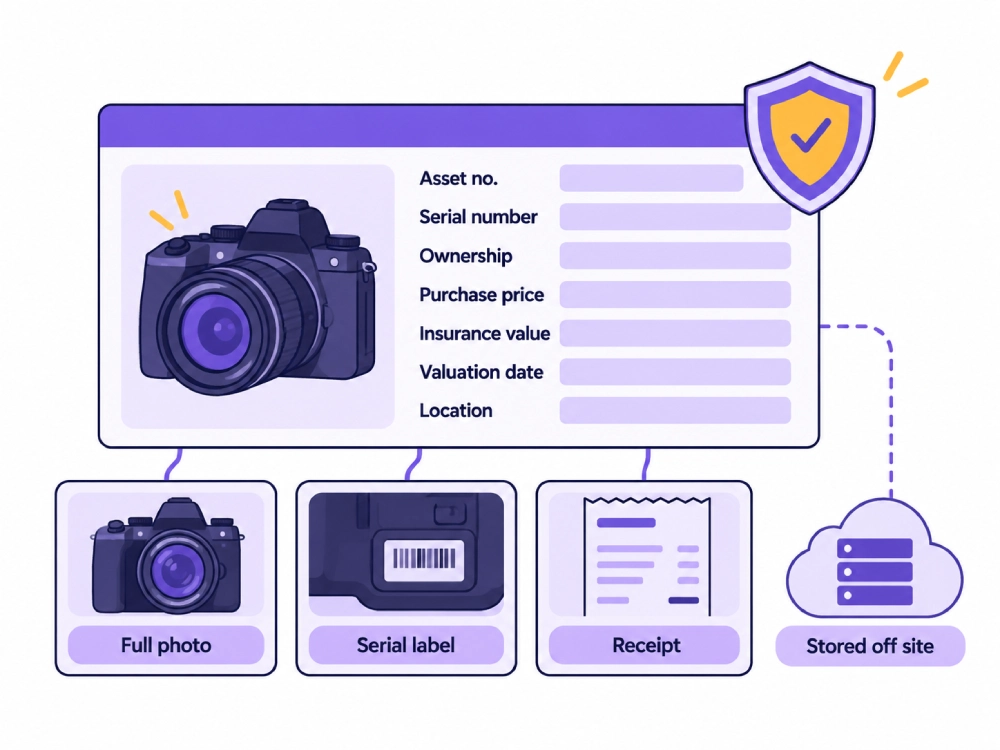
A photography equipment list for insurance should record each asset’s name, category, manufacturer, model, serial number, internal asset number, ownership status, purchase date, purchase price, current insurance value, storage location, condition, and policy reference. Attach clear photographs, including the serial label, plus receipts, invoices, bills of sale, or other available ownership records. Keep owned, rented, borrowed, and client supplied equipment separate, store copies away from the studio, and review the list after purchases, sales, replacements, relocations, and before policy renewal.
A spreadsheet showing camera and lens names is not a complete insurance asset list.
A useful record must identify the exact item, prove that the studio owns or controls it, show the value submitted for insurance review, and connect the entry with supporting evidence.
A camera listed as “Canon body” is difficult to verify. A lighting kit listed as one total may not explain which heads, packs, modifiers, stands, and cases belong to it. A receipt may prove that something was purchased, but it may not show which physical item matches that purchase unless the serial number and photographs are also recorded.
StudioHero connects photography assets with serial numbers, purchase records, values, storage locations, condition, maintenance, and project assignments. Our photography studio management software helps studios maintain the operational records that can support an insurance review.
The insurer or insurance representative decides what the policy covers, which valuation method applies, and which evidence it accepts. The studio’s responsibility is to maintain accurate records and bring clear questions to that review.
Start With the Policy Requirements
Before building the final asset list, confirm what the insurer wants to receive.
Ask your insurance representative:
- Which property categories should be documented?
- Which items need individual records?
- Can lower value items be grouped?
- Do high value assets need to be listed separately?
- Which value should the studio record?
- How should rented or borrowed equipment be handled?
- Does equipment used away from the studio need separate treatment?
- Which ownership documents may be requested?
- How should newly purchased equipment be reported?
- How often should values and policy limits be reviewed?
Do not assume that every item inside the studio receives the same treatment.
Equipment stored at the insured premises may be handled differently from cameras, lighting kits, drives, computers, and other assets that regularly travel to locations.
The policy documents and insurance representative should control those decisions.
Build One Record for Every Tracked Asset
Each individually tracked asset should have one permanent record.
Include:
- Asset name
- Asset category
- Internal asset number
- Barcode where used
- Manufacturer
- Model
- Serial number
- Description
- Included components
- Ownership status
- Purchase date
- Purchase price
- Insurance value field
- Value type
- Valuation date
- Regular storage location
- Mobile or off site use
- Condition
- Policy reference
- Supporting documents
Use inventory management software to connect purchase, vendor, warranty, value, location, and asset details.
One asset record should remain active throughout the item’s working life. Do not create a new identity every time the camera moves, receives maintenance, or changes kits.
Decide Which Assets Need Individual Records
Create individual records when the item:
- Has a serial number
- Has a high replacement cost
- Moves between projects or locations
- Can be assigned to one person or shoot
- Requires maintenance
- Has separate purchase documents
- May need to be identified after theft or damage
Likely categories include:
- Camera bodies
- Lenses
- Lighting units
- Power packs
- Generators
- Computers
- Monitors
- Printers
- Storage drives
- Tethering workstations
- Calibration devices
- Specialty grip equipment
- Portable location kits
- High value cases or carts
- Installed studio technology
Props, backdrops, furniture, and grouped supplies may still need to appear in the insurance records, but the level of detail should follow the insurer’s requirements.
The wider Photography Studio Inventory Checklist: Props, Backdrops, Gear, and Supplies should remain the full operating inventory. The insurance list is a narrower record prepared for insurance review.
Record Manufacturer, Model, and Serial Number
These three fields serve different purposes.
The manufacturer identifies the brand.
The model identifies the product type.
The serial number identifies the exact physical unit.
Record the number exactly as it appears on the item.
Avoid:
- Shortened serial numbers
- Missing characters
- Spaces added during manual entry
- Using a kit number instead of the item serial
- Copying the same serial into several records
Photograph the serial and model labels so the typed information can be checked against the physical item.
Use equipment tracking software to connect barcodes, serial numbers, storage locations, assignments, and current equipment status.
Add an Internal Asset Number
The studio should assign its own permanent reference even when the item already has a manufacturer serial number.
An internal asset number can connect:
- Inventory record
- Barcode
- Storage location
- Maintenance history
- Project assignment
- Insurance evidence
- Purchase documents
- Incident records
- Replacement records
The internal number should not replace the manufacturer serial number.
Keep both fields because each supports a different part of the record.
A clear naming method may combine the equipment category with a unique number, but the studio should use the structure that already fits its inventory system.
Photograph Every Asset
Insurance records should include clear photographs that help identify the item.
Capture:
- Full front view
- Full rear view where useful
- Manufacturer and model label
- Serial number label
- Included accessories
- Existing identifying marks
- Current condition
- Kit contents where a package is being documented
The image should be sharp enough for the labels and identifying details to be read.
Record the photograph date.
Name the files using the internal asset number so the team can connect them with the correct asset record.
For example, one asset may have separate files for:
- Full item
- Serial label
- Model label
- Accessories
- Condition notes
Do not keep every photograph only on a computer stored in the same room as the equipment.
Attach Proof of Ownership
Possible ownership records include:
- Retail receipt
- Vendor invoice
- Online order confirmation
- Bill of sale
- Ownership transfer document
- Lease or finance record
- Payment evidence where retained
- Manufacturer registration
- Valuation document where requested
- Replacement quote
Connect each document with the matching asset number.
A folder of receipts without asset references creates extra work later. The team may know that the business purchased a camera, but it may be difficult to connect the receipt with one of several identical bodies.
For used, gifted, inherited, or older equipment without the original receipt, ask the insurer which other records it will accept.
Do not create or alter proof of purchase when the original record is missing.
Separate Purchase Price From Insurance Value
An asset record may contain several values.
Purchase Price
The amount the studio originally paid.
Book Value
The accounting value maintained by the studio where applicable.
Current Replacement Estimate
The amount recorded for replacing the item with comparable property at the review date.
Declared or Reviewed Insurance Value
The amount entered or confirmed during the insurance process.
These values should not be treated as interchangeable.
A camera purchased several years ago may have a different current replacement cost. A discontinued lens may not have a direct replacement. A used item may have been purchased below the price of comparable new equipment.
Record the value type so the number is not misunderstood later.
Confirm which value belongs on the insurance list with the insurance representative. Accounting values should be reviewed with the studio’s accountant.
Record the Valuation Date
Every value should include:
- Amount
- Currency
- Value type
- Review date
- Person completing the review
- Replacement quote or reference where available
- Insurance confirmation where provided
A value with no date can remain unchanged for years while replacement prices and equipment availability change.
Set a review date for high value items and the full asset register.
Do not overwrite the old value without retaining the previous review record where the studio needs historical documentation.
Record Included Parts and Accessories
A camera package may include:
- Camera body
- Battery grip
- Batteries
- Charger
- Viewfinder accessory
- Bracket
- Case
- Cables
- Other listed components
A lighting package may include:
- Lighting heads
- Power packs
- Triggers
- Cables
- Reflectors
- Cases
- Stands
The record should state whether the value covers only the main asset or the full package.
High value parts may need separate asset records. Lower value accessories may be grouped with the main item if that matches the studio’s inventory method and insurer requirements.
Avoid one package value with no documented contents.
Separate Ownership Types
Ownership status affects how the asset should appear in the records.
Studio Owned
Property legally owned by the business.
Financed or Leased
Property used under a finance or lease arrangement.
Rented
Equipment supplied by an external rental company for a fixed period.
Borrowed
Equipment owned by another person or business.
Client Supplied
Products, props, equipment, or other property held for a client project.
Do not add every temporary item to the studio’s owned asset total.
Each ownership type should have its own evidence and review process.
Rented or borrowed equipment may require different coverage, certificates, limits, or documentation. Confirm the requirements with the insurance representative before the item is used.
Keep Rented Equipment in a Separate Record
For rented equipment, record:
- Supplier
- Rental agreement
- Project
- Item name
- Manufacturer and model
- Serial number where provided
- Rental period
- Pickup date
- Return deadline
- Replacement value supplied by the rental company
- Certificate requirement
- Responsible person
- Condition on receipt
- Return status
- Final charges
Connect rented items with production management software so the team can see which shoot is using the equipment and when it must be returned.
Do not assume the studio’s owned equipment policy automatically covers hired equipment.
Record the Normal Storage Location
The asset record should show where the item is normally kept.
Use a clear location hierarchy:
- Building
- Floor
- Studio room
- Equipment area
- Rack
- Shelf
- Cabinet
- Case
A location such as “main studio” may be too broad when the business has several rooms, storage areas, or nearby facilities.
The regular location helps the studio maintain the asset and review how equipment is distributed across the business.
It may also help distinguish permanent studio equipment from mobile production assets.
Identify Mobile and Off Site Equipment
Photography assets often move between:
- Main studio
- Client location
- Rented location
- Outdoor production
- Vehicle
- Temporary storage
- Courier or freight movement
- Another company facility
Record whether the asset normally leaves the premises.
Include:
- Assigned location kit
- Normal operating area
- Current project
- Expected return
- Temporary storage location
- Responsible person
The Photography Equipment Checkout and Return: A Complete Tracking Workflow should own the full movement and custody process.
The insurance record should show enough location and mobility information for the studio to discuss off site use with the insurer.
Do not assume that coverage at the studio address applies unchanged while equipment is in transit or working at another location.
Document Studio Assets Beyond Cameras
The asset list may need more than cameras and lenses.
Review:
- Lighting units
- Power packs
- Computers
- Monitors
- Printers
- Network equipment
- Storage systems
- Tethering stations
- Grip equipment
- Backdrop support systems
- Calibration equipment
- Makeup stations
- Furniture
- Storage racks
- Editing equipment
- Facility electronics
- Portable production kits
- High value props or set pieces
The insurance representative should confirm whether grouped studio contents, furniture, backdrops, props, and supplies need detailed schedules or category totals.
Do not limit the review to items that leave the studio.
Record Condition and Maintenance
Use defined condition statuses such as:
- Ready
- Minor damage
- Needs repair
- In maintenance
- Awaiting inspection
- Retired
- Missing
Add notes and photographs when an issue affects the item’s condition or use.
Use studio equipment management to connect equipment with condition, maintenance, warranties, repairs, and replacement records.
Do not silently replace an old asset record with a new item.
Close the retired, sold, lost, or damaged record according to the studio’s process. Create a new record for the replacement and connect the two where useful.
This preserves purchase, maintenance, valuation, and incident history.
Map the Asset to the Insurance Record
Where confirmed, record:
- Insurer
- Policy number or internal reference
- Coverage category
- Listed or grouped status
- Applicable limit group
- Deductible reference
- Coverage territory
- Renewal date
- Insurance contact
- Date last confirmed
These fields should come from current policy documents or direct confirmation.
Do not copy old policy details into a new review without checking them.
The asset list helps organize the information. It does not prove that the item is covered.
Store the Records Away From the Studio
The list should remain accessible if the main studio, office, or equipment room becomes unavailable.
Store controlled copies in:
- Secure cloud storage
- Another approved business location
- A secure document system
- An encrypted backup
The backup should include:
- Asset list
- Photographs
- Serial labels
- Receipts
- Vendor invoices
- Bills of sale
- Replacement quotes
- Policy references
- Review records
Limit access because the files contain serial numbers, equipment values, storage locations, and insurance information.
Follow the studio’s security policy for account access, encryption, sharing, and backup retention.
Update the List After Asset Changes
Create update triggers for:
- New purchase
- Sale
- Disposal
- Replacement
- Major repair
- Change of storage location
- Change of ownership
- Kit reassignment
- New rented equipment requirement
- Policy renewal
- Coverage limit review
- Studio relocation
- Equipment moved into long term storage
- Asset reported missing
- Asset reported stolen
- New valuation received
Do not wait for annual renewal to record a major purchase.
A new camera, lighting system, computer, or storage server should enter the asset register when it enters studio control.
Review Total Asset Value Before Renewal
Before policy renewal, compare:
- Total owned asset value
- Value by equipment category
- Value by studio location
- Value of mobile equipment
- Value of new purchases
- Value of sold or retired assets
- Value of replacement equipment
- Rented equipment needs
- Recorded policy limits
- Missing evidence
- Assets waiting for valuation review
- Equipment stored outside the main location
The total from the asset register should be reviewed with the insurance representative.
Do not assume that the exported inventory total automatically equals the correct insured amount.
Complete an Asset Audit
Compare the asset list with the physical equipment.
For each item, confirm:
- Asset is present
- Manufacturer and model are correct
- Serial number matches
- Storage location is correct
- Ownership status is correct
- Photographs are current
- Purchase evidence is attached
- Value has a review date
- Policy reference is current
- Condition is accurate
- Included components are present
- Retired assets have been removed from active totals
- New assets have been added
- Missing documents have an owner
The audit should produce corrective actions, not only a list of missing information.
Common Asset List Problems
Listing Models Without Serial Numbers
The studio can identify the product type but not the individual unit.
Using Only the Original Purchase Price
The record does not show whether the value remains suitable for the current review.
Keeping Receipts Separate From Assets
The team has proof of purchase but cannot quickly connect it to the correct item.
Missing Label Photographs
The asset photos do not show the serial or model information.
Mixing Rented and Owned Equipment
Temporary assets increase the studio owned total and create unclear coverage records.
Forgetting Computers and Studio Electronics
The list includes cameras and lenses but misses workstations, monitors, printers, storage, and tethering equipment.
Recording One Kit Total Without Contents
The studio cannot show which individual items belong to the package value.
Ignoring Off Site Equipment
The inventory shows only the main storage address even though equipment regularly travels.
Leaving Sold or Retired Assets Active
Old items remain inside the total value.
Keeping One Copy at the Studio
The evidence may become unavailable during the same event that damages the equipment.
Assuming the Asset List Proves Coverage
The inventory record documents property. The policy determines coverage.
Photography Equipment List for Insurance
| Asset Category | Items to Include | Individual Record Needed | Ownership Evidence | Value Record | Location Record | Insurance Review |
| Camera bodies | Studio and location cameras | Yes | Receipt, invoice, bill of sale | Purchase and reviewed value | Regular storage and mobile use | Confirm individual listing needs |
| Lenses | Prime, zoom, specialty lenses | Yes | Receipt or invoice | Purchase and reviewed value | Cabinet, case, or kit | Confirm high value treatment |
| Lighting units | Strobes, continuous lights, flash units | Usually | Receipt or invoice | Unit or package value | Studio, case, or location kit | Confirm portable equipment treatment |
| Power packs and generators | Power units and portable power | Yes | Receipt or invoice | Reviewed value | Storage area or kit | Confirm off site use |
| Specialty modifiers | High value modifiers and systems | As required | Receipt or vendor record | Unit or grouped value | Rack, case, or studio room | Confirm grouping rules |
| Grip equipment | Specialty stands, booms, support systems | As required | Receipt or invoice | Individual or grouped value | Grip area or case | Confirm required detail |
| Tethering workstations | Computers, carts, cables, accessories | Yes for major assets | Receipt or invoice | Asset and package value | Studio room or mobile cart | Confirm mobile use |
| Computers | Editing and production computers | Yes | Invoice and serial record | Reviewed value | Office, edit bay, or studio | Confirm property category |
| Monitors | Client and editing displays | Yes for higher value units | Receipt or invoice | Reviewed value | Edit bay or studio room | Confirm listing level |
| Printers | Production and office printers | Usually | Receipt or invoice | Reviewed value | Print or office area | Confirm property category |
| Storage drives | Portable and fixed storage systems | Yes for major units | Receipt or invoice | Reviewed value | Server area, edit bay, or case | Confirm mobile and fixed treatment |
| Calibration equipment | Calibration devices and tools | Usually | Receipt or invoice | Reviewed value | Technical storage | Confirm grouping |
| Cases and carts | High value cases and production carts | As required | Receipt or invoice | Unit or kit value | Case storage or assigned kit | Confirm contents documentation |
| Portable location kits | Camera, lighting, grip, and tethering kits | Yes by item or documented package | Item purchase records | Total supported by contents | Mobile kit location | Confirm off site coverage |
| Backdrop systems | Support units and installed systems | As required | Receipt or vendor invoice | Individual or grouped value | Studio room or storage | Confirm property category |
| High value props | Specialty props and set pieces | As required | Receipt, invoice, or valuation | Reviewed value | Prop storage or assigned room | Confirm detail level |
| Furniture and fixtures | Studio furniture and permanent fittings | As required | Receipt or vendor record | Grouped or item value | Assigned room | Confirm category treatment |
| Network equipment | Routers, switches, storage hardware | Usually | Invoice and serial record | Reviewed value | Server or office area | Confirm property category |
| Rented equipment | Temporary external equipment | Separate record | Rental agreement | Supplier stated replacement value | Project and temporary location | Confirm rented equipment coverage |
| Client supplied property | Client equipment or project property | Separate custody record | Client project record | Client supplied where required | Controlled project storage | Confirm whether documentation is needed |
Insurance Asset Record Template
| Record Field | What to Enter |
| Asset name | Clear name used across inventory and insurance records |
| Asset category | Camera, lens, lighting, computer, grip, or another category |
| Internal asset number | Permanent studio reference |
| Barcode | Scannable reference where used |
| Manufacturer | Brand shown on the item |
| Model | Exact product model |
| Serial number | Exact manufacturer serial |
| Description | Identifying details and current configuration |
| Included components | Accessories or parts included in the recorded value |
| Ownership status | Owned, financed, leased, rented, borrowed, or client supplied |
| Owner name | Legal owner or supplier |
| Purchase date | Date acquired |
| Purchase price | Original amount paid |
| Value type | Purchase, book, replacement estimate, or reviewed insurance value |
| Recorded insurance value | Amount prepared or confirmed for the review |
| Currency | Currency used for the value |
| Valuation date | Date the value was reviewed |
| Regular storage location | Building, room, cabinet, rack, shelf, or case |
| Mobile or off site use | Normal travel or location use |
| Condition | Ready, damaged, maintenance, retired, or missing |
| Reference photographs | Full item and identifying label images |
| Receipt or invoice | Linked purchase document |
| Other ownership evidence | Bill of sale, transfer record, or accepted alternative |
| Policy reference | Confirmed insurance policy or category reference |
| Last review date | Most recent insurance asset review |
Supporting Evidence Checklist
| Evidence Type | What It Should Show | File Naming Reference | Update Trigger |
| Full asset photograph | Entire item and visible condition | Asset number plus full view | Purchase, replacement, or condition change |
| Serial number photograph | Readable serial label | Asset number plus serial | Purchase or label update |
| Model label photograph | Manufacturer and exact model | Asset number plus model | Purchase |
| Purchase receipt | Seller, date, item, and amount | Asset number plus receipt | Purchase |
| Vendor invoice | Vendor, invoice number, item, and amount | Asset number plus invoice | Purchase or replacement |
| Bill of sale | Seller, buyer, item, date, and agreed amount | Asset number plus bill of sale | Used equipment purchase |
| Payment record | Payment connected to the purchase where retained | Asset number plus payment | Purchase |
| Replacement quote | Comparable replacement and review date | Asset number plus quote | Value review |
| Appraisal | Asset identity, value, date, and provider where requested | Asset number plus appraisal | Appraisal update |
| Rental agreement | Supplier, items, period, and replacement terms | Project plus rental reference | Every rental |
| Repair record | Damage, service, parts, and result | Asset number plus repair date | Repair |
| Disposal or sale record | Date, method, buyer where recorded, and closed status | Asset number plus disposal | Sale or retirement |
Asset Insurance Review Status
| Review Status | Meaning | Required Action |
| Complete | Required record and evidence are present | Include in review |
| Missing serial number | Individual identity is incomplete | Check the asset and update the record |
| Missing photograph | Asset evidence is incomplete | Capture required images |
| Missing ownership evidence | Purchase or ownership support is absent | Locate records or ask what alternatives are accepted |
| Value review required | Recorded value is old or unclear | Review the value with the required reference |
| Policy confirmation required | Coverage mapping is uncertain | Ask the insurance representative |
| Location review required | Regular storage or mobile use is unclear | Update the location record |
| Rented asset review | Temporary equipment needs coverage confirmation | Check rental and policy requirements |
| Retired | Asset is no longer active | Remove from active totals and retain history |
| Missing | Physical location is unknown | Start an investigation and review insurance reporting needs |
| Claim record open | Asset is connected to an active incident | Preserve records and follow the insurer’s process |
| Ready for renewal review | Records are complete for the next policy review | Add to renewal package |
Insurance Renewal Asset Review
| Review Field | What to Confirm |
| Total owned equipment value | Current recorded value of active owned assets |
| Value by location | Equipment and studio contents assigned to each location |
| Value of mobile equipment | Assets that regularly leave the studio |
| Newly purchased assets | All purchases since the last review |
| Sold or disposed assets | Items removed from active ownership totals |
| Replaced equipment | Old and replacement records are correctly linked |
| Missing ownership documents | Assets needing supporting evidence |
| Outdated photographs | Images that no longer show current condition or configuration |
| Values awaiting review | Assets with old or unsupported amounts |
| Rented equipment needs | Expected temporary equipment exposure |
| Policy references | Current policy and category information |
| Questions for the agent | Unclear values, locations, ownership, or coverage needs |
| Secure backup completed | Asset data and evidence stored away from the studio |
| Review date | Date the review was completed |
| Responsible person | Person who completed and approved the review |
How StudioHero Supports Photography Asset Records
StudioHero gives photography studios one connected place to maintain the operational records behind an insurance asset list.
Your team can manage:
- Central asset catalog
- Custom equipment categories
- Internal asset numbers
- Serial numbers
- Barcodes
- Reference photographs and attachments
- Purchase dates and costs
- Vendor records
- Warranty records
- Asset values
- Depreciation records
- Storage locations
- Asset condition
- Maintenance history
- Project assignments
- Equipment movement
- Owned and rented asset records
- Inventory reports
- Exportable asset information
- Audit history
StudioHero does not provide insurance, determine coverage, approve ownership evidence, set the correct insurance value, or guarantee a claim payment.
It helps the studio maintain the asset, purchase, location, condition, and assignment records that may be requested during insurance review.
Prepare the Asset Record Before You Need It
A photography studio should not begin identifying cameras, lenses, lights, computers, and purchase records after a theft, fire, or equipment loss.
Every relevant asset should already have a clear identity, serial number, ownership record, photograph, value review, storage location, and policy reference.
The studio should also know which items travel, which equipment is rented, which records are missing, and when the asset values were last checked.
StudioHero connects inventory, equipment, purchases, vendors, warranties, values, locations, maintenance, and project assignments so your team can maintain an accurate asset register and prepare the information requested by your insurance representative.
Book a StudioHero demo to see how your studio can organize photography asset records, serial numbers, purchase details, locations, maintenance, and equipment history in one system.