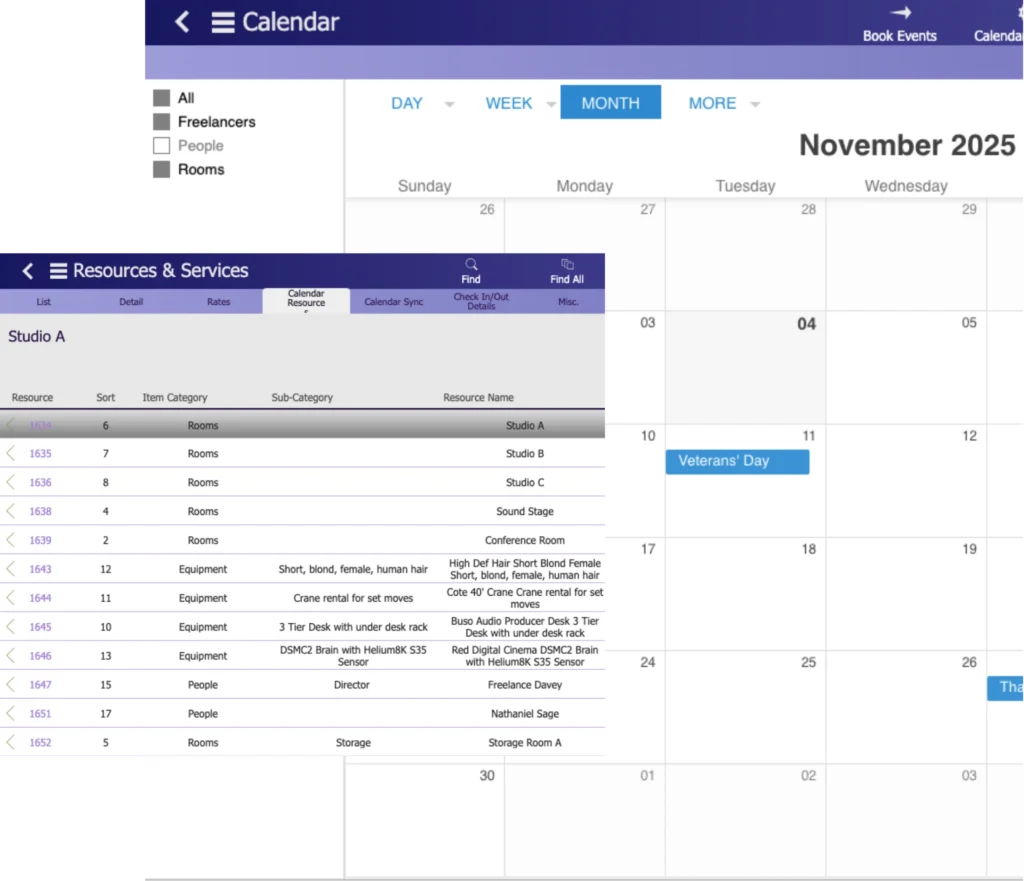
Your film production equipment list should show every piece of gear your studio owns, rents, assigns, or maintains across a shoot. It should also show where each item is, what condition it is in, who has it, and when it comes back.
For a one-off production, a spreadsheet might be enough. But when your studio is running multiple productions, your production equipment list has to do more than store gear names. It needs to connect inventory, scheduling, budgets, rentals, maintenance, and department accountability.
That is when equipment tracking stops being a gear-room task and becomes part of how your studio operates.
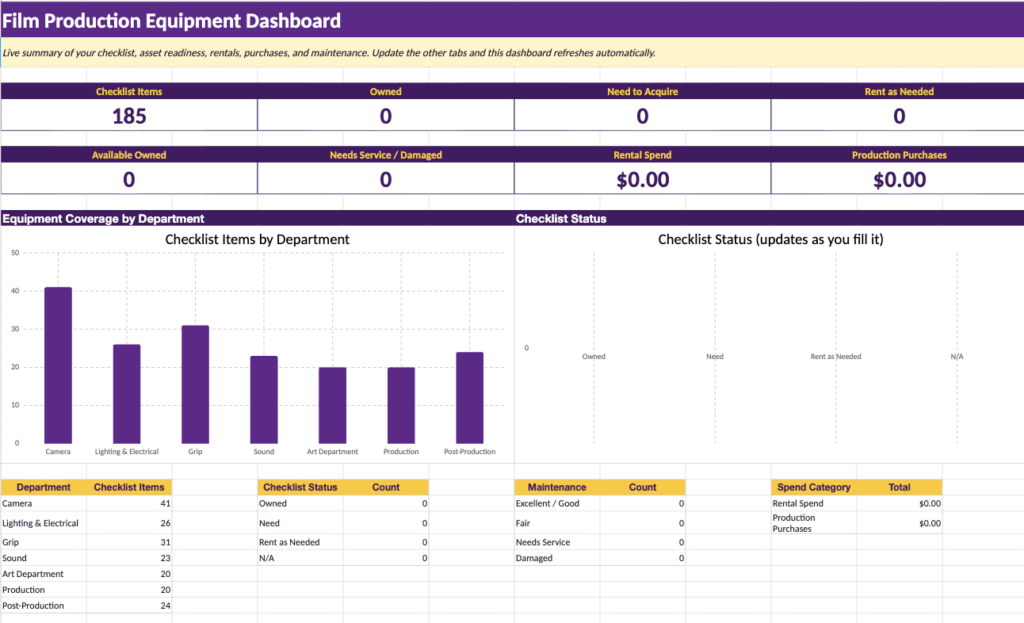
What Your Film Production Equipment List Should Include
Your film production equipment list should include every physical asset your team uses before, during, and after production. That includes camera gear, lenses, lighting, grip equipment, sound gear, production department equipment, art department tools, post-production hardware, and rented items.
Complete Film Production Equipment List by Department
| Department | Equipment to Track |
| Camera Equipment List | Camera bodies, lenses, camera support, monitors, batteries, media cards, filters, wireless video |
| Lighting and Electrical Equipment List | Fixtures, generators, distribution boxes, cables, dimmers, DMX systems, stands, diffusion, gels |
| Grip Equipment List | Dollies, track, cranes, rigs, clamps, stands, overhead frames, flags, nets, silks |
| Sound Equipment List | Field recorders, microphones, wireless systems, boom poles, timecode gear, monitoring kits |
| Art Department Equipment List | Tools, props, set dressing, fabrication gear, scenic supplies, special effects equipment |
| Production Department Equipment List | Walkie-talkies, monitors, office gear, vehicles, safety equipment, first aid kits |
| Post-Production Equipment List | Editing workstations, RAID and NAS storage, backup systems, reference monitors, color grading hardware, audio workstations |
| Rented Equipment List | Rental house gear, pickup and return condition, rates, rental dates, damage records |
Use the breakdown below as a working checklist, then adjust it to match the way your studio shoots, rents, and stores gear.
Camera Department Equipment
Your camera department usually carries the most expensive and technically sensitive equipment on a production. Camera gear should be tracked at the individual item level, especially when your studio owns camera bodies, lenses, batteries, monitors, media, or specialty support systems.
Camera Bodies
- Digital cinema camera bodies
- Backup camera bodies
- Viewfinders
- On-board monitors
- Battery plates and power accessories
- Camera body serial numbers
- Firmware versions
- Service and repair records
A camera body should never appear in your equipment list as a generic line item. Each body needs its own record because condition, usage history, sensor issues, firmware, and service history can affect whether it is safe to deploy.
Lenses
- Prime lens sets
- Zoom lenses
- Anamorphic lenses
- Macro lenses
- Tilt-shift lenses
- Specialty lenses
- Lens caps, cases, and accessories
- Serial numbers
- Calibration records
- Condition notes
Your lens records should include more than the lens name. Scratches, fungus, mount damage, focus ring issues, and calibration problems should be logged before the lens goes back into circulation.
Camera Support and Movement
- Tripods
- Fluid heads
- Shoulder rigs
- Handheld rigs
- Steadicam systems
- Gimbals
- Dollies
- Track
- Remote heads
- Crane or jib mounts
- Vehicle mounts
- Underwater housings
Support equipment often moves between departments or units, which makes tracking important. If your team assigns a dolly, gimbal, or specialty mount to one production, another production should not be able to book it for the same day without a conflict warning.
Camera Accessories
- Matte boxes
- Follow focus systems
- Wireless follow focus units
- Lens filters
- Filter trays
- Wireless video transmitters
- Wireless video receivers
- Video village monitors
- Clapper boards
- Production slates
- Camera reports
- Media management supplies
Accessories are easy to lose because they are smaller than the main camera package. Your team should still track them properly, especially when they are part of a larger kit.
Digital and Media Management
- Camera media cards
- Card readers
- On-set backup drives
- RAID systems
- DIT carts
- DIT workstations
- Color management hardware
- Data wrangling accessories
Media equipment needs tight accountability. A missing media card, failed drive, or untracked backup device can create a much bigger problem than a missing accessory.
Every camera item should sit inside your equipment tracking system with its own condition record, assignment history, and maintenance notes.

See StudioHero in Action
Book a personalized walkthrough for your studio.
Lighting and Electrical Equipment List
Your lighting and electrical departments manage a large number of items, many of which move between productions. Fixtures, cables, stands, power distribution, and control systems should all be tracked clearly.
Lighting Fixtures
- HMI fixtures by wattage
- LED panels
- LED tubes
- Flexible LED systems
- Tungsten fixtures
- Fresnels
- Practical lamp kits
- Balloon lights
- Softboxes
- Large area soft sources
Each fixture should be tracked by type, wattage, location, condition, and availability. A fixture that needs repair should not appear as available for the next production.
Power Distribution
- Generators
- Distribution boxes
- Breakout boxes
- Cable runs by gauge and length
- Extension cables
- Dimmers
- Lighting control boards
- Power conditioning equipment
- Surge protection equipment
Power equipment needs proper records because missing or damaged electrical gear can slow down a shoot quickly. It can also create safety issues.
Lighting Control and Accessories
- Wireless DMX systems
- DMX cables
- Flags
- Nets
- Silks
- Diffusion frames
- C-stands
- Grip heads
- Sandbags
- Ballast weights
- Gels
- Diffusion rolls
- Tape and expendables
Your team should separate lighting expendables from durable equipment. A C-stand is an inventory asset. A roll of gel is a production expense. Treating both the same creates messy inventory and unclear costs.
Grip Equipment List
Your grip equipment supports camera movement, rigging, shaping light, safety, and set control. Much of it looks simple, but losing track of grip gear can delay a shoot fast.
Camera Support
- Western dollies
- Doorway dollies
- Dolly track
- Curved track
- Jib arms
- Cranes
- Rigging systems
- Overhead rigs
- Wall mounts
- Vehicle mounts
- Aerial mounts
- Water mounts
Grip support gear is often shared between units. On a multi-unit production, the same track, crane, or rigging hardware may be needed by more than one team. Your studio scheduling system should connect directly to equipment availability so these conflicts are visible before the shoot day.
Grip Hardware
- Speed rail
- Pipe fittings
- C-clamps
- Pipe clamps
- Rigging clamps
- Matthews stands
- Century stands
- Cardellini clamps
- Baby plates
- Suction cup mounts
- Car mounts
Small grip hardware goes missing easily. Your team should still track it, either individually for higher-value items or as counted inventory for lower-value items.
Shading and Diffusion
- Overhead frames
- Butterfly frames
- Solids
- Silks
- Nets
- Blackwrap
- Duvetyne
- Scrims
- Cutters
Your grip equipment should be grouped by type, size, and condition. A damaged frame or missing fabric should be logged before the item returns to available inventory.
Sound Department Equipment List
Your sound equipment has its own tracking challenges. It includes high-value recording systems, small accessories, wireless frequency coordination, and fragile components that can affect the quality of production audio.
Recording Systems
- Multi-track field recorders
- Backup recorders
- Portable recorders
- Timecode generators
- Sync systems
- Audio bags
- Cables
- Adapters
- Power accessories
Recording systems should be tracked by configuration, channel count, format, and condition. Backup systems should also be listed, not treated as loose accessories.
Microphones
- Boom microphones
- Lavalier microphones
- Plant microphones
- Shotgun microphones
- Specialty microphones
- Microphone clips
- Shock mounts
- Windscreens
- Wind protection kits
Your microphone records should include condition notes because small faults can ruin production sound. Crackling, connector damage, weak mounts, or missing accessories should be logged.
Wireless Systems
- Wireless transmitters
- Wireless receivers
- IFB systems
- Wireless monitoring systems
- Frequency coordination equipment
- Antennas
- Batteries and chargers
Wireless equipment should be tracked by frequency band. If your studio runs multiple productions or units in the same location, frequency conflicts can affect the audio before anyone notices the real cause.
Boom Equipment
- Boom poles
- Fishpoles
- Pistol grips
- Shock mounts
- Windshields
- Boom accessories
Boom equipment looks simple, but damaged poles, missing mounts, or broken accessories can slow down your sound team immediately.
Related Reading:
- Film Production Studio Operations Checklist for Multi-Project Teams
- Film Production Workflow
- Film Production Crew Roles and Responsibilities
- Signs Your Film Production Studio Needs an All-in-One Studio Management Tool
Managing multiple productions, crews, schedules, and equipment? Explore Studio Hero’s film and video production management software.
Art Department Equipment List
Your art department manages a mix of durable tools, props, set dressing, consumables, and specialty materials. Not every item needs the same level of tracking, but the department still needs structure.
Construction and Fabrication
- Power tools
- Saws
- Drills
- Sanders
- Hand tools
- Paint equipment
- Sprayers
- Rollers
- Scenic finishing tools
- Fabrication equipment
Tools should be tracked by location, condition, and department ownership. Scenic supplies and paint materials should usually be treated as consumables.
Set Dressing and Props
- Set dressing inventory
- Props
- Hero props
- Background props
- Period-specific items
- Furniture
- Production vehicles where applicable
Props and set dressing need a practical tracking system. Some items are high-value or story-critical and need individual records. Others can be grouped by category.
Specialty Equipment
- Fog machines
- Wind machines
- Rain effects equipment
- Breakaway materials
- Mold-making tools
- Casting equipment
- Practical effects gear
Specialty equipment should include safety notes, usage requirements, and condition records. Some items also need trained operators or department approval before use.
A props and set dressing workflow should sit inside your broader inventory management system so your studio can reuse, locate, and account for assets across productions.
Production Department Equipment
Your production department equipment supports the daily operation of the set. It may not be as glamorous as camera or lighting gear, but missing production equipment causes real delays.
Office and Communication
- Production office computers
- Printers
- Tablets
- Walkie-talkies
- Base stations
- Walkie batteries
- Chargers
- Headsets
- Production phones
- Vans and transport vehicles
Your walkie-talkies need proper tracking. They move constantly, get handed between departments, and often disappear between productions.
On-Set Monitoring
- Video village monitors
- Director monitors
- Wireless video receivers
- Monitor stands
- Director tent setup
- Script supervisor workstation
- Playback equipment
Monitoring equipment is often shared between camera, production, and client-facing teams. Your tracking system should show who has it and which production it belongs to.
Safety Equipment
- First aid kits
- Medical supplies
- Fire extinguishers
- Safety harnesses
- Fall protection equipment
- PPE
- Health compliance equipment
Safety equipment should include inspection dates, expiry dates where relevant, and restocking status. A first aid kit that exists in your system but is empty on set is not useful.
Post-Production Equipment List
Your post-production equipment belongs on the studio equipment list too. Many studios track production gear carefully but forget about edit suites, storage systems, software seats, and delivery hardware.
Editorial
- Editing workstations
- Laptops
- External storage
- RAID systems
- NAS systems
- Backup drives
- Archival storage
- Calibrated monitors
- Audio monitors
- Editing peripherals
- Control surfaces
Editorial equipment should be tracked by specification, software setup, user assignment, storage capacity, and availability.
Color Grading
- Color grading workstations
- GPU systems
- Reference monitors
- Calibration tools
- Color panels
- Color management hardware
- Certification records
Color grading equipment needs more than basic inventory data. Monitor calibration and certification records matter because they affect technical delivery standards.
Sound Post-Production
- Pro Tools workstations
- Audio interfaces
- Studio monitors
- Acoustic treatment equipment
- ADR recording equipment
- Foley equipment
- Microphones
- Control surfaces
Post-production sound equipment should be tracked by room, workstation, software setup, and session availability.
Delivery and Archive
- Encoding workstations
- Hardware encoders
- LTO tape systems
- Archive drives
- Quality control monitors
- Delivery storage
Post-production equipment also requires software license tracking. An editing workstation is not just a computer. It may depend on editing software, plugins, storage access, color tools, audio tools, and renewal dates.
Your post-production studio management workflow should include both hardware inventory and software license visibility.
How to Structure Owned, Rented, and Production-Specific Equipment
Your equipment list should separate gear by ownership type. Owned equipment, rented gear, and production-specific purchases all behave differently in scheduling, budgeting, and accounting.
Owned inventory includes equipment your studio has purchased outright. These items belong to your studio, can be assigned across productions, and usually need condition tracking, maintenance records, and depreciation data.
Rented equipment includes gear your team brings in from rental houses for a specific production or shooting period. These items need rental dates, rates, pickup records, return records, and damage documentation.
Production-specific purchases include consumables or one-off items bought for a single project. These may include gels, tape, scenic materials, props, breakaway materials, expendables, and other items charged directly to the production budget.
Your inventory management setup should make these categories clear. A rented lens, an owned lens, and a production-specific expendable should not sit in your system as if they carry the same operational or financial meaning.
What Information to Track for Each Item
Your equipment list should do more than name the item. Each record should include the information your team needs to make scheduling, budgeting, maintenance, and assignment decisions.
For owned equipment, track:
- Item name
- Department
- Category
- Serial number
- Purchase date
- Current location
- Current condition
- Assigned production
- Assigned crew or department
- Availability status
- Maintenance history
- Last service date
- Next service date
- Replacement notes
For rented equipment, track:
- Rental house
- Rental contact
- Pickup date
- Return date
- Daily or weekly rate
- Total rental cost
- Assigned production
- Assigned department
- Pickup condition
- Return condition
- Damage notes
- Extension history
- Budget allocation
For production-specific purchases, track:
- Item name
- Production
- Department
- Quantity
- Cost
- Purchase date
- Vendor
- Usage status
- Remaining quantity where relevant
The more active productions your studio runs, the more important this structure becomes. Without it, your equipment list turns into a static document instead of a working system.
Rented Equipment Tracking Checklist
Your rented equipment needs separate attention because it creates cost, liability, and return obligations. Every rented item should be tracked from pickup to return.
For every rented item, your studio should record:
- Rental house and contact information
- Rental period start and end dates
- Daily or weekly rate
- Total rental cost
- Production and department allocation
- Condition at pickup
- Condition at return
- Photos where needed
- Damage charges
- Extension requests
- Budget impact
Rented gear should connect to studio budgeting so your producers can see rental costs while the production is still active. If a rental extends because the schedule changes, the budget should update before the final invoice arrives.
This matters most when your studio is running several productions at once. Rental cost overruns often happen quietly, especially when returned gear is not logged promptly or extensions are handled through email instead of a central system.
Maintenance and Condition Tracking Checklist
Your equipment condition tracking prevents faulty gear from going out on the next shoot. It also gives your studio a record of what happened, when it happened, and whether the item should be repaired, replaced, or removed from circulation.
A maintenance record should include:
- Last service date
- Service provider
- Current condition
- Known faults
- Repair status
- Scheduled maintenance
- Deployment history
- Total usage hours where relevant
Condition tracking matters for both owned and rented gear. For owned gear, it helps your studio plan repairs and replacements. For rented gear, it protects your team from unclear damage claims.
A live studio equipment management system should keep maintenance records besides assignment history and availability. If an item is marked damaged, it should not appear as available for the next production.
Connecting Your Equipment List to Scheduling and Budgeting
An equipment list that sits alone is just an inventory document. A useful studio equipment list connects to your production schedule.
When your team assigns a camera package to one production, it should become unavailable for every other production during that same period. When it comes back and passes a condition check, it should return to available inventory. The same logic applies to lighting kits, grip equipment, sound gear, monitors, vehicles, and post-production workstations.
This connection also affects budgets. If your team assigns rented equipment to a production, the rental cost should flow into that production’s cost tracking. If the shoot extends and the rental period changes, the budget impact should be visible before the invoice arrives.
Equipment also connects to people. A camera body, lens package, lighting rig, or sound kit may be assigned to a department head, operator, assistant, or production manager. That is why crew management and equipment management should not live in separate systems.
If your studio runs multiple productions, this is the difference between knowing and guessing. Shared gear, shared crew, and changing schedules create conflicts quickly. A connected studio operations management system gives your team one view of what is available, what is booked, what is damaged, what is returning, and what is already affecting the budget.
Why Equipment Tracking Matters for Studio Operations
Equipment tracking affects more than the gear room. It touches scheduling, budgeting, production continuity, client delivery, and department accountability.
When your team tracks equipment only at the production level, your studio loses the full picture. One team may think a camera package is available because their spreadsheet says so. Another team may already have it booked. A rental may sit unused for two extra days because no one logged the return. A damaged item may go back on the shelf without a note, then fail on the next shoot.
These are common shared equipment tracking mistakes in studios managing more than one production. They are avoidable when every asset connects to the schedule, budget, and production assignment.
Equipment problems also create wider production tracking gaps. A missing monitor is not just a missing monitor. It can delay client review. A double-booked dolly is not just a gear issue. It can force a schedule change. A rented item returned late is not just admin. It becomes a budget problem.
That is why equipment tracking needs to sit inside your studio’s operating system, not inside a disconnected spreadsheet.
Manage Your Production Studio Equipment with Studio Hero
Studio Hero helps your film production studio manage equipment as part of a connected studio workflow.
Instead of keeping a static list in a spreadsheet, your team can track owned inventory, rented gear, condition records, maintenance history, assignments, availability, and production usage in one place.
The value is not just knowing what equipment exists. It is knowing what equipment is available, what is booked, what is damaged, what is costing money, and what is connected to each production schedule.
With our in-built equipment tracking and inventory management capabilities, your team has a clearer way to manage camera packages, lighting rigs, grip equipment, sound gear, production equipment, post-production hardware, and rental items across multiple active productions.
Wrapping up
Your film production equipment list should not be a static document that someone updates when they remember. It should be a live record of every asset your studio owns, rents, uses, maintains, and assigns.
For small productions, a spreadsheet may be enough. For a studio managing shared equipment across multiple productions, your list needs to connect to scheduling, budgeting, maintenance, rentals, and crew responsibility. The real goal is simple: know what you have, where it is, who has it, what condition it is in, and whether it is available for the next production.
That is what turns an equipment list into an equipment management system.
Frequently Asked Questions
Your film production equipment list should include camera gear, lenses, lighting, grip equipment, sound gear, art department tools, production equipment, post-production hardware, and rented items. Each item should be tracked by condition, location, availability, assignment, and maintenance status.
Film production studios track equipment across multiple productions with a centralized inventory system connected to the production schedule. When gear is assigned to one production, its availability should update across every other active production.
Owned inventory is gear your studio has purchased and can reuse across productions. Rented equipment comes from a rental house for a defined period and needs rental dates, rates, return tracking, and condition documentation.
Equipment condition tracking prevents damaged or faulty gear from being sent to set. It also helps your studio plan maintenance, document damage, manage repairs, and decide when equipment should be replaced.
Equipment tracking connects to budgeting when rental costs, equipment assignments, damage charges, and extended rental periods are allocated to the correct production budget. This helps producers see equipment costs before they become invoice surprises.
Common mistakes include double-booking shared gear, failing to log damaged equipment, losing track of rented items, extending rentals unnecessarily, and managing owned and rented equipment in disconnected spreadsheets.
SEE STUDIO HERO IN ACTION
Run every production from one place.
Coordinate schedules, crews, equipment, budgets, and projects without relying on disconnected tools.