Photography studios can prevent double bookings by checking the room, shoot time, assigned people, and required equipment before confirming any session. Every request, tentative hold, confirmed shoot, maintenance period, and schedule change must appear in the same studio calendar so availability reflects what the team can actually deliver.
A room may look available while the photographer assigned to the shoot is already booked elsewhere. A lighting kit may sit in the equipment room but remain reserved for an outdoor campaign. Two sessions may have different start times yet still conflict because the first shoot needs another hour for teardown and room reset.
That is why photography studio double bookings cannot be treated as ordinary appointment clashes.
StudioHero gives photography teams one place to schedule rooms, photographers, assistants, equipment, client requests, and production work. Instead of checking separate calendars and message threads, teams can review the resources attached to each shoot before approving the booking.
What Counts as a Double Booking in a Photography Studio?
The most obvious double booking happens when two clients receive the same room at the same time. Busy studios face several other conflicts that can be just as disruptive.
A shoot may become double-booked when:
- Two sessions require the same cyclorama or shooting room.
- One photographer is assigned to overlapping projects.
- Separate teams reserve the same lighting package, lens kit, or tethering station.
- A confirmed session overlaps with setup or teardown work for another shoot.
- A room appears open even though it has been blocked for maintenance.
- A client reschedules, but the crew and equipment reservations remain on the old date.
- A recurring shoot reserves the room but not the photographer or gear needed for each session.
Each conflict comes from the same mistake: the studio confirmed a date without checking every resource needed to complete the work.
A photography booking should represent the full shoot, not just the time a client expects to stand in front of the camera.
Why Photography Studio Booking Conflicts Happen
Double bookings rarely come from one dramatic mistake. They usually build through small gaps in the booking process.
One coordinator records sessions in Google Calendar. A photographer keeps personal assignments on another calendar. Equipment reservations live in a spreadsheet. Client holds remain buried in email. Studio maintenance gets mentioned in a group chat but never added to the booking schedule.
Each person may believe the calendar is accurate, but nobody sees the complete booking.
Informal confirmations create another problem. A client asks whether Friday afternoon is open, and someone replies that it should be fine. The studio then treats the conversation as a tentative booking, while another employee sees the open calendar and confirms the room for someone else.
Last-minute changes make these gaps worse. A session moves by two hours, a photographer calls in sick, or a product shoot needs extra lighting. Unless every connected reservation changes with the shoot, the calendar no longer reflects the actual plan.
Record Every Booking, Hold, and Block in One Calendar
Every activity that affects studio availability needs a calendar entry.
That includes:
- Confirmed client shoots
- Tentative booking holds
- Internal test shoots
- Equipment preparation
- Room maintenance
- Staff training sessions
- Setup and teardown periods
- Recurring client bookings
- Location shoots that remove crew or gear from the studio
A calendar that shows only confirmed client sessions leaves too much hidden. The room might appear open even though staff need it for lighting tests or backdrop installation. A camera package may seem available while it is already assigned to location work.
A shared studio scheduling system gives the team a clear view of rooms, people, gear, and blocked time before anyone confirms a new request.
The calendar also needs a named owner. Several employees may create or update bookings, but one role should control final approval rules and resolve conflicts. Without that responsibility, staff may assume someone else checked availability.
Give Every Booking a Clear Status
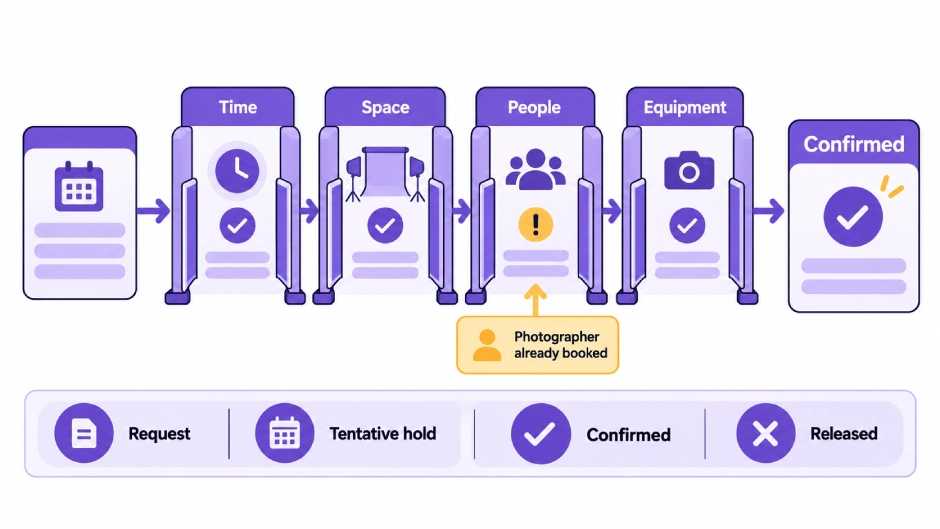
Booking requests, temporary holds, and confirmed shoots are not the same thing.
A useful photography studio booking process should separate them clearly.
Booking Request
The client has asked for a date, room, service, or equipment package. The studio has not approved the request yet.
Tentative Hold
The studio has reserved the requested resources for a limited period while waiting for a deposit, contract, production brief, or client decision.
Confirmed Shoot
The studio has approved the booking and reserved the required time, room, people, and equipment.
Cancelled or Released
The studio has removed the reservation and returned the resources to available status.
When staff cannot distinguish these stages, they either block too much studio time or sell time that another client believes they hold.
Tentative bookings need clear expiration rules. A hold should not remain on the calendar forever because nobody followed up. Once the hold expires, the room and related resources should return to available status.
Confirmed shoots also need an identifiable record of who approved them and when. This prevents two employees from making separate promises based on different information.
Check Time, Space, People, and Equipment Before Confirmation
Every photography booking should pass four checks.
1. Time
Check the full production window, not only the scheduled camera time.
The booking may require client arrival, wardrobe preparation, lighting setup, test shots, shooting, file transfer, teardown, cleaning, and room reset. A session booked from 10:00 a.m. to noon may occupy the room much longer.
2. Space
Confirm each area required by the production.
A fashion shoot may need the main stage, a changing room, a makeup area, and a client review space. A product photography session may need a prep table, prop storage access, and an edit station.
The main room can be available while a supporting space remains booked.
3. People
Check the availability of every assigned person.
That may include the photographer, assistant, producer, stylist, makeup artist, model, digital tech, retoucher, or studio manager.
A room reservation does not guarantee that the right team can support the shoot.
4. Equipment
Confirm cameras, lenses, lights, stands, backdrops, modifiers, grip equipment, tethering systems, batteries, and portable kits.
The equipment must remain available throughout preparation, shooting, and return. Gear expected back at noon should not be promised for a 12:00 p.m. shoot without enough time for inspection and setup.
A booking should stay pending until all four checks pass.
Reserve Every Required Resource Under the Same Shoot
Many studio conflicts begin when staff book the room first and plan to assign people and gear later.
That creates a false sense of certainty. The client receives confirmation, but the studio still has to find an available photographer, assistant, lighting setup, or camera package.
Instead, the booking record should contain:
- Client and project name
- Shoot type
- Date and full time block
- Shooting room or cyclorama
- Prep and support spaces
- Assigned photographer and crew
- Equipment package
- Setup and reset requirements
- Booking status
- Client notes and attached production details
Linking these details makes conflicts visible before the client arrives.
StudioHero’s photography studio management software connects studio scheduling with crew assignments, equipment availability, client requests, project details, and operational planning. A coordinator can review the shoot as a complete production booking rather than a room entry with missing information.
Include Setup, Teardown, and room reset time.
Back-to-back sessions often look efficient on a calendar. They can become impossible once the team accounts for the work between shoots.
A portrait session may need only a modest lighting change. A fashion shoot could require wardrobe racks, makeup stations, large modifiers, a different backdrop, prop movement, and several test frames before the next client enters.
Product studios face another version of the problem. One team may leave a large set in place while the next booking requires the same table, surface, rig, or shooting angle.
The calendar should block enough time for:
- Lighting and equipment setup
- Background or set changes
- Client and talent arrival
- Equipment testing
- Data transfer or backup
- Teardown
- Cleaning and room reset
There is no universal buffer that fits every photography studio. The time depends on the room, shoot type, set design, crew size, and equipment involved.
Studios should define standard preparation rules for common session types, then adjust the time when a production requires more work.
Keep Crew Availability Connected to the Studio Schedule
A photography studio may have several open rooms but only one photographer who can handle a specific client, lighting style, or production type.
Crew scheduling must account for more than the visible shoot time. Staff may need time for preparation, travel, equipment checks, client meetings, or file review after the session.
Freelancers add another layer. A stylist or digital tech may accept work from several studios, and their availability can change quickly. The booking team should verify their commitment before presenting the shoot as confirmed.
StudioHero’s crew management software keeps profiles, roles, rates, availability, and assignments connected to studio projects. This helps the coordinator see whether the selected photographer, assistant, or specialist already has another commitment.
If someone becomes unavailable, update the assigned person inside the booking. Do not leave the original name in place while discussing the replacement through email or chat.
Match Equipment Reservations to Shoot Times
Equipment conflicts can stop a production even when the studio room and crew are ready.
A camera body may be assigned to a location shoot. A lens could be under repair. A lighting kit may have returned late, or one of its parts may be missing. Portable equipment might still be packed in a vehicle from the previous job.
Every equipment reservation should include the period needed for preparation, checkout, use, return, inspection, and repacking.
Studios should also reserve kits as complete packages where possible. A lighting package is not ready if the heads are available but the required stands, modifiers, triggers, or cables are booked elsewhere.
Using equipment tracking software alongside the studio calendar helps teams see where gear is, who has it, when it should return, and whether it is ready for the next shoot.
Maintenance status must affect availability as well. Equipment marked for repair, calibration, cleaning, or inspection should not appear bookable until staff return it to service.
Control Client Booking Requests Before Confirming Them
Online booking can reduce phone calls and email exchanges, but photography studios should not treat every client request as an instant confirmation.
A basic appointment calendar may check only the selected room or time. A commercial shoot can depend on several spaces, multiple crew members, equipment packages, and preparation work.
Clients should be able to request:
- Preferred date and time
- Shoot type
- Studio room
- Expected duration
- Crew support
- Equipment needs
- Setup notes
- Reference files or production briefs
The studio can then review actual availability before approving the request.
StudioHero’s client booking portal lets clients submit detailed booking requests that connect with scheduling and project workflows. The team can review the request, check conflicts, and process it into a confirmed project once the necessary resources are available.
Confirmation emails should go out only after that review. A request received online should remain a request until the studio approves it.
Review Every Occurrence in a Recurring Booking
Recurring bookings are common in e-commerce, catalog, brand content, school photography, and ongoing client work.
A weekly booking may reserve the same room every Tuesday, but that does not guarantee the same photographer, assistant, equipment package, or prep area remains available for every date.
Each occurrence should reserve the complete resource set.
The same rule applies to productions that run across several days. A three-day campaign may use one room throughout but change crew, gear, call times, or support spaces each day.
Copying the first session without checking later dates can create conflicts that remain hidden for weeks.
Review recurring shoots when:
- Staff schedules change
- Equipment leaves for repairs.
- A client extends the production
- The studio adds another large booking
- A room closes for maintenance
- The shoot requirements change
“Recurring” does not mean “fixed forever.”
Recheck Availability After Every Schedule Change
A confirmed booking can become a conflict after the client changes the time, date, room, crew, or production scope.
Moving the calendar entry is not enough. The studio must check every connected resource again.
Suppose a client moves a product shoot from the morning to the afternoon. The room may still be free, but the photographer could have another assignment. The lighting kit may be booked for a location job. The prep area might already support another production.
A change process should include:
- Record the client’s requested change.
- Return the booking to pending review.
- Check time, space, people, and equipment again.
- Confirm any replacement resources.
- Update the complete booking.
- Send the revised confirmation.
Staff should never promise the new time before completing these checks.
What to Do When a Double Booking Has Already Happened
Act quickly, but do not contact the client before understanding the full conflict.
Start by identifying the exact resource involved. Is the problem the room, photographer, crew member, equipment package, or preparation space?
Then check the status of both bookings. A confirmed paid session carries a different commitment than an expired hold or incomplete request.
Look for a workable replacement. Another room may support the production. A qualified photographer could take the assignment. A comparable lighting package may be available. The studio might adjust setup time without affecting the client’s shoot.
Once the team has a realistic option, contact the affected client directly. Explain the change, offer the specific resolution, and confirm the updated plan in writing.
After resolving the immediate issue, record why it happened. Perhaps someone confirmed a booking without checking gear, a tentative hold had no expiration date, or a reschedule updated the room but not the crew.
Fix the booking rule, not only the calendar entry.
Photography Studio Double Booking Prevention Checklist
Before confirming a shoot, verify that:
- The booking appears on the main studio calendar.
- Its status is clear.
- The full production time includes preparation and reset.
- Every required room and support area is available.
- The photographer and crew have accepted the assignment.
- Equipment remains available for the full booking period.
- Gear under repair or inspection is blocked.
- Recurring sessions reserve resources on every date.
- Client changes trigger another availability check.
- Tentative holds have an expiration date.
- One person has authority to approve the booking.
- The client receives confirmation only after all checks pass.
Prevent Conflicts Before They Reach the Client
A busy photography studio cannot prevent double bookings by checking room availability alone. Every shoot depends on time, space, people, equipment, and preparation work that must remain available together.
Separate calendars and informal messages hide those dependencies. A connected booking process exposes them before the studio makes a promise it cannot keep.
StudioHero brings room scheduling, crew assignments, equipment tracking, client requests, and photography project details into one system. Your team can check the complete production plan, catch conflicts earlier, and confirm shoots with fewer last-minute surprises.
Book a StudioHero demo to see how your studio can manage bookings, rooms, photographers, crew, and equipment in one place.