A photography studio booking workflow starts when your team records the client inquiry, collects the shoot requirements, checks room, crew, and equipment availability, sets the price, and records the client’s approval. The shoot becomes confirmed only after every required resource has been reserved for the full production time.
A client asks whether your main cyclorama is free next Thursday. The answer depends on more than the room calendar because the shoot may also need a photographer, assistant, lighting package, makeup area, setup time, and space for teardown. Confirming the date before checking those details creates a weak booking.
StudioHero gives photography studios one place to handle client requests, room availability, crew assignments, equipment reservations, project details, and later billing work. Our photography studio management software keeps the booking tied to the work your team has agreed to deliver, rather than leaving parts of the shoot across emails, spreadsheets, and separate calendars.
A reliable photography studio booking process should move through ten clear stages.
Stage 1: Record the Inquiry Before Anyone Promises a Date
Photography inquiries arrive through website forms, email, phone calls, repeat clients, agencies, producers, and direct messages. The channel can vary; the review process should not.
Record every request before checking availability or discussing a final price. Collect the client name, company, contact details, shoot type, preferred and alternate dates, expected duration, team size, and a short project description.
Production-heavy shoots need more detail, including room type, set build, power needs, talent, wardrobe, loading, equipment, client attendance, and delivery expectations. Let clients attach a brief, shot list, mood board, floor plan, or reference images when those files affect the setup.
StudioHero’s client booking portal lets clients submit structured requests for rooms, dates, crew, gear, and other production needs. Your booking team can review the request before it reaches the production calendar.
An inquiry is a request for information or availability. It is not a reservation, even when the client says they are ready to proceed.
Stage 2: Resolve Missing Details
A request that says, “We need the studio all day for a product shoot,” does not contain enough information to reserve resources or prepare accurate pricing.
What does all day mean? How many products will arrive? Does the client need tabletop space, a full set, a white cyclorama, continuous lighting, strobes, tethering, a photographer, or only the room? Will a stylist, agency team, or brand representative attend? Does the studio need time before the client arrives to build the set?
Your coordinator should close those gaps before moving the inquiry forward. Otherwise, the studio may quote for room use while missing setup time, equipment, crew, overtime, or a separate prep area. Keep supplied details, attachments, and later decisions under the same request so nobody has to reconstruct the booking from email.
Stage 3: Check the Full Production Window
The requested shoot time is only one part of the booking.
Suppose a client wants to shoot from 10:00 a.m. to 2:00 p.m. Your team may need access at 8:30 a.m. for lighting, background installation, equipment testing, and product staging. After the client leaves, the room may remain occupied for teardown, cleaning, file backup, and reset.
The real booking could therefore run from 8:30 a.m. to 3:30 p.m.
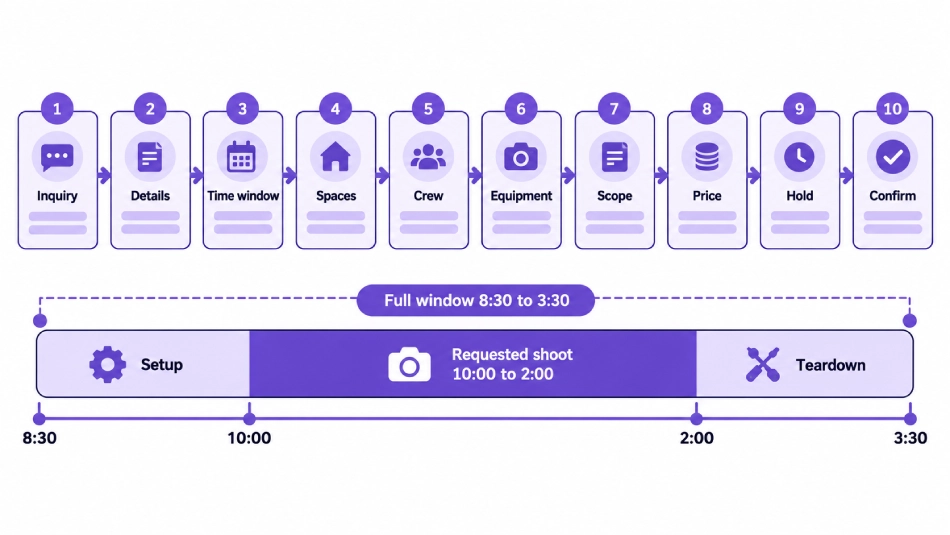
Check the complete period against your studio scheduling software, including requests, temporary holds, confirmed shoots, internal work, maintenance, and blackout periods. Your studio scheduling best practices should also define who can place holds, who can confirm a shoot, and when calendar changes must be recorded.
Stage 4: Check Every Space the Shoot Will Use
Photography studios often check the main shooting room and forget the supporting areas.
A fashion booking may require the stage, a changing room, makeup station, wardrobe area, client lounge, and loading access. A catalog production might need a prep room for products, a holding area for completed items, and an edit station for live selects. Two shoots can use different stages and still compete for the same makeup area, freight access, or client review space.
List each required area under the booking and check it for the period it will actually be used. Room profiles with dimensions, ceiling height, power access, installed lighting, backdrops, rates, and photographs also help the coordinator confirm that the space suits the work.
Stage 5: Confirm Photographer and Crew Availability
A free room does not mean the studio can deliver the shoot.
The request may depend on a named photographer, an assistant familiar with the equipment, a digital tech, a producer, a stylist, a makeup artist, a model, a set builder, or a retoucher. Check their availability before sending a final booking summary.
Availability should cover preparation, the shoot, breaks, travel where relevant, teardown, and later work already promised. StudioHero’s crew management software keeps roles, rates, availability, and assignments connected to the studio schedule, so the coordinator can spot another commitment before confirmation.
Do not confirm a freelancer based on an unread message or an old availability note. Record their acceptance under the shoot.
Stage 6: Reserve the Required Equipment
Now check the cameras, lenses, lighting kits, stands, modifiers, grip equipment, tethering stations, backgrounds, cables, batteries, and portable kits named in the production plan.
Availability means the item is not booked elsewhere, checked out, missing a required component, or blocked for maintenance. Match the reservation to preparation, use, inspection, and repacking time. Gear returning from another location when setup starts is not safely available.
Equipment tracking software gives your team current checkout status, assignments, return times, storage locations, and maintenance records. Keep the equipment reservation attached to the shoot so a later date change triggers another gear check.
This stage is also where how to prevent double bookings in a busy photography studio becomes part of the workflow. A booking cannot pass simply because one calendar appears open. The room, people, and gear must all remain available together.
Stage 7: Turn the Request Into a Defined Scope
By this point, your team should know what the client asked for and what the studio must provide.
Write the booking scope in plain terms. Include the date, access time, shoot time, expected finish, assigned spaces, crew roles, equipment package, setup work, and any services the studio will supply. Mark items the client will bring so nobody assumes the studio has agreed to provide them.
A client may first request room rental, then add a photographer, assistants, lighting, product tables, or same-day selects. Those additions change availability and price. Record undecided items as pending and state what must happen before they can be added.
Stage 8: Set the Price Against the Agreed Scope
Pricing should follow the resource plan, not precede it.
Apply the correct room rate, crew rate, equipment charge, service fee, tax, discount, package, and overtime rule. A repeat client may have an agreed rate card; a large production may require a custom quote. Some studios charge by the hour, half day, full day, or package, while equipment and crew may follow different units.
If your team needs a structured starting point for room pricing, the studio rental rate calculator helps compare operating costs, target margins, and billable studio time before you set a rental rate.
The booking summary should state what the price covers and which extra hours, equipment, crew, set changes, cleaning, or damages may create further charges. After the shoot, approved rates and actual usage can move into studio invoicing software without rebuilding the job from memory.
Stage 9: Place a Temporary Hold With an Expiration
Some clients need time to approve a quote, arrange a purchase order, pay a booking fee, or confirm talent. A temporary hold can protect the requested slot while they complete that step.
The hold should cover the resources that make the shoot possible. Holding only the room creates a problem when the client expects the named photographer and lighting package to remain available too.
Every hold needs five details: the client, included resources, date and time, required next action, and expiration. It also needs an owner inside the studio.
When another client asks for the same slot, your team should know whether the first hold has priority and who must contact the client. Once the deadline passes, release the room, crew, and gear together unless an authorized person extends it.
Stage 10: Record Approval and Confirm the Shoot
A studio may require written approval, a signed agreement, a deposit, a purchase order, or another condition before confirmation. Your own policy decides the commercial requirement. The booking workflow decides how your team records it.
Before changing the status to confirmed, check the following:
- The client and project details are correct.
- The date includes setup, shooting, teardown, and reset.
- Every room and support area has been reserved.
- The photographer and required crew have accepted.
- Equipment has been reserved for the full usage period.
- Pricing and client approval appear in the record.
- The brief and supporting files are attached.
- One internal owner is responsible for the booking.
Once those checks pass, convert the request into a confirmed shoot or project. StudioHero can process an approved client request into a project, update the calendar, and keep the booking details connected to production work.
Send written confirmation with the date, access time, shoot time, location, booked spaces, crew, equipment, agreed charges, and any action still required. Give the internal team the same confirmed details, including call times and preparation duties.
Common Booking Workflow Failures
A weak process usually fails at the handoffs.
One person answers the inquiry, another checks the room, someone else discusses pricing, and the production team hears about the job after the client receives confirmation. Details get copied, attachments disappear, and assumptions replace written decisions.
Watch for these failures:
- Staff treat an inquiry as a reservation.
- The studio quotes before understanding the required setup.
- A coordinator checks the room but not the crew or gear.
- Temporary holds have no expiration.
- The client approves a revised date, but the calendar keeps the old one.
- Pricing changes without an updated booking summary.
- The production team receives the client brief too late.
- Staff create a new project by retyping incomplete inquiry details.
Fix the stage that allowed the error. Asking everyone to “be more careful” will not repair missing ownership, unclear statuses, or disconnected records.
Photography Studio Booking Checklist
Before closing the booking task, confirm that the inquiry is complete, the full time block has been checked, required spaces are reserved, crew members have accepted, and equipment remains available. Then verify the scope, rates, hold status, approval, attachments, owner, project record, and written confirmation.
A busy studio also needs to review how booking decisions affect capacity. The studio utilization calculator can help you compare available room hours with booked hours, which gives your team a clearer basis for schedule changes, pricing decisions, and future capacity planning.
Build a Booking Process That Holds Up Under Pressure
A photography studio booking should not depend on who answered the inquiry or which calendar they happened to check. Your process must carry the same client details, resource requirements, pricing, approvals, and files through every stage.
StudioHero connects client requests with room schedules, crew assignments, equipment reservations, production records, and billing data. Your team can move an inquiry into a confirmed shoot without losing the details that made the booking possible.
Book a StudioHero demo and see how your studio can manage each booking from the first request through final confirmation.