A photography booking form should collect the client’s contact details, session type, preferred date, alternate date, expected duration, room needs, crew requirements, equipment requests, attendee count, budget range, and supporting files. The form should also state that submitting a request does not confirm the session until the studio checks availability and approves the booking.
A name, email address, and preferred date are not enough for a busy photography studio.
Before your team accepts a session, you may need to check the shooting room, cyclorama, photographer, assistant, lighting package, prep area, makeup station, setup time, and client arrival schedule. Missing one of those details can lead to a weak quote, an unsuitable room, or a conflict that appears after the client thinks the date is theirs.
StudioHero helps photography studios collect client booking requests and connect them with scheduling, crew, equipment, and project records. Our photography studio management software keeps the request attached to the resources your team must review before accepting the work.
A useful photography session booking form should answer four questions:
- Who is requesting the session?
- What are they planning to photograph?
- Which studio resources will the work require?
- What still needs approval before the shoot can be confirmed?
Start With Client and Company Details
Your first group of fields should identify the person submitting the request and the business responsible for the project.
Include:
- Full name
- Company, brand, or agency name
- Email address
- Phone number
- Preferred contact method
- Billing contact, when different
- Returning client status
Commercial photography studios often work with several people from the same company. A producer may submit the request, a marketing manager may approve the quote, and an accounts contact may handle the purchase order.
Recording only one person’s name can create confusion later. Your form should identify the working contact and give the client space to add a separate billing or approval contact where needed.
Do not collect information your team will never use. A shorter form with the right questions will produce better submissions than a long form filled with generic fields.
Ask What Type of Photography Session They Need
The session type affects almost every later decision.
Use a selection field with options that match the work your studio accepts. Common choices include:
- Portrait session
- Corporate headshots
- Product photography
- Ecommerce photography
- Fashion or editorial shoot
- Commercial campaign
- Food photography
- Test shoot
- Studio rental
- Other
Add a short description under each choice when clients may not know which category fits their work.
The selected session type should also control which later questions appear. A headshot client does not need to answer questions about product delivery and tabletop surfaces. A fashion production may need model counts, wardrobe space, makeup stations, and changing areas.
Conditional fields keep the photography booking form manageable without removing questions your team needs.
Collect a Short Project Description
Give the client a text field that asks what they plan to photograph and how they expect to use the images.
A useful prompt could read:
“Tell us what you are photographing, how the images will be used, and anything that may affect the room, setup, crew, or equipment.”
This question often reveals requirements that a list of checkboxes will miss.
A client may mention that the shoot involves reflective products, a large group, confidential packaging, moving talent, food preparation, or an overhead camera position. Each detail can affect the room, equipment, crew, time, and price.
Keep the prompt specific. A field labeled “Tell us about your project” may produce a vague answer that does not help your booking coordinator.
Request a Preferred Date and an Alternate Date
Your photography session booking form should ask for more than one possible date.
Include:
- Preferred date
- Alternate date
- Preferred start time
- Timing flexibility
- Expected shooting duration
- Final delivery deadline
- Campaign, launch, or publication date where relevant
An alternate date helps your studio respond without another round of messages when the first choice is unavailable.
The deadline also matters. A client may request a session next month but need finished images two days later. That timing may affect photographer availability, retouching support, room choice, or whether your team can accept the work.
Make it clear that the requested date remains pending until your studio reviews it against the studio scheduling calendar.
Ask About Setup and Teardown Requirements
Clients often estimate only the time spent taking photographs.
Your booking form should ask what needs to happen before and after the session. Relevant options may include:
- Lighting setup
- Set construction
- Product preparation
- Wardrobe setup
- Hair and makeup
- Background installation
- Equipment testing
- Client review station
- File backup
- Set removal and room cleaning
Do not expect the client to calculate the final booking period. Ask what activities the production requires, then let your team decide how much time to reserve.
A two-hour shoot may occupy the room for four hours once preparation and reset are included. Recording those needs early protects the next booking and gives your team a more accurate basis for pricing.
Your wider studio scheduling best practices should define how your team adds preparation, teardown, maintenance, and internal work to the calendar.
Collect Studio Room and Space Requirements
A photography studio booking may involve more than the shooting area.
Include fields for:
- Preferred room or stage
- White cyclorama
- Colored background
- Tabletop shooting area
- Product preparation space
- Hair and makeup area
- Changing room
- Client seating or review space
- Loading access
- Storage during the session
- Accessibility requirements
- Number of people attending
The number of attendees affects room capacity, seating, access, safety, and support space. A room that works for one photographer and one client may not suit a campaign attended by talent, stylists, agency staff, and brand representatives.
You can also ask whether the client needs a particular ceiling height, power supply, floor area, or installed lighting setup. These details help your coordinator match the work to the right room before discussing confirmation.
Ask Which Crew Roles the Client Needs
Some clients arrive with a complete production team. Others expect the studio to provide the photographer and support staff.
Let the client request roles such as the following:
- Photographer
- Photography assistant
- Digital tech
- Producer
- Stylist
- Hair and makeup artist
- Model
- Set builder
- Retoucher
- Production assistant
- Other support
Include a field for preferred or named crew members when repeat clients regularly request the same person.
The form should state that requested crew remain subject to availability. A client selecting a photographer does not reserve that person automatically.
StudioHero’s crew management software connects crew profiles, roles, rates, availability, and shoot assignments. Your booking coordinator can check whether the requested photographer or specialist is available before accepting the session.
Collect Equipment and Technical Requirements
A client may need only the room, or the request may depend on a complete camera and lighting package.
Use selectable fields for equipment such as:
- Camera bodies
- Lenses
- Strobe lighting
- Continuous lighting
- Modifiers
- Light stands
- Grip equipment
- Tethering station
- Backdrops
- Product tables
- Portable kits
- Studio furniture or props
Ask which equipment the client will bring. This prevents your team from reserving gear unnecessarily or assuming the client will supply something the studio needs to provide.
Use an open field for technical requirements that do not fit the list. Examples include high speed capture, overhead rigs, turntables, special power needs, or a specific camera system.
Every requested item must be checked against existing reservations, current checkouts, and maintenance status. StudioHero’s equipment tracking software helps your team see where gear is, who has it, when it should return, and whether it is ready for use.
Ask About Subjects, Products, and Attendees
Different photography sessions need different intake questions.
Portraits and Headshots
Ask for the number of people, outfit changes, age groups where relevant, makeup requirements, accessibility needs, and preferred background style.
Product Photography
Ask for the number of products, approximate dimensions, weight, assembly needs, surface requirements, handling instructions, delivery date, pickup plan, and whether the products will remain onsite.
Fashion and Editorial Photography
Ask for the number of models, wardrobe volume, changing requirements, makeup stations, agency contacts, arrival schedule, and whether fittings will happen before the shoot.
Ecommerce Photography
Ask for the product count, number of views per product, background requirements, model use, styling needs, naming rules, and expected image volume.
Studio Rentals
Ask for the client crew size, activities planned, equipment brought onsite, room setup, access time, and any outside vendors.
These conditional fields help your studio understand the workload before anyone quotes or reserves resources.
Add File Upload Fields
Clients should be able to attach files that help your team review the request.
Useful uploads include:
- Creative brief
- Mood board
- Shot list
- Reference images
- Brand guide
- Product list
- Set sketch
- Floor plan
- Draft call sheet
- Purchase order where applicable
File uploads reduce vague descriptions and help the coordinator spot missing room, crew, equipment, or setup needs.
Keep booking files separate from final production assets. RAW files, proofs, retouched images, and approved deliverables belong in the later project and media workflow.
Ask About Budget and Service Level
A budget field can help your team judge whether the requested scope matches the client’s expectations.
You can use a range instead of asking for an exact amount. You can also let clients choose the level of support they expect:
- Studio room only
- Room and equipment
- Room, crew, and equipment
- Full photography production support
- Custom quote
Make the budget field optional when simple sessions already follow published or fixed rates.
Your booking form should collect information, not calculate the final quote. Your team still needs to review room time, equipment, crew, preparation, overtime rules, and any client specific pricing.
Use our studio rental rate calculator to compare operating costs, billable hours, and target margin.
Collect Image Use and Delivery Expectations
The intended use of the images can affect the production plan and pricing discussion.
Ask for:
- Intended image use
- Expected number of final images
- File format requirements
- Retouching needs
- Delivery deadline
- Review and approval contact
- Rush delivery requirements
- Naming or export instructions
Do not let the form promise a delivery date automatically. Collect the requested deadline and review it against the shoot scope and production schedule.
The same applies to image counts and retouching. A client request is information your team must assess, not a confirmed production commitment.
Include a Field for Special Requirements
Give clients a place to report anything that could affect studio access, safety, setup, or approval.
Examples include:
- Large set pieces
- Animals
- Children
- Food preparation
- Freight delivery
- Confidential products
- Special power requirements
- Accessibility support
- Unusual props
- Smoke, water, paint, or other controlled effects
- Outside vendors
- Security requirements
A single comments box is useful, but specific checkboxes can help your team identify issues that clients may not think to mention.
Explain What Happens After Submission
Place a clear statement beside the submit button.
The message should tell the client that:
- The form submits a booking request.
- The requested date is not confirmed yet.
- Your team will review the room, crew, and equipment requirements.
- You may contact the client for missing information.
- The client will receive written confirmation after approval.
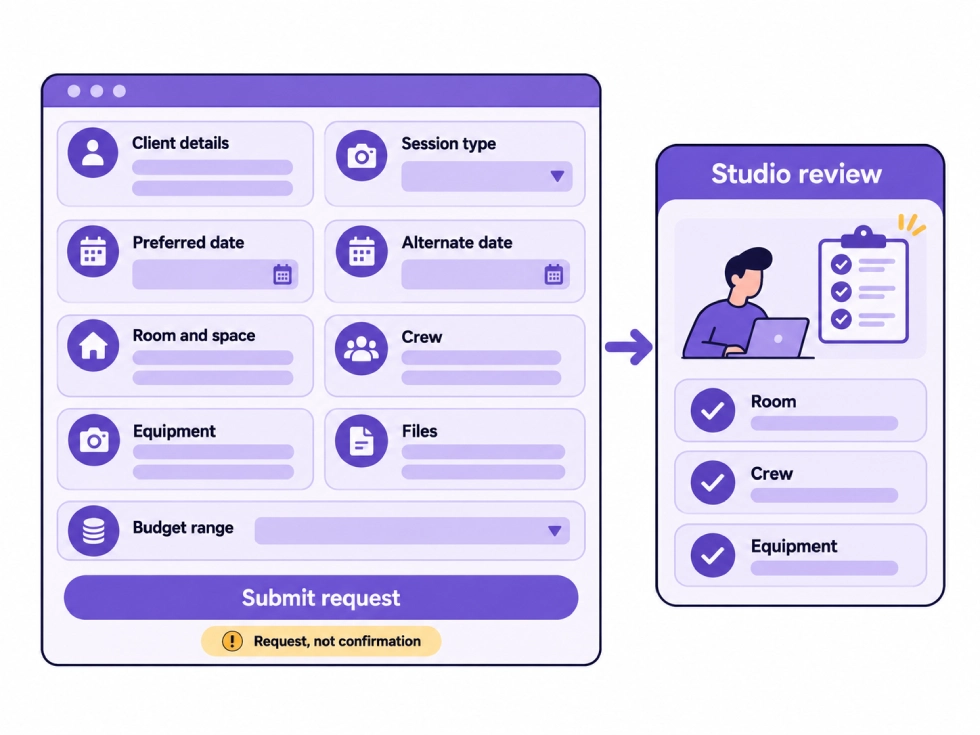
StudioHero’s client booking portal lets clients submit requests with dates, resources, custom fields, and file uploads. Your team can review each request, track its status, and process an approved request into a project.
This keeps the submitted information attached to the booking instead of forcing staff to copy it into another system.
Choose Required Fields Carefully
Every photography booking form needs required fields, but making every question mandatory can discourage simple bookings and produce poor answers.
The required fields should usually include:
- Client name
- Email address
- Session type
- Project description
- Preferred date
- Alternate date or timing flexibility
- Expected duration
- Attendee or subject count
- Basic room requirements
- Acknowledgment that submission does not confirm the session
Fields for crew, equipment, products, models, access, and file uploads can become required only when the client selects a related session type or service.
Keep Internal Booking Fields Off the Public Form
Some information belongs in your team’s booking record, not in the client form.
Internal fields may include:
- Assigned coordinator
- Request status
- Missing information
- Room conflict
- Crew acceptance
- Equipment reservation status
- Approved rate
- Temporary hold expiration
- Internal notes
- Approval owner
- Reason for revision
- Reason for declining the request
Your public form should feel easy for the client. Your internal record can hold the operational detail needed to review and approve the booking.
Photography Session Booking Form Checklist
| Form Section | Field | Setting | Why Your Studio Needs It |
| Client details | Full name | Required | Identifies the person submitting the request |
| Client details | Company or agency | Conditional | Connects the request to the responsible business |
| Client details | Email and phone | Required | Gives your team reliable contact details |
| Session | Photography type | Required | Controls the later questions and resource review |
| Session | Project description | Required | Explains what the client plans to photograph |
| Schedule | Preferred date | Required | Starts the availability check |
| Schedule | Alternate date | Required or flexible | Reduces follow up when the first date is unavailable |
| Schedule | Expected duration | Required | Helps calculate the full room and crew period |
| Schedule | Setup and teardown needs | Conditional | Shows how much extra time the production requires |
| Space | Room or stage | Required | Identifies the main studio space |
| Space | Prep and support areas | Conditional | Prevents conflicts around shared spaces |
| Crew | Requested roles | Conditional | Shows which people the studio must provide |
| Equipment | Camera and lighting needs | Conditional | Starts the equipment availability check |
| Attendance | Subject and attendee count | Required | Helps determine room capacity and support needs |
| Project files | Brief, references, or shot list | Conditional | Gives the team enough detail to review the work |
| Budget | Budget range or service level | Optional | Helps compare expectations with the requested scope |
| Delivery | Image use and deadline | Conditional | Helps the team review later production needs |
| Special needs | Access, safety, or unusual setup | Conditional | Identifies requests needing further approval |
| Submission | Booking acknowledgment | Required | Confirms that the form is a request, not a confirmed shoot |
Build the Form Around the Booking Decision
A photography booking form succeeds when your team can review the request without chasing the client for basic information.
It should identify the client, explain the shoot, show which rooms and resources may be needed, and make unresolved requirements visible before the studio approves the date.
StudioHero connects the submitted request with scheduling, crew, equipment, project creation, and confirmation. Your team can move a client request into a confirmed shoot without losing the details collected at the first step.
Book a StudioHero demo to see how your studio can manage photography booking requests, resource checks, and confirmed shoots in one system.