Asset Check-Out is the process of logging a studio asset before it leaves storage or gets assigned to work. In studio management, it refers to recording who has equipment, props, drives, or production resources. It helps teams track responsibility, availability, and return status.
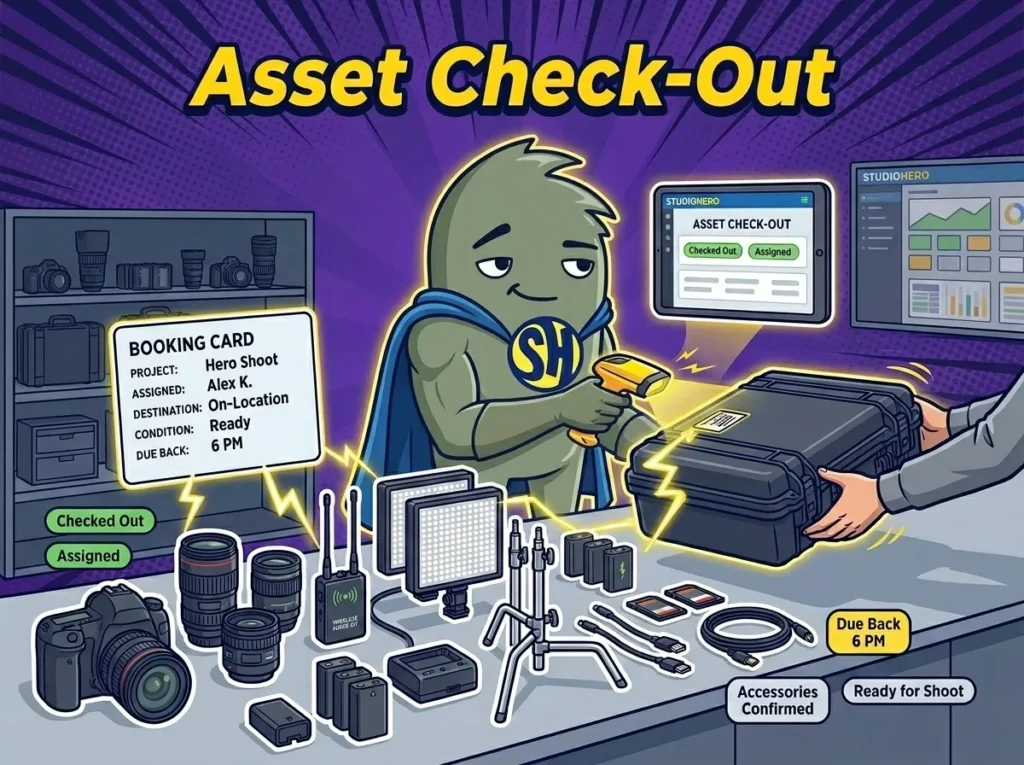
How Studios Use Asset Check-Out
Asset check-out happens before equipment, props, media drives, laptops, or other studio resources are used on a booking, shoot, rental, or internal project. It records which asset is leaving inventory, who is taking it, where it is going, when it should return, and what condition it was in at handoff.
A studio should not rely on a message like “I grabbed the camera kit.” The asset check-out record should name the kit, list the included parts, connect it to the project, and show the expected return time. For a camera package, that may include the body, lenses, batteries, chargers, media cards, cables, monitor, cage, and case.
You may also hear this called equipment check-out, gear check-out, asset issue, inventory check-out, or a check-in/check-out workflow. The wording changes by team, but the purpose stays the same. We need to know what left, who has it, why it left, and when it is due back.
Why Asset Check-Out Matters in Studio Management
Asset check-out matters because studios lose time and money when gear movement is informal. A microphone gets taken for a podcast session, but nobody updates the equipment room. A lighting kit is sent to an off-site shoot, but the studio calendar still shows it as available. A hard drive leaves with a freelance editor, but the production manager does not know who has it.
A clean check-out process supports accurate Equipment Tracking because every asset has a named owner while it is out.
Asset check-out helps studios:
- Prevent double-bookings when two producers need the same kit.
- Show who is responsible for gear, props, drives, or accessories while they are out.
- Give coordinators realistic availability before they confirm the next booking.
- Catch missing parts before a crew leaves the studio.
- Connect asset use to project cost, rental fees, damage, or late returns.
This is especially useful for shared gear rooms, remote shoots, rental operations, post-production drives, and studios with freelance crews. Asset check-out turns “someone took it” into a clear operational record.
How Asset Check-Out Works in a Real Studio Workflow
A creative agency studio running 12 video shoots and 20 social content sessions a month uses StudioHero to check assets out before each production day. A producer books a client shoot that needs a camera package, two LED panels, a wireless audio kit, three C-stands, and a client review monitor. Before the crew leaves, the production assistant opens the booking, selects each asset, confirms accessories, and assigns the kit to the shoot.
Because StudioHero connects check-out with Inventory Management, the team can see that one LED panel is missing its power supply. The assistant swaps it for another panel before the van is loaded, instead of finding the issue on location.
The same workflow supports Crew Management. The check-out record shows that the camera assistant received the camera package and that the producer is responsible for the client monitor. If something comes back late or damaged, the studio knows which job, crew member, and booking were tied to that asset.
Asset check-out also feeds Studio Scheduling. If the camera package is due back at 6 p.m., the coordinator can avoid assigning it to a 5 p.m. studio booking. The team can hold a backup kit, shift the booking, or confirm return timing before a client is affected.
Common Mistakes Studios Make With Asset Check-Out
Asset check-out breaks down when teams treat the gear room like an open shelf. Staff and freelancers may grab what they need, send a quick message, and assume the studio will sort out the record later. That creates gaps before the next booking.
Common mistakes include:
- Checking out a kit without listing the accessories inside the case.
- Assigning gear to a person but not to a booking, client, or project.
- Forgetting expected return time, which makes later availability hard to trust.
- Letting crew take equipment without confirming condition before it leaves.
- Failing to connect check-out records with billing when assets are rented, damaged, or kept late.
The best check-out process is simple enough for busy crews to follow, but detailed enough to protect the studio. Every asset should leave with a name, project, time, location, condition, and return expectation.
How StudioHero Helps Studios Manage Asset Check-Out
StudioHero is an all-in-one studio management software that helps studios track asset check-out before gear, props, drives, and production resources leave inventory. Instead of relying on paper forms, texts, or memory, teams can connect each checked-out asset to the booking, crew member, client, and return plan.
StudioHero helps teams manage asset check-out through:
- Equipment Tracking that records when gear is checked out, assigned, returned, missing, damaged, or ready.
- Inventory Management that keeps accessories, cases, batteries, cables, media, and supplies tied to the asset record.
- Production Management that connects checked-out assets with shoots, tasks, handoffs, and approvals.
- Studio Scheduling that shows whether checked-out assets can support future bookings.
- Studio Budgeting and Studio Invoicing that help teams price rented gear, late returns, damaged items, and added equipment use.
Frequently Asked Questions
What does asset check-out mean in a studio?
Asset check-out means recording when a studio asset is assigned to a person, booking, rental, or project before use. The asset might be a camera, microphone, lighting kit, prop, media drive, laptop, or accessory case. The record should show who took it, where it is going, when it should return, and what condition it was in when it left.
Who is responsible for asset check-out?
Asset check-out is usually handled by an equipment manager, studio coordinator, production assistant, operations manager, or studio owner. The person receiving the asset should also be named in the record. For off-site shoots or rentals, studios should record both the person approving the check-out and the person responsible for returning the asset.
What should an asset check-out record include?
An asset check-out record should include the asset name, asset ID or tag, included accessories, assigned person, booking or project, location, check-out time, expected return time, and condition before departure. For kits, studios should list the parts inside the case, such as batteries, chargers, cables, media cards, adapters, stands, mounts, and protective cases.
What is the difference between asset check-out and asset check-in?
Asset check-out records when an asset leaves inventory or gets assigned to a job. Asset check-in records when that same asset comes back and whether it is complete, usable, and ready for the next booking. Check-out starts the responsibility trail. Check-in closes it or flags damage, missing parts, repairs, late returns, or billing items.
What software helps studios manage asset check-out?
StudioHero helps studios manage asset check-out by connecting equipment tracking, inventory records, booking schedules, production tasks, budgeting, and invoicing. Studios may also use barcode scanners, QR labels, spreadsheets, rental forms, or inventory apps. The strongest setup shows who has each asset, which project it belongs to, and when it should return.