Asset Check-In is the process of returning a studio asset after it has been used. In studio management, it refers to logging equipment, props, drives, or production resources back into inventory. It helps teams confirm condition, update availability, and catch missing items before the next booking.
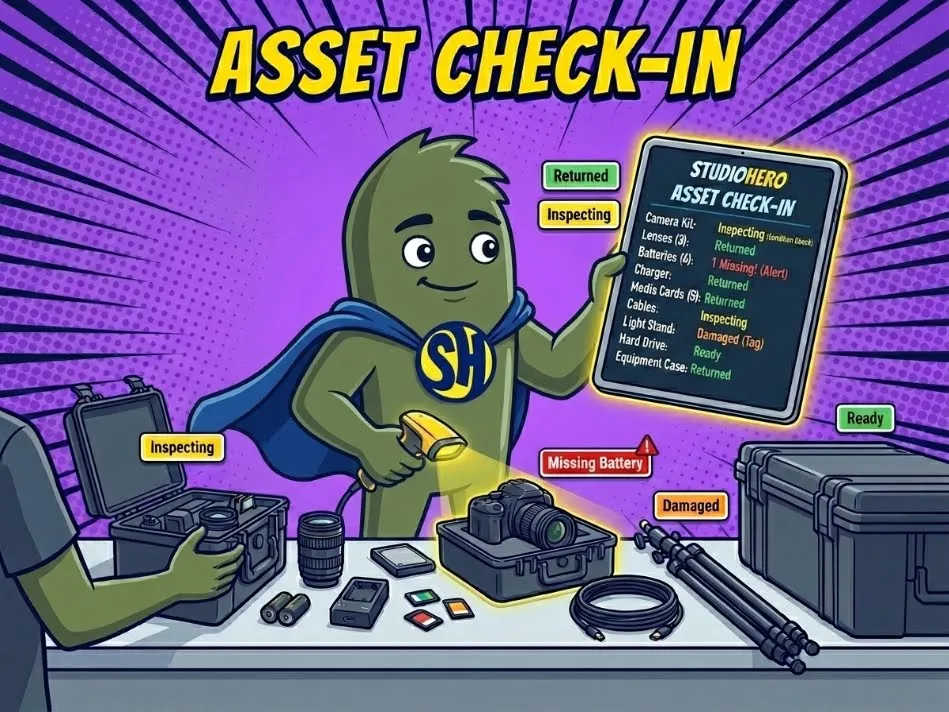
How Studios Use Asset Check-In
Asset check-in happens when a piece of gear, prop, media drive, or production resource comes back after being used on a session, shoot, rental, or internal project. It is the return side of an equipment check-out workflow. A studio does not simply mark the asset as “back.” The team confirms who returned it, when it came back, where it was placed, whether accessories are included, and whether the item is ready for the next job.
For example, a camera kit might return with the body, two lenses, three batteries, a charger, media cards, and cables. If one battery is missing or a lens cap is damaged, the check-in record should show that before the kit is made available again.
You may also hear asset check-in called equipment return, gear check-in, asset return, inventory check-in, or check-in/check-out tracking. The name changes by studio type, but the workflow protects the same thing: the studio’s ability to reuse assets without surprises.
Why Asset Check-In Matters in Studio Management
Asset check-in matters because many equipment problems are found too late. A crew member returns a kit after a shoot, nobody inspects it, and the next producer discovers the issue 20 minutes before call time. By then, the studio may need to rent a replacement, delay the session, or explain the problem to a client.
A proper check-in process supports better Equipment Tracking because asset status changes only after the return has been logged and checked.
Asset check-in helps studios:
- Catch missing accessories before the next booking depends on them.
- Record damage, wear, or repair needs while the job is still fresh.
- Update asset availability only after gear has been returned and inspected.
- Reduce disputes over who last used an item.
- Keep rental, production, and internal equipment records accurate.
This is especially useful for studios with shared gear rooms, off-site shoots, freelance crews, and back-to-back bookings. When check-in is handled well, the equipment manager, studio coordinator, producer, and finance team all work from the same return record.
How Asset Check-In Works in a Real Studio Workflow
A film and video production house managing 18 shoots a month uses StudioHero to check assets back in after each production day. A camera assistant returns a camera package at 7 p.m. after a branded content shoot. The equipment manager scans the kit, confirms the camera body, lenses, batteries, charger, monitor, cage, tripod plate, and media cards, then marks the package as returned.
Because StudioHero connects check-in with Inventory Management, the missing follow-focus gear is flagged before the kit becomes available again. The production manager can see that the item was assigned to the shoot, contact the camera assistant while the crew is still reachable, and update the asset record with a note.
The same workflow connects to Studio Scheduling. The camera package is needed for a studio shoot at 10 a.m. the next morning. Since the kit is not fully ready, the coordinator can assign a backup package, hold the original kit for inspection, and avoid a morning scramble.
Asset check-in also affects billing. If a client damages a light stand or returns a rented drive late, the team can pass that note to Studio Invoicing before the final invoice goes out. The check-in record turns a loose return into a clear operational handoff.
Common Mistakes Studios Make With Asset Check-In
Asset check-in often breaks when studios treat the return as a quick drop-off instead of a controlled handoff. Someone puts a case on a shelf, sends a message saying “gear is back,” and the next person assumes everything is ready.
Common mistakes include:
- Marking gear as available before checking accessories, batteries, cables, cases, and media cards.
- Failing to record damage, which makes repair costs harder to trace.
- Letting freelancers return equipment without a named staff member confirming it.
- Storing returned assets in the wrong room, shelf, bay, or locker.
- Forgetting to update the booking record, which leaves producers unsure whether gear is truly ready.
The best check-in process is short, but strict. Every returned asset should have a timestamp, condition check, location update, responsible person, and next status.
How StudioHero Helps Studios Manage Asset Check-In
StudioHero is an all-in-one studio management software that helps studios track asset check-in after shoots, sessions, rentals, and internal projects. Instead of relying on shelf checks, texts, and paper forms, teams can connect each returned asset to the booking, crew member, client, and next job.
StudioHero helps teams manage asset check-in through:
- Equipment Tracking that records when gear is checked out, returned, missing, damaged, or ready.
- Inventory Management that keeps accessories, cases, batteries, media, and consumables tied to the asset record.
- Production Management that connects returns with tasks, repairs, approvals, and project handoffs.
- Studio Scheduling that helps coordinators see whether returned assets can support the next booking.
- Studio Budgeting and Studio Invoicing that help teams account for damaged, late, or billable equipment returns.
Frequently Asked Questions
What does asset check-in mean in a studio?
Asset check-in means logging a studio asset back into inventory after it has been used. The asset might be a camera kit, microphone, lighting package, prop, media drive, laptop, or other production resource. A proper check-in confirms the return time, condition, accessories, storage location, and whether the asset is ready for the next booking.
Who is responsible for asset check-in?
Asset check-in is usually handled by an equipment manager, studio coordinator, production assistant, operations manager, or studio owner. In smaller studios, the same person may handle check-out and check-in. In larger studios, the person returning the asset and the person receiving it should both be recorded, especially when gear moves between crew, clients, and storage.
What should be checked during asset check-in?
A good asset check-in should confirm the asset name, tag number, return time, condition, accessories, missing items, damage, storage location, and next status. For equipment kits, studios should check every included part, such as batteries, chargers, cables, cards, cases, stands, mounts, and adapters. The asset should not be marked available until the return is complete.
What is the difference between asset check-in and asset check-out?
Asset check-out records when an asset leaves inventory for a person, project, booking, or rental. Asset check-in records when that asset comes back and whether it is complete, usable, and ready for the next job. Check-out starts the responsibility trail. Check-in closes it, or flags any damage, missing items, repairs, or late returns.
What software helps studios manage asset check-in?
StudioHero helps studios manage asset check-in by connecting equipment tracking, inventory records, booking schedules, production tasks, budgeting, and invoicing. Other tools may include barcode scanners, QR code labels, spreadsheets, rental forms, or inventory apps. The best setup records who returned the asset, what condition it came back in, and whether it can be booked again.