Asset Availability is the status of whether a studio resource can be booked, used, or assigned at a specific time. In studio management, it refers to live visibility into rooms, equipment, crew, and media resources. It helps teams confirm bookings faster and avoid conflicts.
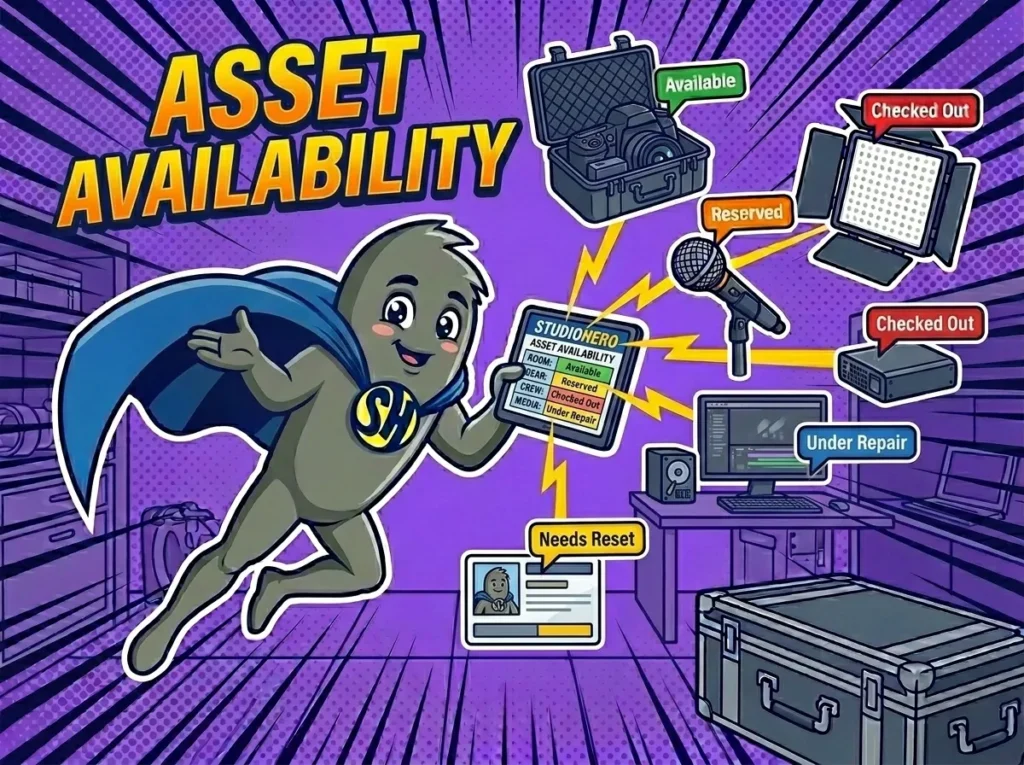
How Asset Availability Works in Studio Operations
Asset availability tells your team whether a resource is actually ready for use. That sounds simple, but in a working studio, “available” has several parts. A camera may be on the shelf, but missing a battery. A room may look open on the calendar, but need a 30-minute reset. An engineer may have no booking at 2 p.m., but may be committed to a same-day mix review.
Studios use asset availability to answer practical questions before confirming work: Is the room free? Is the gear returned? Is the crew member assigned elsewhere? Has the client approved the scope? Is the media storage ready?
You may also hear this called available assets, equipment availability, crew availability, room availability, or production capacity. The wording depends on the studio type, but the goal is the same. We need to know what can be used, when it can be used, and whether it is fit for the job.
Asset availability matters because most studio mistakes happen before the work starts.
Why Asset Availability Matters in Studio Management
Asset availability matters because studio teams sell time, space, people, and equipment in limited quantities. If those resources are not tracked clearly, staff can promise a client something the studio cannot deliver. A podcast studio might confirm a video session without checking whether the camera kit is out on another job. A recording studio might book a vocalist before realizing the best vocal chain is still in repair.
Better availability tracking supports cleaner Studio Scheduling because the calendar reflects real capacity, not only open time slots.
Common operational gains include:
- Prevents double-bookings when two producers request the same room, engineer, or gear package.
- Reduces last-minute rentals by showing missing or reserved equipment before a job is confirmed.
- Protects prep time by blocking turnover, testing, cleaning, and reset periods.
- Helps producers answer client requests with accurate options instead of guesses.
- Keeps billing cleaner because added assets and crew hours are visible before work starts.
Asset availability also protects the studio’s reputation. Clients usually do not care why a mic, room, operator, or edit bay is unavailable. They care that the booking runs on time and the team looks prepared.
How Asset Availability Works in a Real Studio Workflow
A three-room photography studio running 22 client shoots a week uses StudioHero to check asset availability before confirming each booking. A client asks for a four-hour product shoot with two lighting setups, a white cyc wall, tethered capture, and a same-day proofing gallery. The studio coordinator checks Studio 2, the cyc wall, two Profoto kits, a digital tech, and the retouching queue before sending the client a confirmed slot.
Because the team tracks Equipment Tracking, the coordinator can see that one lighting kit is reserved for an off-site shoot until 1 p.m. The booking request is moved to 2 p.m., giving the assistant time to check the kit back in, test it, and replace one missing sync cable.
The production manager also checks Crew Management to confirm that the digital tech is free for the shoot and not already assigned to an e-commerce session. Once the job is approved, the booking includes the room, equipment, crew, prep time, and retouching handoff.
Nothing depends on memory or a private spreadsheet. Each person sees whether the needed asset is free, reserved, checked out, blocked for maintenance, or assigned to another job. Asset availability turns a client request into a booking the studio can deliver.
Common Mistakes Studios Make With Asset Availability
Most asset availability problems come from treating “free” and “ready” as the same thing. A room may be free, but not cleaned. A camera may be in the building, but not charged. A freelancer may be open on the calendar, but unavailable at the requested rate or call time.
Common mistakes include:
- Checking only the room calendar while ignoring gear, crew, storage, and prep time.
- Marking equipment as available before it has been returned, inspected, and reset.
- Forgetting soft holds, which makes two producers think the same asset is theirs.
- Leaving maintenance status outside the booking workflow, so broken gear appears usable.
- Failing to connect availability with cost, which leads to missed charges for added rooms, kits, or operators.
The fix is not more meetings. Studios need a clear availability process that covers rooms, equipment, people, media, and billing before a booking is confirmed.
How StudioHero Helps Studios Manage Asset Availability
StudioHero is an all-in-one studio management software that helps studios see which assets are free, reserved, assigned, checked out, or unavailable. That gives coordinators, producers, and studio owners a cleaner way to confirm work without chasing updates across calendars, spreadsheets, and chat threads.
StudioHero helps teams manage asset availability through:
- Studio Scheduling that shows room bookings, holds, prep time, session length, and production capacity.
- Equipment Tracking that shows whether gear is available, checked out, reserved, missing, or under repair.
- Inventory Management that keeps equipment, accessories, and supplies tied to real booking needs.
- Production Management that connects asset status with tasks, handoffs, approvals, and delivery dates.
- Studio Budgeting and Studio Invoicing that help teams price booked assets, crew time, and added scope.
Frequently Asked Questions
What does asset availability mean in a studio?
Asset availability means a studio resource is free, usable, and ready to assign to a booking or production task. The asset might be a room, camera, microphone, lighting kit, edit bay, engineer, producer, assistant, or storage location. In practice, availability should include time, condition, location, ownership, and any setup or reset time needed before the asset can be used.
What makes an asset unavailable?
An asset can be unavailable because it is already booked, checked out, under repair, missing parts, blocked for prep, assigned to another crew, or held for a pending client. In studios, unavailable does not always mean physically gone. A room may be empty but blocked for cleanup. A crew member may appear free but already assigned to a client call or handoff.
Who manages asset availability in a studio?
Asset availability is usually managed by a studio coordinator, production manager, operations manager, equipment manager, or studio owner. In smaller studios, one person may handle rooms, gear, crew, and client bookings. In larger studios, each department may update its own resources, while operations checks that the full booking can be delivered before the client gets confirmation.
What is the difference between asset availability and asset allocation?
Asset availability answers whether a resource can be used at a certain time. Asset allocation answers where that resource should be assigned. For example, a camera kit may be available on Tuesday morning. Once a producer assigns it to a client shoot, that kit has been allocated. Availability comes first, then allocation turns that open resource into part of a confirmed production plan.
What software helps studios check asset availability?
StudioHero helps studios check asset availability by connecting room scheduling, equipment status, crew assignments, production tasks, budgeting, and invoicing. Studios may also use calendar tools, inventory systems, project management apps, or media asset platforms. The best setup shows whether each asset is free, reserved, checked out, under repair, or already assigned before the client booking is confirmed.